Origin groups for CDN resources

Origin groups define where the CDN fetches content from for a CDN resource. Origin groups support load balancing and failover across multiple origins.

Origin group overview

One origin group can contain a single website, private bucket, or CDB EdgeCompute HTTP application, or multiple origins.

With multiple active origins, the CDN distributes requests using a round-robin algorithm. Failover and retry behavior — including when to activate backup origins and which failure conditions trigger a retry — depend on origin roles and the Use next upstream option. See Available options for details.

Origin group configuration

Add one or more origins to the group. For URL and S3 origins, Host header override is optional; when left empty, the CDN uses the Host header value from the CDN resource settings.

S3 storage

Select CDB for CDB Object Storage, Amazon for Amazon S3, or Other for another S3-compatible storage service. Egress from CDB Object Storage to the CDN is not billed.

Without Origin Shielding, each cache miss on a CDN node sends a request directly to the S3 bucket. At scale, this can overload the storage cluster — enable Origin Shielding to consolidate edge cache misses through a shared shield cache and reduce requests to the S3 origin.

CDB Object Storage

CDB Object Storage does not require access keys. Select a storage and a bucket, or create them from the same lists.

  1. 1

    Select CDB

    Select S3 storage, then select CDB.

  2. 2

    Choose the storage and bucket

    In Storage, select an existing Object Storage or click Create storage. Creating a storage requires a Storage name and Location. Only Standard storage is supported.

    In Bucket, select a bucket or click Create bucket.

Amazon S3 storage

Amazon S3 requires an access key ID and secret access key; the AWS guide explains where to find both values.

  1. 1

    Select Amazon S3

    Select S3 storage, then select Amazon.

  2. 2

    Configure the bucket

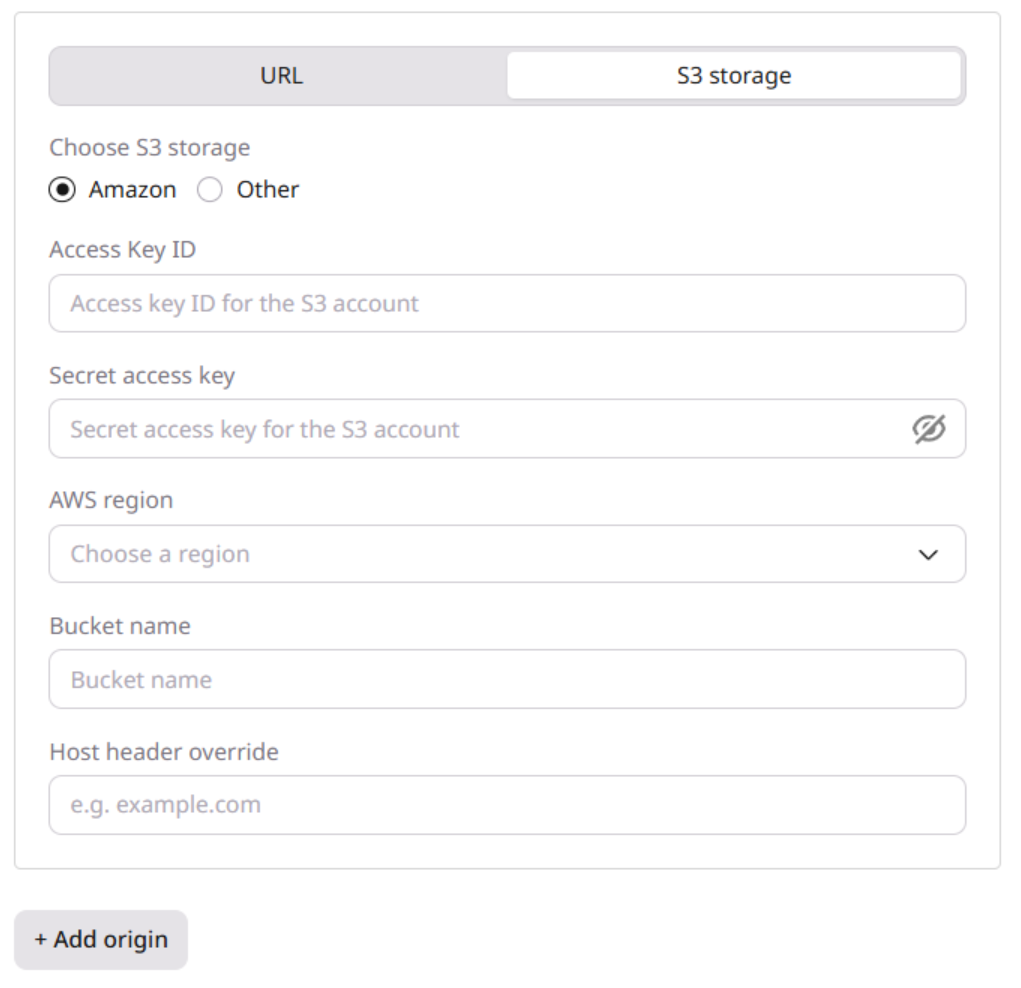
    Enter the storage details:

    1. Enter the Access Key ID.
    2. Enter the Secret access key.
    3. Select the AWS region where the bucket is hosted.
    4. Enter the Bucket name.
    5. (Optional) Enter the Host header override.
    Amazon S3 origin settings

Other S3 storage

Use Other for an S3-compatible service that is not CDB or Amazon. Create the required credentials in that provider's console.

  1. 1

    Select another S3 service

    Select S3 storage, then select Other.

  2. 2

    Configure the bucket

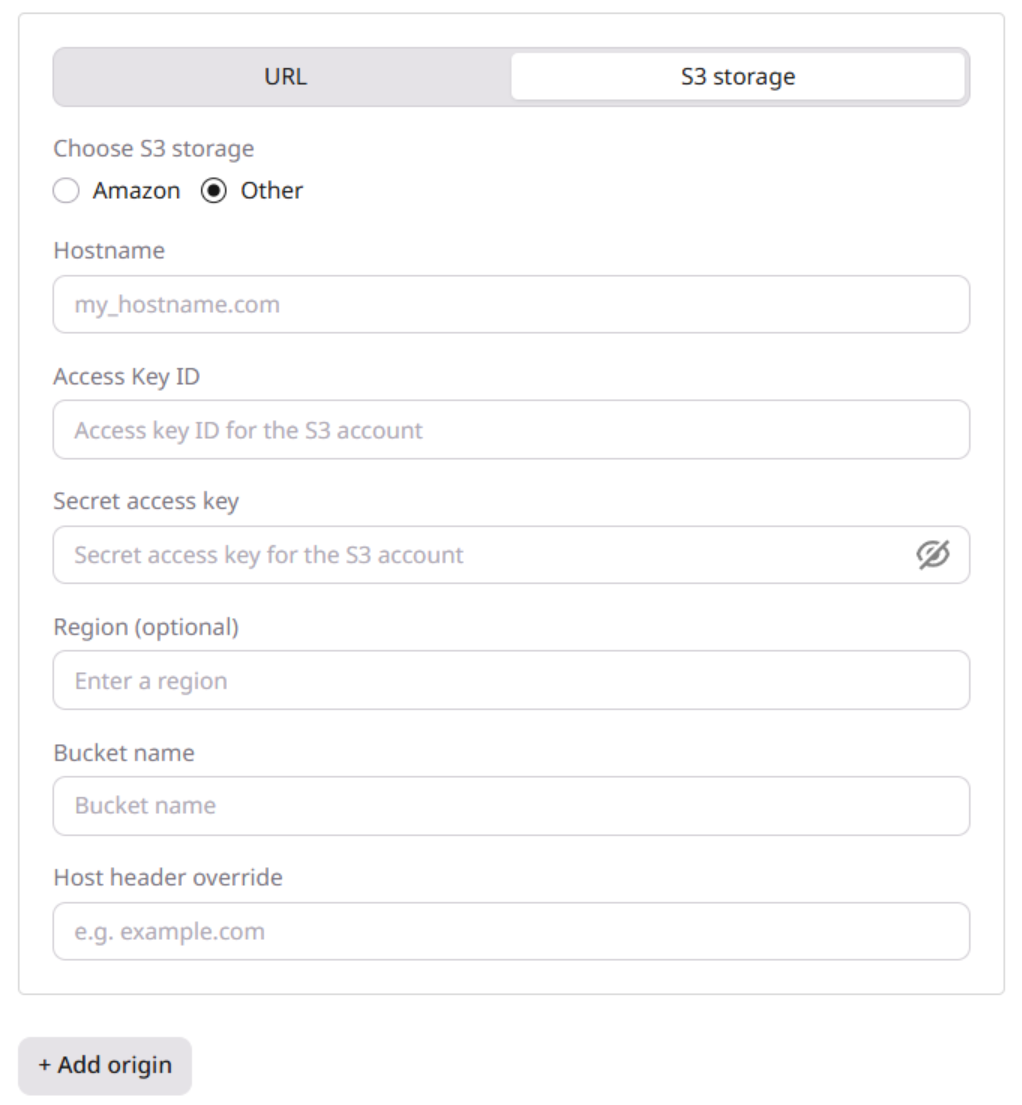
    Enter the storage details:

    1. Enter the storage server Hostname.
    2. Enter the Access Key ID.
    3. Enter the Secret access key.
    4. Enter the Region (optional) where the bucket is hosted.
    5. Enter the Bucket name.
    6. (Optional) Enter the Host header override.
    Other S3-compatible origin settings

URL origin

Use a URL origin for a website or IP address that does not require S3 authentication.

  1. 1

    Select the origin type

    Select URL.

  2. 2

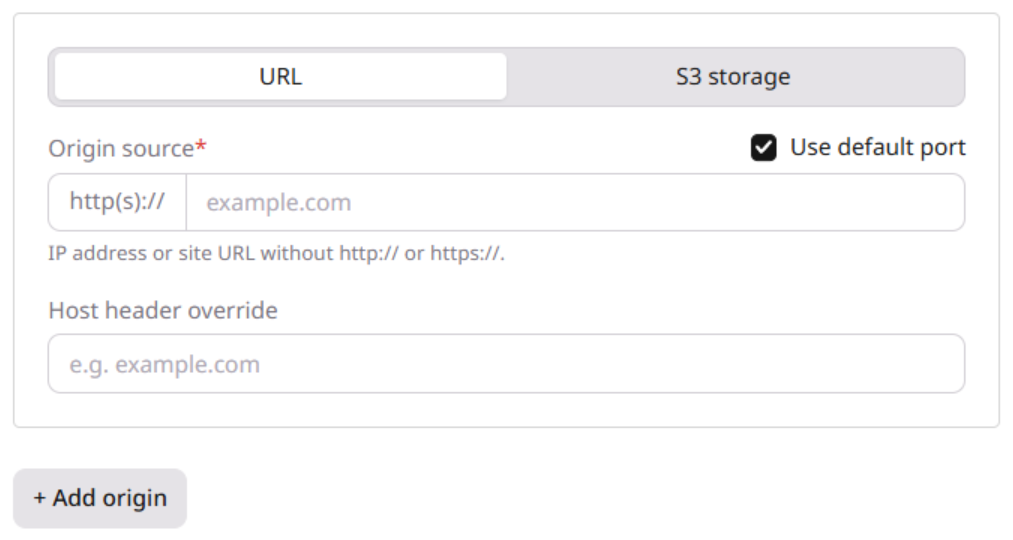
    Configure the origin

    Enter the origin details:

    1. In Origin source, enter the IP address or domain name without http:// or https://.
    2. (Optional) Enter the Host header override.
    3. (Optional) For ports other than 80 or 443, disable Use default port and enter the port.
    URL origin settings
  3. 3

    Add more origins

    (Optional) Click + Add origin and enter another source. The CDN distributes requests across active origins using a round-robin algorithm.

CDB EdgeCompute HTTP application

A CDB EdgeCompute HTTP application can serve as a native CDN origin. Requests reach the application directly on the same edge node, which avoids duplicate response headers, preserves client GeoIP data, and reduces latency.

Because the CDB EdgeCompute application runs on the same edge node as the CDN, the upstream address in CDN logs and metrics can appear as that node's IP rather than a remote origin address. This applies only when the origin type is a CDB EdgeCompute HTTP application, not when a CDB EdgeCompute hook is attached to a regular CDN origin.

  1. 1

    Select the origin type

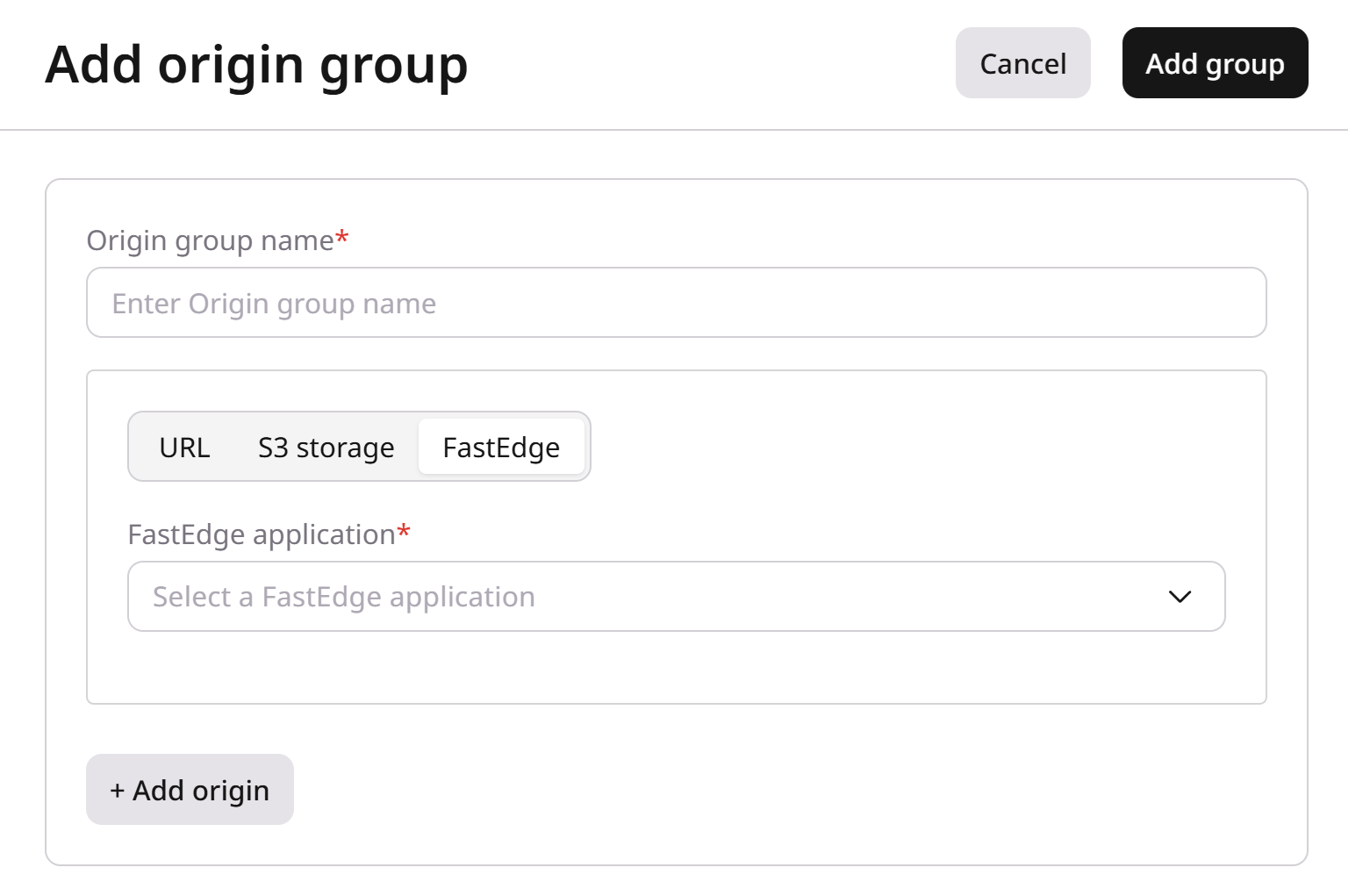
    Select CDB EdgeCompute.

  2. 2

    Select the application

    In the CDB EdgeCompute application dropdown, select the HTTP application.

    CDB EdgeCompute origin type with the application dropdown

Available options

Multiple-origin configuration

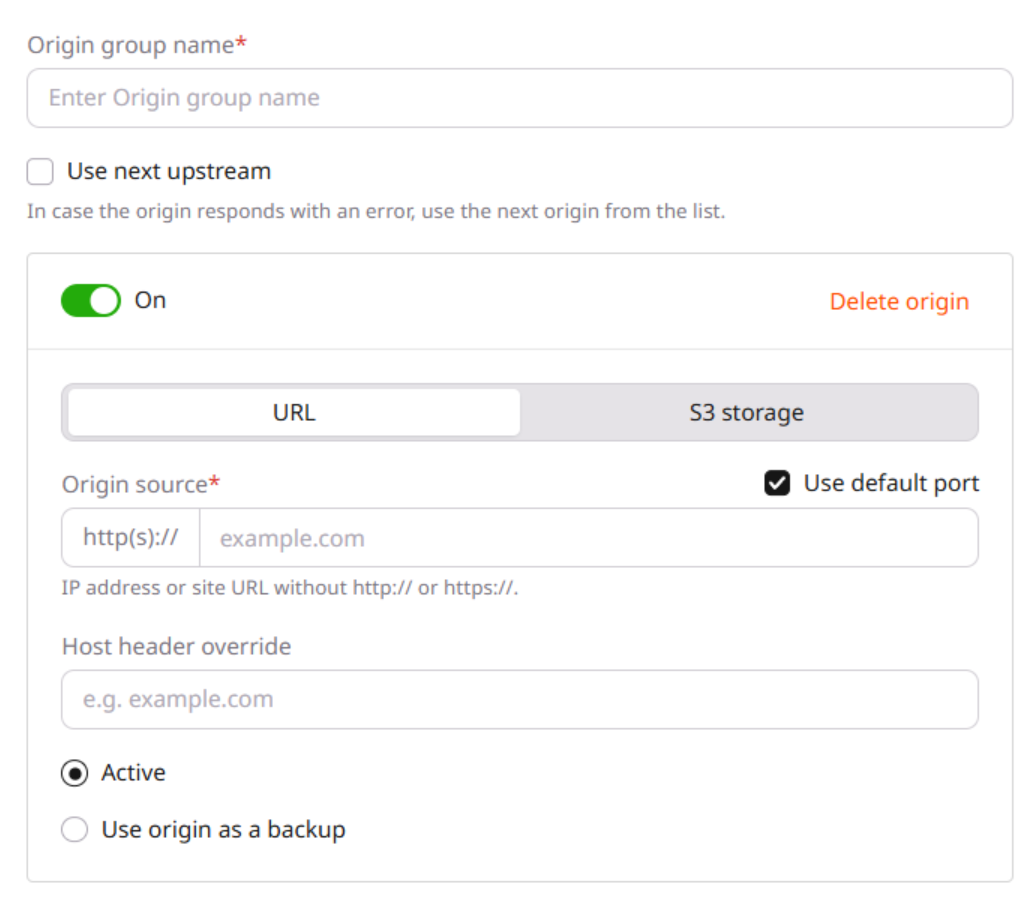
For groups with multiple origins, configure their availability, roles, and failover behavior:

  • Enable or disable each origin.
  • Assign active and backup origins.
  • Enable or disable Use next upstream.
Set up multiple origins

Origin availability

Each origin has the On toggle enabled by default, so the CDN can pull content from it. Disable the toggle to remove the origin from this group's load balancing; requests stop reaching it within 15 minutes.

At least one active origin must remain enabled.

Active and backup origins

New origins receive the Active status by default and participate in round-robin load balancing. Select Use origin as a backup to remove an origin from regular balancing and use it when the active origins meet the applicable failover conditions.

Use next upstream

Enable Use next upstream only when every origin contains the exact same content. When enabled via the Customer Portal, the CDN retries the request on the next available origin after connection errors or timeouts. Additional retry conditions — such as specific HTTP response codes — can be configured through the Create origin group API using the proxy_next_upstream array. If no origin is available, the CDN serves the last origin's response.

The resulting request behavior depends on the origin roles and option state:

CaseCDN request behavior
Use next upstream disabled; all origins activeThe CDN returns the active origin's error response to the client without retrying
Use next upstream disabled; active and backup origins presentAfter a 5 s timeout or 5xx response from an active origin, the CDN tries the backup origins in list order. For a 4xx response, it returns the error to the client
Use next upstream enabled; no backup originsAfter connection errors or timeouts, the CDN tries the remaining active origins in list order. If all active origins fail, the CDN serves the last origin's response
Use next upstream enabled; active and backup origins presentAfter connection errors or timeouts, the CDN tries the remaining active origins first, then backup origins, in list order

Origin group creation

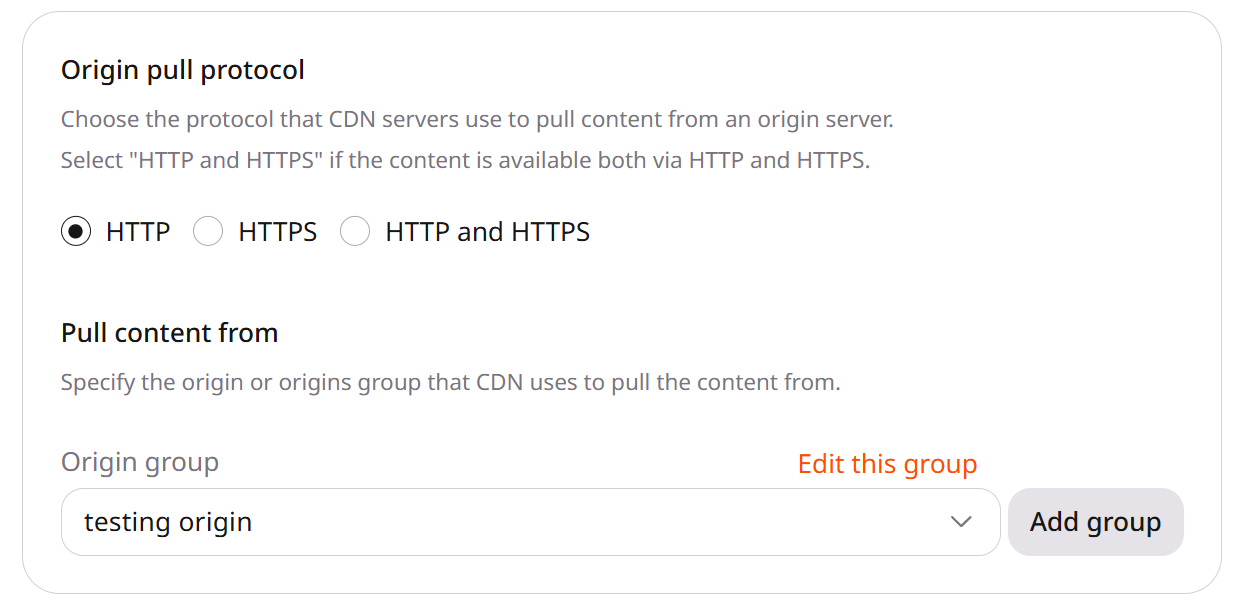
Origin groups can be created directly from CDN resource settings or from the Origin groups page.

From resource settings

  1. 1

    Open the resource settings

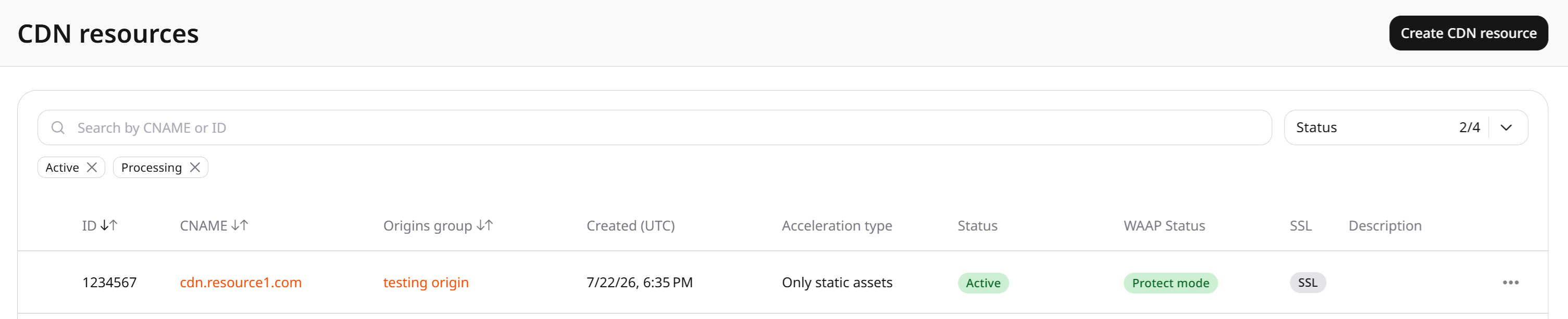
    In the CDB Technical Web Portal, navigate to CDN, find the resource, and click its CNAME.

    Resource name highlighted
  2. 2

    Open the origin group form

    In the Pull content from section, click Add group.

    New origin group option in resource settings
  3. 3

    Enter the origin group name

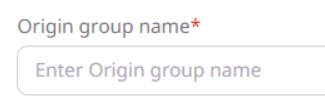
    Enter a unique Origin group name.

    Choose a new origin group in resource settings
  4. 4

    Configure the origin group

    Select the origin type and configure it as described in Origin group configuration.

  5. 5

    Save the origin group

    Click Add group.

  6. 6

    Save the CDN resource

    Click Save changes.

From the Origin groups page

Groups created on the Origin groups page must be attached to a CDN resource after creation. See Origin group attachment.

  1. 1

    Open the origin groups page

    In the Customer Portal, navigate to CDN > Origin groups.

    Origin groups page
  2. 2

    Open the creation form

    Click Add origin group.

  3. 3

    Enter the origin group name

    Enter a unique Origin group name.

  4. 4

    Configure the origin group

    Select the origin type and configure it as described in Origin group configuration.

  5. 5

    Save the origin group

    Click Add group.

Origin group attachment

Changing a resource's origin group does not update its Host header. Update the Host header separately.

Attach a group created from the Origin groups page to its CDN resource.

  1. 1

    Open the resource settings

    In the Customer Portal, navigate to CDN, find the resource, and click its CNAME.

  2. 2

    Select the origin group

    In the Pull content from section, select the group from the Origin group dropdown and click Add group.

    Origin group selection in resource settings
  3. 3

    Save the resource

    Click Save changes.

Create a URL origin group, attach it to a CDN resource, then update, replace, or delete the group. The origin domain must resolve in public DNS.

An API token is required.

export GCORE_API_KEY="{YOUR_API_KEY}"

Create an origin group

Create a group with one or more URL origins. The CDN pulls content from enabled origins and can fail over to a backup origin when backup is true.

ParameterRequiredDescription
nameYesUnique group label
sources[].sourceYesOrigin domain or IP without http:// or https://
sources[].enabledNoWhether the CDN can pull from this origin. Defaults to true
sources[].backupNotrue keeps the origin out of regular balancing until active origins fail
use_nextNoRetry on the next origin after the errors listed in proxy_next_upstream
proxy_next_upstreamNoConditions that send the request to the next origin when use_next is true. error and timeout cover connection failures and timeouts
from gcore import CDB

client = CDB()

og = client.cdn.origin_groups.create(
    name="my-origin-group",
    sources=[{"source": "origin.example.com", "enabled": True}],
)
print(og.id, og.name)
package main

import (
    "context"
    "fmt"

    gcore "github.com/G-Core/gcore-go"
    "github.com/G-Core/gcore-go/cdn"
)

func main() {
    client := gcore.NewClient()
    ctx := context.Background()

    og, err := client.CDN.OriginGroups.New(ctx, cdn.OriginGroupNewParams{
        OfNoneAuth: &cdn.OriginGroupNewParamsBodyNoneAuth{
            Name: "my-origin-group",
            Sources: []cdn.OriginGroupNewParamsBodyNoneAuthSourceUnion{
                {OfHostSource: &cdn.OriginGroupNewParamsBodyNoneAuthSourceHostSource{
                    Source:  "origin.example.com",
                    Enabled: gcore.Bool(true),
                }},
            },
        },
    })
    if err != nil {
        panic(err)
    }
    fmt.Println(og.ID, og.Name)
}
curl -X POST "https://api.cdb-staging.cdn.orange.com/cdn/origin_groups" \
  -H "Authorization: APIKey $GCORE_API_KEY" \
  -H "Content-Type: application/json" \
  -d '{
    "name": "my-origin-group",
    "sources": [
      {"source": "origin.example.com", "enabled": true}
    ]
  }'

The API returns HTTP 201:

{
  "id": 10001,
  "name": "my-origin-group",
  "sources": [
    {
      "source": "origin.example.com",
      "backup": false,
      "enabled": true
    }
  ],
  "auth_type": "none",
  "has_related_resources": false
}

List and get origin groups

List groups by name, or retrieve one group by ID. A group with has_related_resources set to true is already attached to at least one CDN resource.

from gcore import CDB

client = CDB()

for og in client.cdn.origin_groups.list(name="my-origin-group", limit=10):
    print(og.id, og.name, og.has_related_resources)

og = client.cdn.origin_groups.get(10001)
print(og.id, [(s.source, s.enabled, s.backup) for s in og.sources])
package main

import (
    "context"
    "fmt"

    gcore "github.com/G-Core/gcore-go"
    "github.com/G-Core/gcore-go/cdn"
)

func main() {
    client := gcore.NewClient()
    ctx := context.Background()

    page, err := client.CDN.OriginGroups.List(ctx, cdn.OriginGroupListParams{
        Name: gcore.String("my-origin-group"),
    })
    if err != nil {
        panic(err)
    }
    for _, og := range page.Results {
        fmt.Println(og.ID, og.Name, og.HasRelatedResources)
    }

    og, err := client.CDN.OriginGroups.Get(ctx, 10001)
    if err != nil {
        panic(err)
    }
    fmt.Println(og.ID, og.Name)
}
curl -X GET "https://api.cdb-staging.cdn.orange.com/cdn/origin_groups?name=my-origin-group&limit=10" \
  -H "Authorization: APIKey $GCORE_API_KEY"

curl -X GET "https://api.cdb-staging.cdn.orange.com/cdn/origin_groups/10001" \
  -H "Authorization: APIKey $GCORE_API_KEY"

A list request returns a paginated object:

{
  "count": 1,
  "next": null,
  "previous": null,
  "results": [
    {
      "id": 10001,
      "name": "my-origin-group",
      "has_related_resources": false
    }
  ]
}

Update an origin group

Change the group name, origin list, backup roles, or retry behavior. The update replaces the sources array sent in the request.

from gcore import CDB

client = CDB()

og = client.cdn.origin_groups.update(
    10001,
    name="my-origin-group",
    sources=[
        {"source": "origin.example.com", "enabled": True, "backup": False},
        {"source": "backup.example.com", "enabled": True, "backup": True},
    ],
    use_next=True,
    proxy_next_upstream=["error", "timeout"],
)
print([(s.source, s.backup) for s in og.sources])
package main

import (
    "context"
    "fmt"

    gcore "github.com/G-Core/gcore-go"
    "github.com/G-Core/gcore-go/cdn"
)

func main() {
    client := gcore.NewClient()
    ctx := context.Background()

    og, err := client.CDN.OriginGroups.Update(ctx, 10001, cdn.OriginGroupUpdateParams{
        OfNoneAuth: &cdn.OriginGroupUpdateParamsBodyNoneAuth{
            Name:    "my-origin-group",
            UseNext:            gcore.Bool(true),
            ProxyNextUpstream:  []string{"error", "timeout"},
            Sources: []cdn.OriginGroupUpdateParamsBodyNoneAuthSourceUnion{
                {OfHostSource: &cdn.OriginGroupUpdateParamsBodyNoneAuthSourceHostSource{
                    Source:  "origin.example.com",
                    Enabled: gcore.Bool(true),
                    Backup:  gcore.Bool(false),
                }},
                {OfHostSource: &cdn.OriginGroupUpdateParamsBodyNoneAuthSourceHostSource{
                    Source:  "backup.example.com",
                    Enabled: gcore.Bool(true),
                    Backup:  gcore.Bool(true),
                }},
            },
        },
    })
    if err != nil {
        panic(err)
    }
    fmt.Println(og.ID, len(og.Sources), og.UseNext)
}
curl -X PATCH "https://api.cdb-staging.cdn.orange.com/cdn/origin_groups/10001" \
  -H "Authorization: APIKey $GCORE_API_KEY" \
  -H "Content-Type: application/json" \
  -d '{
    "name": "my-origin-group",
    "use_next": true,
    "proxy_next_upstream": ["error", "timeout"],
    "sources": [
      {"source": "origin.example.com", "enabled": true, "backup": false},
      {"source": "backup.example.com", "enabled": true, "backup": true}
    ]
  }'

The API returns HTTP 200 with the updated group:

{
  "id": 10001,
  "name": "my-origin-group",
  "sources": [
    {"source": "origin.example.com", "backup": false, "enabled": true},
    {"source": "backup.example.com", "backup": true, "enabled": true}
  ],
  "use_next": true,
  "proxy_next_upstream": ["error", "timeout"]
}

Attach an origin group

Point a CDN resource at the group. Changing originGroup does not change the resource Host header.

from gcore import CDB

client = CDB()

resource = client.cdn.cdn_resources.update(
    resource_id=12345,
    origin_group=10001,
)
print(resource.id, resource.origin_group)
package main

import (
    "context"
    "fmt"

    gcore "github.com/G-Core/gcore-go"
    "github.com/G-Core/gcore-go/cdn"
)

func main() {
    client := gcore.NewClient()
    ctx := context.Background()

    resource, err := client.CDN.CDNResources.Update(ctx, 12345, cdn.CDNResourceUpdateParams{
        OriginGroup: gcore.Int(10001),
    })
    if err != nil {
        panic(err)
    }
    fmt.Println(resource.ID, resource.OriginGroup)
}
curl -X PATCH "https://api.cdb-staging.cdn.orange.com/cdn/resources/12345" \
  -H "Authorization: APIKey $GCORE_API_KEY" \
  -H "Content-Type: application/json" \
  -d '{"originGroup": 10001}'

The API returns HTTP 200. The originGroup field is the attached group ID:

{
  "id": 12345,
  "cname": "cdn.example.com",
  "originGroup": 10001
}

Replace an origin group

Point the CDN resource at another origin group. The CDN resource stays, and the previous group can be deleted after this call.

from gcore import CDB

client = CDB()

resource = client.cdn.cdn_resources.update(
    resource_id=12345,
    origin_group=10002,
)
print(resource.id, resource.origin_group)
package main

import (
    "context"
    "fmt"

    gcore "github.com/G-Core/gcore-go"
    "github.com/G-Core/gcore-go/cdn"
)

func main() {
    client := gcore.NewClient()
    ctx := context.Background()

    resource, err := client.CDN.CDNResources.Update(ctx, 12345, cdn.CDNResourceUpdateParams{
        OriginGroup: gcore.Int(10002),
    })
    if err != nil {
        panic(err)
    }
    fmt.Println(resource.ID, resource.OriginGroup)
}
curl -X PATCH "https://api.cdb-staging.cdn.orange.com/cdn/resources/12345" \
  -H "Authorization: APIKey $GCORE_API_KEY" \
  -H "Content-Type: application/json" \
  -d '{"originGroup": 10002}'

The API returns HTTP 200. The originGroup field is the replacement group ID:

{
  "id": 12345,
  "cname": "cdn.example.com",
  "originGroup": 10002
}

Delete an origin group

Delete a group after the CDN resource points at another group. A successful delete returns HTTP 204.

from gcore import CDB

client = CDB()

client.cdn.origin_groups.delete(10001)
package main

import (
    "context"

    gcore "github.com/G-Core/gcore-go"
)

func main() {
    client := gcore.NewClient()
    ctx := context.Background()

    if err := client.CDN.OriginGroups.Delete(ctx, 10001); err != nil {
        panic(err)
    }
}
curl -X DELETE "https://api.cdb-staging.cdn.orange.com/cdn/origin_groups/10001" \
  -H "Authorization: APIKey $GCORE_API_KEY"

A successful request returns HTTP 204 with an empty body.

An origin group defines where the CDN fetches content. Declare the group and attach it to a CDN resource with the Terraform provider v2.

Create an origin group

One enabled origin is enough to create the group. Set origin_group on the CDN resource so the CDN pulls content from this group.

resource "gcore_cdn_origin_group" "example" {
  name = "my-origin-group"

  sources = [
    {
      source  = "example.com"
      enabled = true
    }
  ]
}

resource "gcore_cdn_resource" "example" {
  cname        = "cdn.example.com"
  origin_group = gcore_cdn_origin_group.example.id
}

Update an origin group

Edit fields in the resource block and run terraform apply. With two origins, use_next and proxy_next_upstream make the CDN retry the next origin after a connection error or a timeout.

resource "gcore_cdn_origin_group" "example" {
  name     = "my-origin-group"
  use_next = true

  proxy_next_upstream = ["error", "timeout"]

  sources = [
    {
      source  = "example.com"
      enabled = true
      backup  = false
    },
    {
      # Stays out of regular balancing until the active origin fails.
      source  = "www.example.com"
      enabled = true
      backup  = true
    }
  ]
}

resource "gcore_cdn_resource" "example" {
  cname        = "cdn.example.com"
  origin_group = gcore_cdn_origin_group.example.id
}

Replace an origin group

Point the CDN resource at another origin group and run terraform apply. The CDN resource stays. If apply reports an inconsistent origin_group_name, run terraform apply again.
resource "gcore_cdn_origin_group" "example" {
  name = "my-origin-group"

  sources = [
    {
      source  = "example.com"
      enabled = true
    }
  ]
}

resource "gcore_cdn_origin_group" "replacement" {
  name = "replacement-origin-group"

  sources = [
    {
      source  = "example.com"
      enabled = true
    }
  ]
}

resource "gcore_cdn_resource" "example" {
  cname        = "cdn.example.com"
  origin_group = gcore_cdn_origin_group.replacement.id
}

List and get origin groups

Reads an existing group by ID or by name. has_related_resources is true when a CDN resource already uses the group.

data "gcore_cdn_origin_group" "example" {
  origin_group_id = 10001
}

data "gcore_cdn_origin_groups" "example" {
  name = "my-origin-group"
}

Delete an origin group

Remove the origin group block after the CDN resource points at another group. Terraform deletes that group and leaves the CDN resource.

resource "gcore_cdn_origin_group" "replacement" {
  name = "replacement-origin-group"

  sources = [
    {
      source  = "example.com"
      enabled = true
    }
  ]
}

resource "gcore_cdn_resource" "example" {
  cname        = "cdn.example.com"
  origin_group = gcore_cdn_origin_group.replacement.id
}

# Remove the group the CDN resource no longer uses:
# resource "gcore_cdn_origin_group" "example" {
#   name = "my-origin-group"
#   sources = [
#     {
#       source  = "example.com"
#       enabled = true
#     }
#   ]
# }
terraform apply