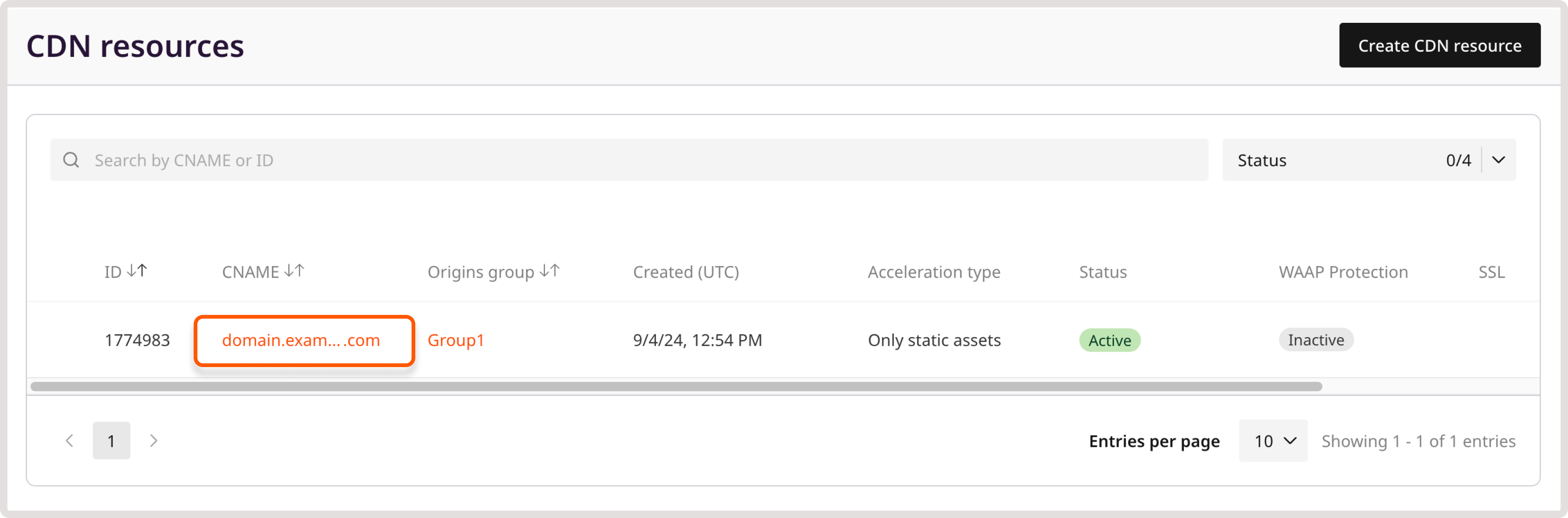
Select which request variables separate cached objects on a CDN resource. Requests that produce the same key share one cached object.
Cache key modification
Save the selection as Cache key modification on the CDN resource.
⚠️
Enabling or changing cache key modification can invalidate cached objects and reduce the cache hit ratio. Purge by pattern is unavailable while this option is enabled.
In the Cache section, click Cache key modification.
4
Set the variables
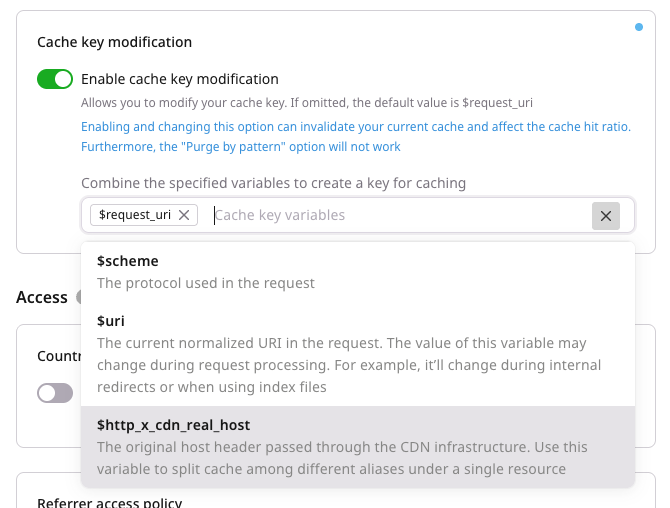
Turn on the Enable cache key modification toggle and add variables from Supported variables.
5
Save the cache key
Click Save changes.
Supported variables
Include a variable when its values must be cached as separate objects.
$request_uri: Full original request URI, including the query string. With the rewrite feature, this variable keeps the original URI rather than the rewritten path.
$scheme: Request protocol.
$uri: Normalized request URI. The value can change during request processing, including internal redirects and index files.
$http_x_cdn_real_host: Original Host header passed through the CDN. It splits the cache across aliases on one resource.
Interactions and limitations
These combinations change which requests still share one object.
If the key includes both $uri and $request_uri, the query string remains part of the cache key because $request_uri includes it.
When Redirect HTTP to HTTPS is enabled, $scheme does not create separate HTTP and HTTPS cache variants, because HTTP requests are redirected to HTTPS.
value joins the variables that should separate cached objects. Each variable appears at most once, with no separator between them.
Variable
Description
$request_uri
Full original request URI, including the query string. With the rewrite feature, this variable keeps the original URI
$scheme
Request protocol, http or https
$uri
Normalized request URI. The value can change during request processing. This variable overrides Ignore query string
$http_x_cdn_real_host
Original Host header. It splits the cache across aliases on one resource
If the key includes both $uri and $request_uri, the query string remains part of the cache key because $request_uri includes it.
When Redirect HTTP to HTTPS is enabled, $scheme does not create separate HTTP and HTTPS cache variants, because HTTP requests are redirected to HTTPS.
Administrator-restricted cache keys stay as set by CDB. Contact support to request a change.
⚠️
Enabling or changing cache key modification can invalidate cached objects and reduce the cache hit ratio. Purge by pattern is unavailable while this option is enabled.
Unsupported variables, a repeated variable, or other text return HTTP 400.
enabled and value are both required. A blank value returns HTTP 400.
Send proxy_cache_key with enabled true. Variable order matters: $scheme$uri and $uri$scheme produce different cache key strings.
Set enabled to false to turn cache key modification off. value remains required, and the stored string stays in place.
📝
In the Go SDK, set Value to an allowed non-empty string when Enabled is false. An empty Value is omitted, and the stored option stays unchanged.
Set proxy_cache_key so selected request variables separate cached objects, using the Terraform provider v2. Requests that produce the same key share one cached object.
value joins the allowed variables with no separator, and each variable appears at most once. The allowed variables are $http_x_cdn_real_host (original Host header), $request_uri (full original request URI, including the query string), $scheme (request protocol), and $uri (normalized request URI). A blank value, a repeated variable, or any other text returns HTTP 400. Leaving proxy_cache_key out of options leaves the stored option unchanged. Run terraform apply after editing options.
With the rewrite feature, $request_uri keeps the original URI rather than the rewritten path. If the key includes both $uri and $request_uri, the query string stays in the key because $request_uri includes it. When Redirect HTTP to HTTPS is enabled, $scheme does not create separate HTTP and HTTPS variants, because HTTP requests are redirected to HTTPS. $uri overrides Ignore query string. Administrator-restricted cache keys stay as set by CDB. Contact support to request a change.
⚠️
Enabling or changing cache key modification can invalidate cached objects and reduce the cache hit ratio. Purge by pattern is unavailable while this option is enabled.
Cache key
Set enabled to true. $scheme$uri and $uri$scheme are stored as different keys.