Specify cache lifetime for user browsers

The Browser caching option controls how long CDN content is stored in end users' browsers. Two modes are available: Origin controlled and CDN controlled.

Use Origin controlled when the origin server already manages browser cache duration through response headers. Use CDN controlled to set a fixed browser cache lifetime independently of the origin headers.

When Origin controlled is active, the origin determines browser cache behavior through its response headers. Orange's CDN passes the origin's Cache-Control header to browsers unchanged.

If the origin sends no Cache-Control, browsers may apply heuristic caching when a Last-Modified header is present. If neither header is present, the browser does not cache the response.

When CDN controlled is active, Orange's CDN overrides the origin cache headers and sets the lifetime on the response:

  • Cache-Control — sets the maximum browser cache time. A 12-hour lifetime returns Cache-Control: max-age=43200.
  • Expires — calculated from the current time plus the max-age value.

Browser caching applies to responses with codes 200, 201, 204, 206, 301, 302, 303, 304, 307, 308. Responses with other codes will not be cached.

Configure browser caching

Configure browser caching on a CDN resource:

  1. 1

    Navigate to CDN resources

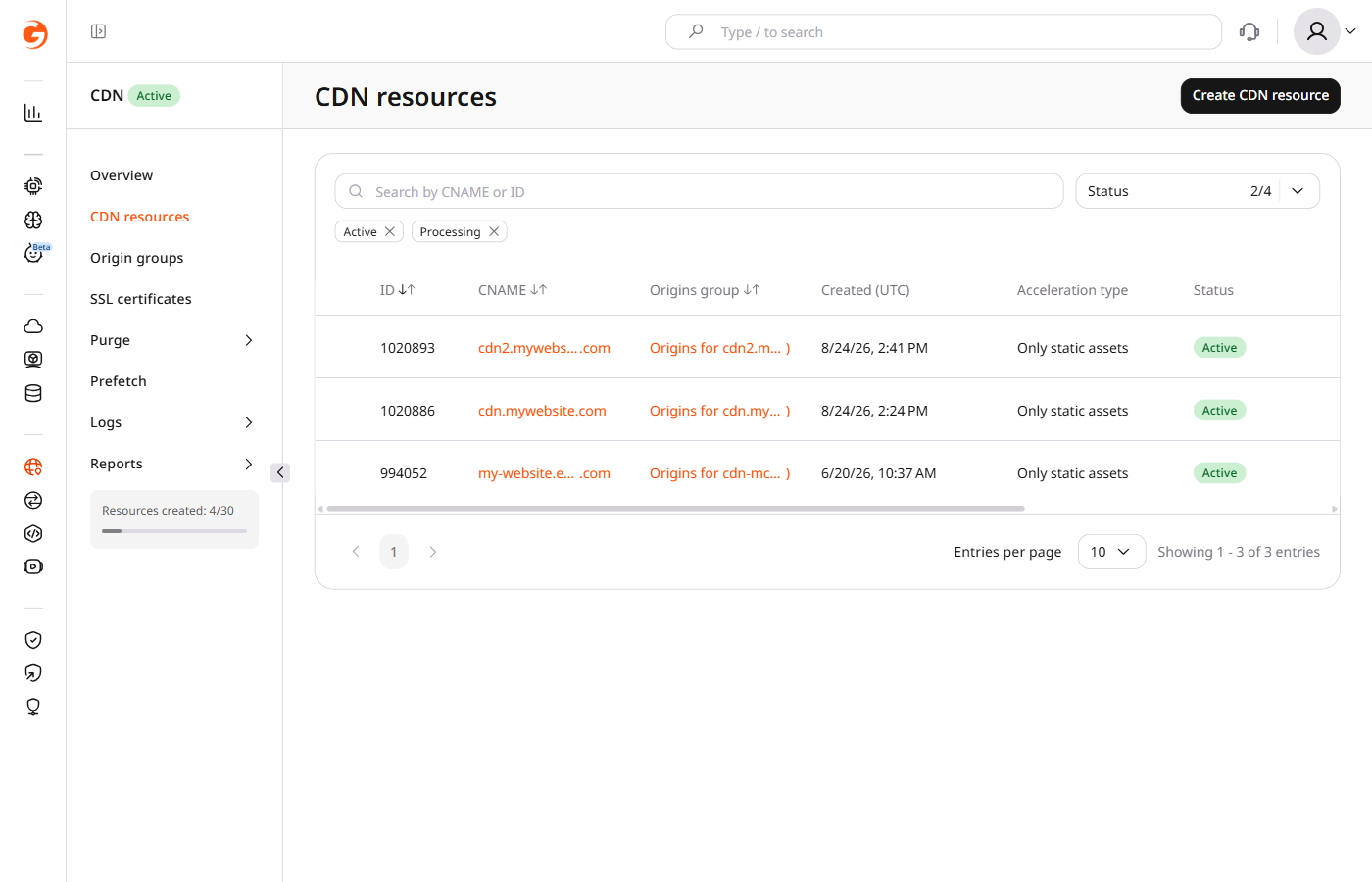
    In the CDB Technical Web Portal, navigate to CDN > CDN resources and click the CNAME of the required resource.

    CDN resources list with custom domain names

  2. 2

    Open browser caching settings

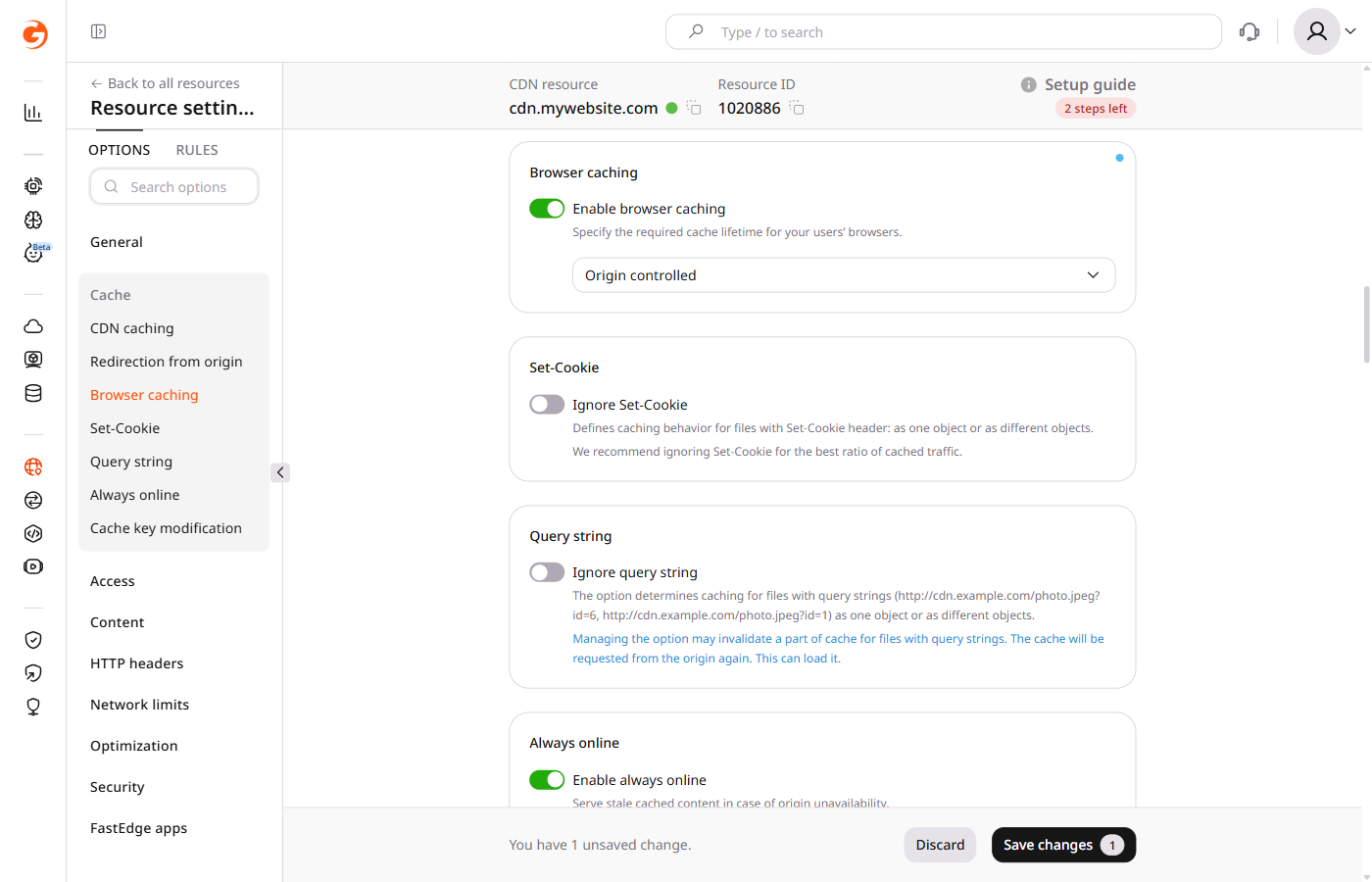
    In the Cache section, click Browser caching.

    CDN resource settings with Browser caching toggle enabled and Origin controlled dropdown

  3. 3

    Enable the toggle

    Turn on the Enable browser caching toggle.

  4. 4

    Select the caching mode

    From the dropdown, select Origin controlled or CDN controlled. If Origin controlled is selected, the configuration is complete — proceed to save. For CDN controlled, configure the cache lifetime using the expandable block.

  5. 5

    Save

    Click Save changes.

Set options.browser_cache_settings on a CDN resource. Origin controlled is selected in the Customer Portal. enabled true with value sets the CDN controlled lifetime. Find the resource ID in list CDN resources.

An API token is required.

export GCORE_API_KEY="{YOUR_API_KEY}"
export CDN_RESOURCE_ID="{YOUR_RESOURCE_ID}"

Cache lifetime

Send enabled true and value 4d to store a four-day CDN controlled lifetime. For a custom lifetime, set value to a string of seconds. 86400 is one day.

value is required. A duration above 1y returns HTTP 400.

import os

from gcore import CDB

client = CDB()
resource_id = int(os.environ["CDN_RESOURCE_ID"])

resource = client.cdn.cdn_resources.update(
    resource_id,
    options={
        "browser_cache_settings": {"enabled": True, "value": "4d"},
    },
)
print(resource.options.browser_cache_settings.enabled, resource.options.browser_cache_settings.value)
package main

import (
    "context"
    "fmt"
    "os"
    "strconv"

    gcore "github.com/G-Core/gcore-go"
    "github.com/G-Core/gcore-go/cdn"
)

func main() {
    client := gcore.NewClient()
    ctx := context.Background()
    resourceID, err := strconv.ParseInt(os.Getenv("CDN_RESOURCE_ID"), 10, 64)
    if err != nil {
        panic(err)
    }

    resource, err := client.CDN.CDNResources.Update(ctx, resourceID, cdn.CDNResourceUpdateParams{
        Options: cdn.CDNResourceUpdateParamsOptions{
            BrowserCacheSettings: cdn.CDNResourceUpdateParamsOptionsBrowserCacheSettings{
                Enabled: true,
                Value:   "4d",
            },
        },
    })
    if err != nil {
        panic(err)
    }
    fmt.Println(resource.Options.BrowserCacheSettings.Enabled, resource.Options.BrowserCacheSettings.Value)
}
curl -X PATCH "https://api.cdb-staging.cdn.orange.com/cdn/resources/$CDN_RESOURCE_ID" \
  -H "Authorization: APIKey $GCORE_API_KEY" \
  -H "Content-Type: application/json" \
  -d '{
    "options": {
      "browser_cache_settings": {
        "enabled": true,
        "value": "4d"
      }
    }
  }'

The API returns HTTP 200:

{
  "id": 12345,
  "options": {
    "browser_cache_settings": {
      "enabled": true,
      "value": "4d"
    }
  }
}

Turn browser caching off

Set enabled to false and still send value. Browser caching turns off, and the stored value remains.

import os

from gcore import CDB

client = CDB()
resource_id = int(os.environ["CDN_RESOURCE_ID"])

resource = client.cdn.cdn_resources.update(
    resource_id,
    options={
        "browser_cache_settings": {"enabled": False, "value": "4d"},
    },
)
print(resource.options.browser_cache_settings.enabled, resource.options.browser_cache_settings.value)
package main

import (
    "context"
    "fmt"
    "os"
    "strconv"

    gcore "github.com/G-Core/gcore-go"
    "github.com/G-Core/gcore-go/cdn"
)

func main() {
    client := gcore.NewClient()
    ctx := context.Background()
    resourceID, err := strconv.ParseInt(os.Getenv("CDN_RESOURCE_ID"), 10, 64)
    if err != nil {
        panic(err)
    }

    resource, err := client.CDN.CDNResources.Update(ctx, resourceID, cdn.CDNResourceUpdateParams{
        Options: cdn.CDNResourceUpdateParamsOptions{
            BrowserCacheSettings: cdn.CDNResourceUpdateParamsOptionsBrowserCacheSettings{
                Enabled: false,
                Value:   "4d",
            },
        },
    })
    if err != nil {
        panic(err)
    }
    fmt.Println(resource.Options.BrowserCacheSettings.Enabled, resource.Options.BrowserCacheSettings.Value)
}
curl -X PATCH "https://api.cdb-staging.cdn.orange.com/cdn/resources/$CDN_RESOURCE_ID" \
  -H "Authorization: APIKey $GCORE_API_KEY" \
  -H "Content-Type: application/json" \
  -d '{
    "options": {
      "browser_cache_settings": {
        "enabled": false,
        "value": "4d"
      }
    }
  }'

The API returns HTTP 200. The saved option is:

{
  "enabled": false,
  "value": "4d"
}

Set how long browsers keep a CDN response with the Terraform provider v2. Origin controlled is selected in the Customer Portal. With enabled set to true, value is the CDN controlled lifetime: the CDN overrides origin cache headers, sends Cache-Control with max-age, and sets Expires to the current time plus that max-age.

The lifetime applies to responses 200, 201, 204, 206, 301, 302, 303, 304, 307, and 308. Other codes are not cached. A duration above 1y returns HTTP 400.

Set a CDN controlled lifetime

Set enabled to true and value to 4d to keep responses in the browser for four days. The CDN sends Cache-Control: max-age=345600.

Edit value and run terraform apply to change the lifetime.
resource "gcore_cdn_origin_group" "example" {
  name = "my-origin-group"

  sources = [
    {
      source  = "example.com"
      enabled = true
    }
  ]
}

resource "gcore_cdn_resource" "example" {
  cname           = "cdn.example.com"
  origin_group    = gcore_cdn_origin_group.example.id
  origin_protocol = "HTTPS"

  options = {
    browser_cache_settings = {
      enabled = true
      value   = "4d"
    }
  }
}

Set a lifetime in seconds

Set value to 86400 for a one-day lifetime in seconds. The CDN sends Cache-Control: max-age=86400.

resource "gcore_cdn_origin_group" "example" {
  name = "my-origin-group"

  sources = [
    {
      source  = "example.com"
      enabled = true
    }
  ]
}

resource "gcore_cdn_resource" "example" {
  cname           = "cdn.example.com"
  origin_group    = gcore_cdn_origin_group.example.id
  origin_protocol = "HTTPS"

  options = {
    browser_cache_settings = {
      enabled = true
      value   = "86400"
    }
  }
}

Turn browser caching off

Set enabled to false and keep value in the same object. The next terraform apply turns browser caching off, and the stored value remains.

resource "gcore_cdn_origin_group" "example" {
  name = "my-origin-group"

  sources = [
    {
      source  = "example.com"
      enabled = true
    }
  ]
}

resource "gcore_cdn_resource" "example" {
  cname           = "cdn.example.com"
  origin_group    = gcore_cdn_origin_group.example.id
  origin_protocol = "HTTPS"

  options = {
    browser_cache_settings = {
      enabled = false
      value   = "4d"
    }
  }
}