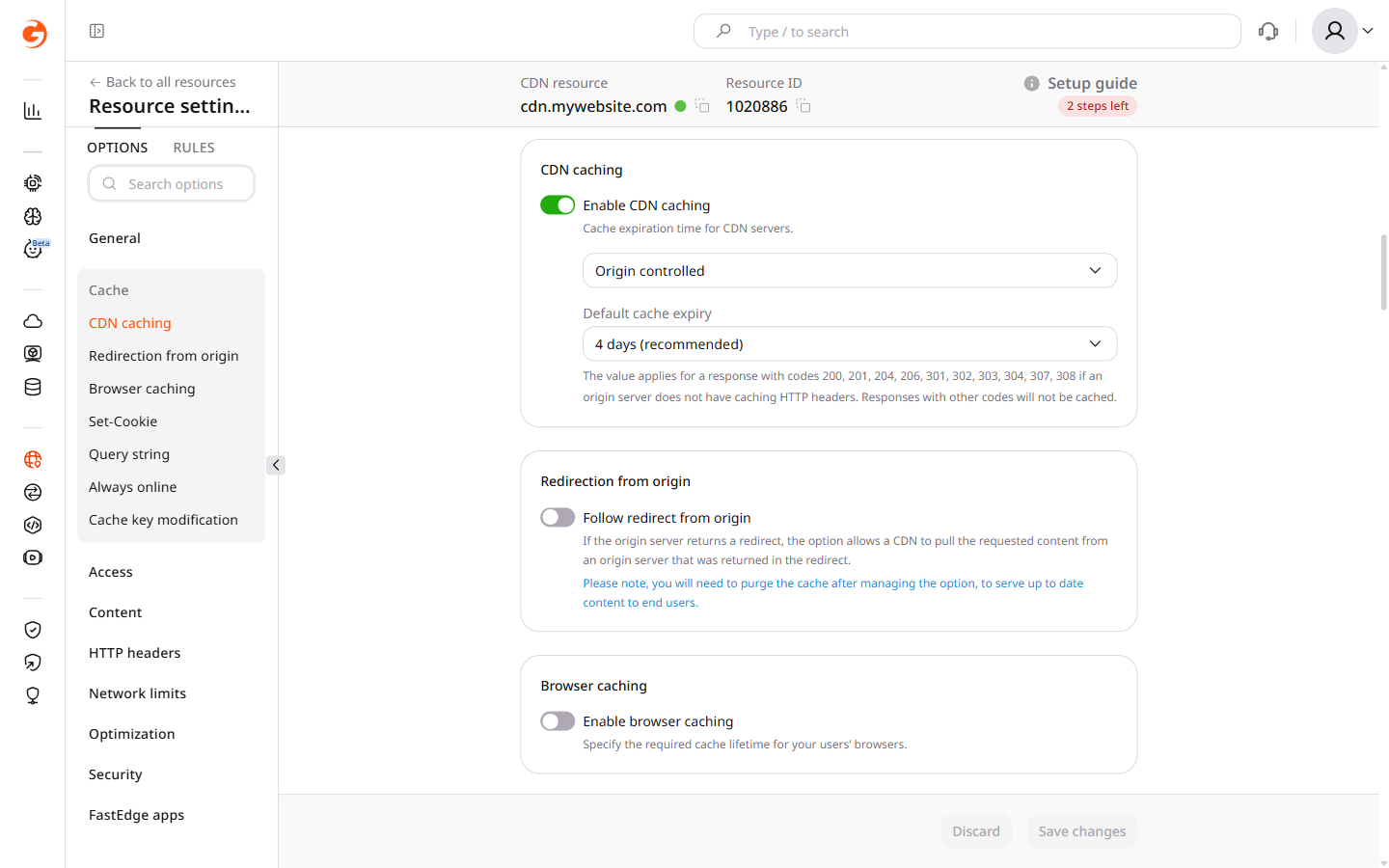
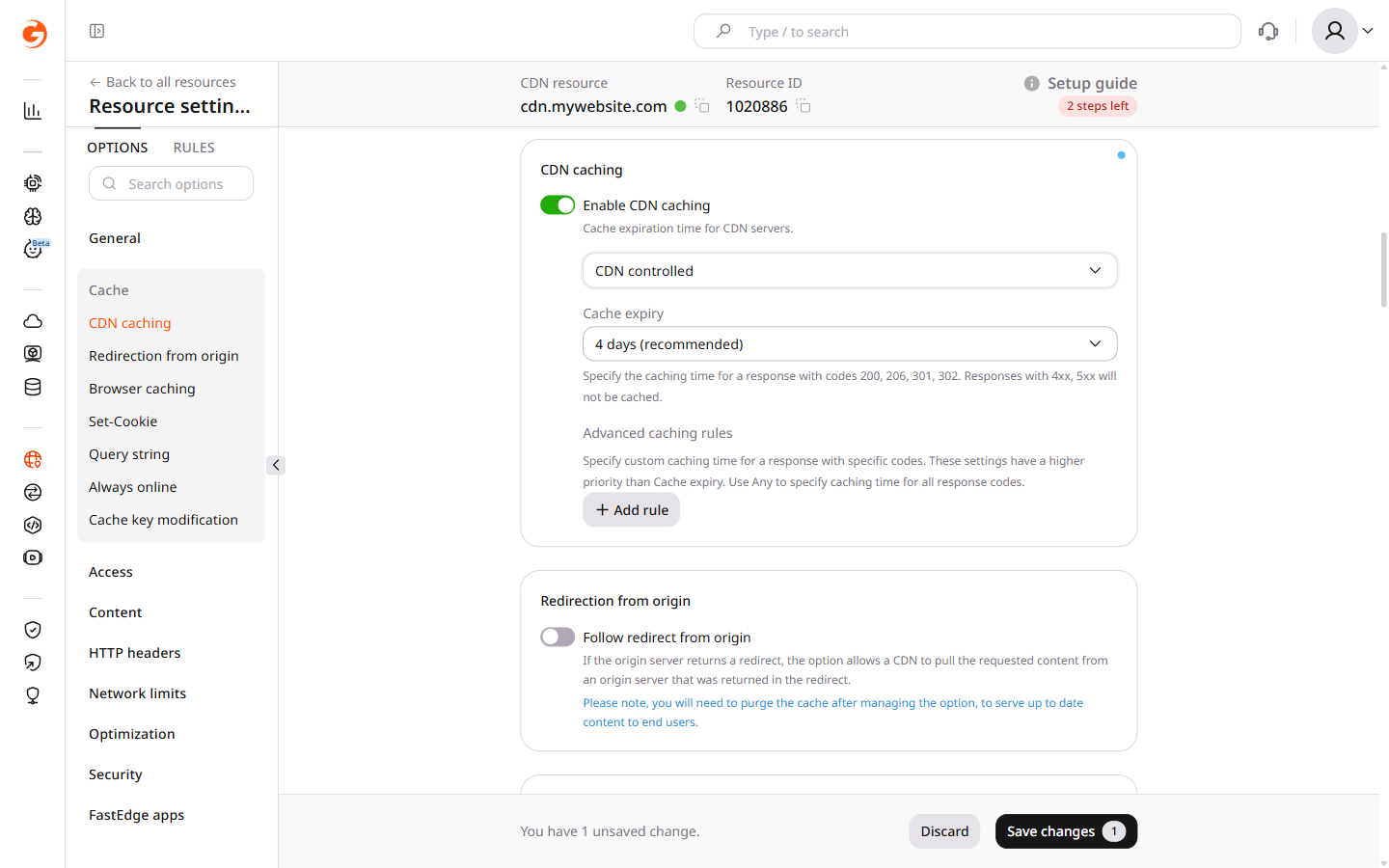
Choose where the cache lifetime comes from. Origin controlled uses caching headers from the origin and a fallback lifetime from the CDN settings. CDN controlled uses the lifetime configured on the CDN. Advanced rules can set a separate caching time for specific response codes.
📝
Files that users have not requested within 36 hours will be removed from the CDN servers' cache, regardless of the feature settings.
CDN caching configuration
ℹ️
CDN caching eligibility is based on HTTP response status codes and Cache-Control headers, not on file extensions. All file types—including .webp, .swf, and others—follow the same caching rules as any other object.
Origin controlled
Configure Cache-Control on the origin when the origin should control freshness. Default cache expiry is the fallback when the origin does not send caching headers.
1
Configure Cache-Control on the origin server
Skip this step when the origin already sends Cache-Control. Depending on the web server (Apache or Nginx), add the Cache-Control header with the max-age and public parameters to the .htaccess (for Apache) or nginx.conf (for Nginx) file.
In Cache-Control, public permits shared-cache (CDN) storage, and max-age sets the freshness duration in seconds.
The following Apache configuration caches .gif and .ico files for 4 days (max-age=345600 seconds):
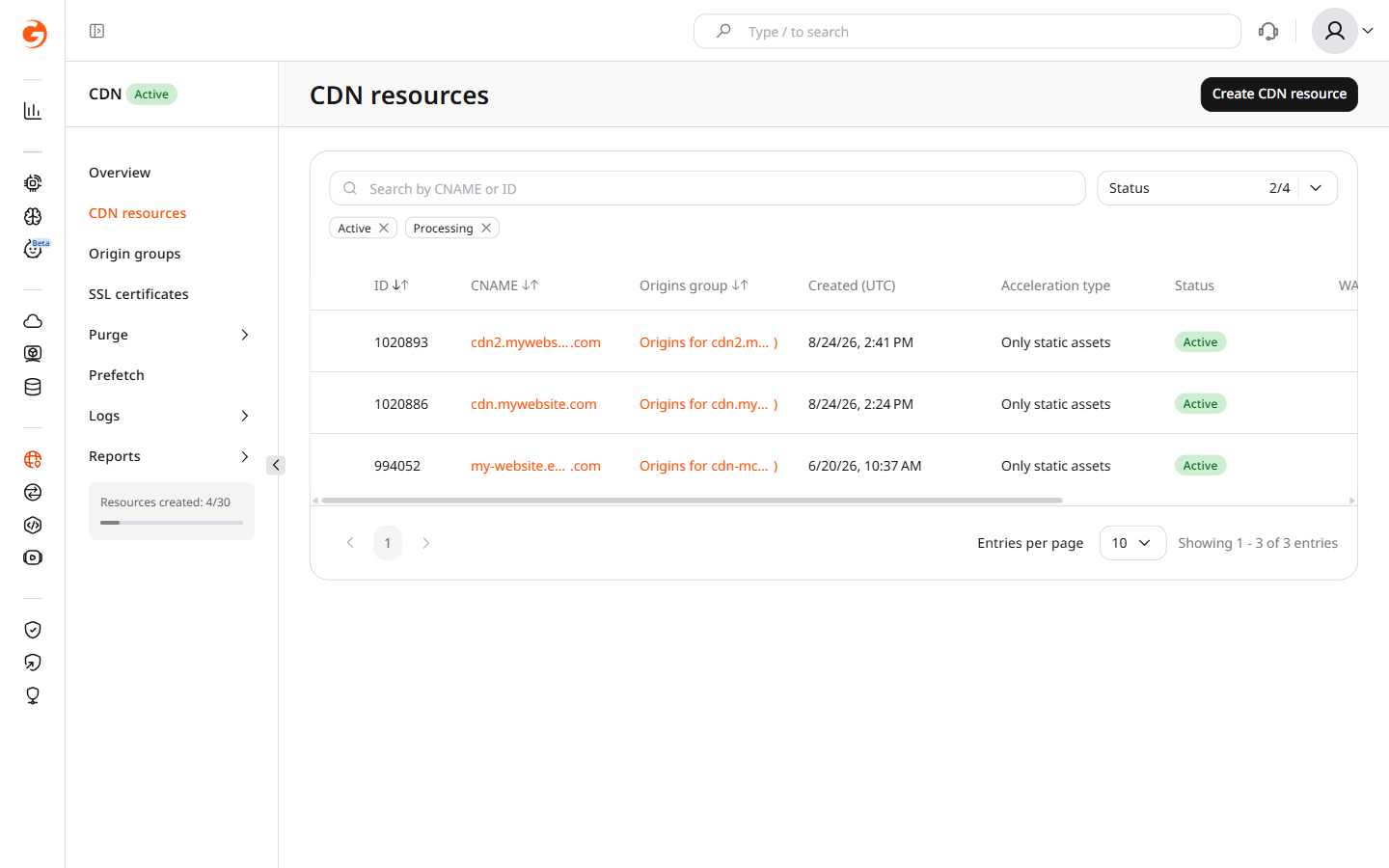
In the CDB Customer Portal, navigate to CDN > CDN resources and click the CNAME of the required resource.
3
Navigate to CDN caching
Navigate to Cache > CDN caching.
4
Confirm Origin controlled is selected
Confirm that Origin controlled is selected in the dropdown.
5
Set the default cache expiry
Specify the timespan in the Default cache expiry field. Select a predefined value from the list or select Custom value and enter the time in seconds. This value is used as a fallback when the origin does not send caching HTTP headers.
ℹ️
For Origin controlled mode, CDN servers store responses with codes 200, 201, 204, 206, 301, 302, 303, 307, and 308. A 304 Not Modified response is not independently stored; it revalidates and extends an existing cached entry. Responses with other codes are not cached.
6
Save changes
Click Save changes.
CDN controlled
CDN caching can be configured at two levels:
For the whole resource
At the advanced caching rule level in the resource
These settings are independent — CDN caching can be set to Do not cache in the main settings while enabled in an advanced rule, and vice versa.
⚠️
By default, CDN caching applies to responses with status codes 200, 206, 301, and 302. Responses with 4xx and 5xx status codes require an advanced caching rule. To cache 404 or another non-default status code, configure a rule under the Enable CDN caching via advanced caching rules tab below.
1
Open CDN resources
In the Customer Portal, navigate to CDN > CDN resources.
2
Open the resource settings
Click the CNAME of the required resource to open its settings.
3
Navigate to CDN caching
Navigate to Cache > CDN caching.
4
Enable CDN caching
Confirm the Enable CDN caching toggle is enabled. If not, click the toggle to enable it.
5
Select CDN controlled
Select CDN controlled from the dropdown.
6
Set the cache expiry
Specify the caching timespan in the Cache expiry field. Select a predefined value from the list or select Custom value and enter a time in seconds.
⚠️
If the Do not cache option is selected, caching is disabled for the general resource setting even when the Enable CDN caching toggle is enabled. Matching advanced caching rules can still cache responses.
7
Configure advanced rules (optional)
Optionally, configure advanced caching rules for different caching times by response code.
8
Save changes
Click Save changes.
1
Navigate to CDN caching
In the CDN resource settings, navigate to Cache > CDN caching.
2
Enable CDN caching
Confirm the Enable CDN caching toggle is enabled. If not, click the toggle to enable it.
3
Select CDN controlled
Select CDN controlled from the dropdown.
4
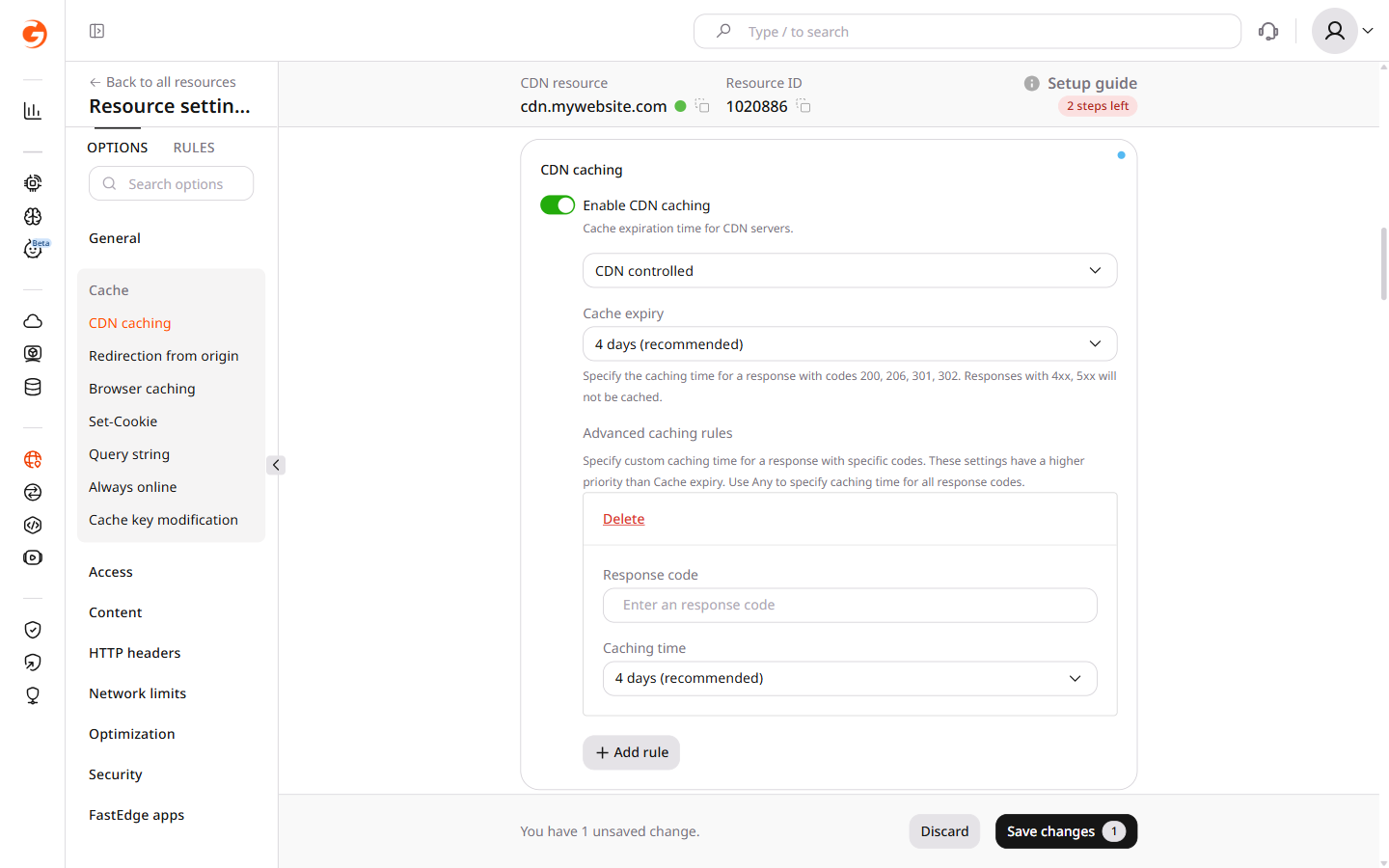
Add a caching rule
Click Add rule and configure it as follows:
Response code: enter the HTTP response code to apply caching to.
Caching time: specify how long the data will be stored in the cache before it expires.
The Caching time in advanced rules takes priority over the general Cache expiry.
With a Cache expiry of 4 days and two advanced rules — one for the 200 response code configured for 10 minutes and another for 404 configured for 1 minute — requests are cached as follows:
Requests with response code 200: cached for 10 minutes.
Requests with response code 404: cached for 1 minute.
Requests with response codes 206, 301, and 302: cached for 4 days.
Requests with response codes 4xx (except 404) and 5xx: not cached.
5
Save changes
Click Save changes to apply the settings.
📝
For VOD and live streaming, use the video-specific cache lifetimes described in caching rules.
What happens when the cache lifetime expires
When a cached file's lifetime expires, Orange's CDN performs conditional revalidation with the origin if the cached response includes a validator such as an ETag or Last-Modified header. The CDN sends a conditional request (If-None-Match or If-Modified-Since); if the origin responds with 304 Not Modified, the cached copy is reused and its lifetime is reset. If the origin returns a new response, the CDN stores and serves the updated content.
If the cached response includes no validator, the CDN cannot perform conditional revalidation and must retrieve the full response from the origin after expiration.
CDN caching verification
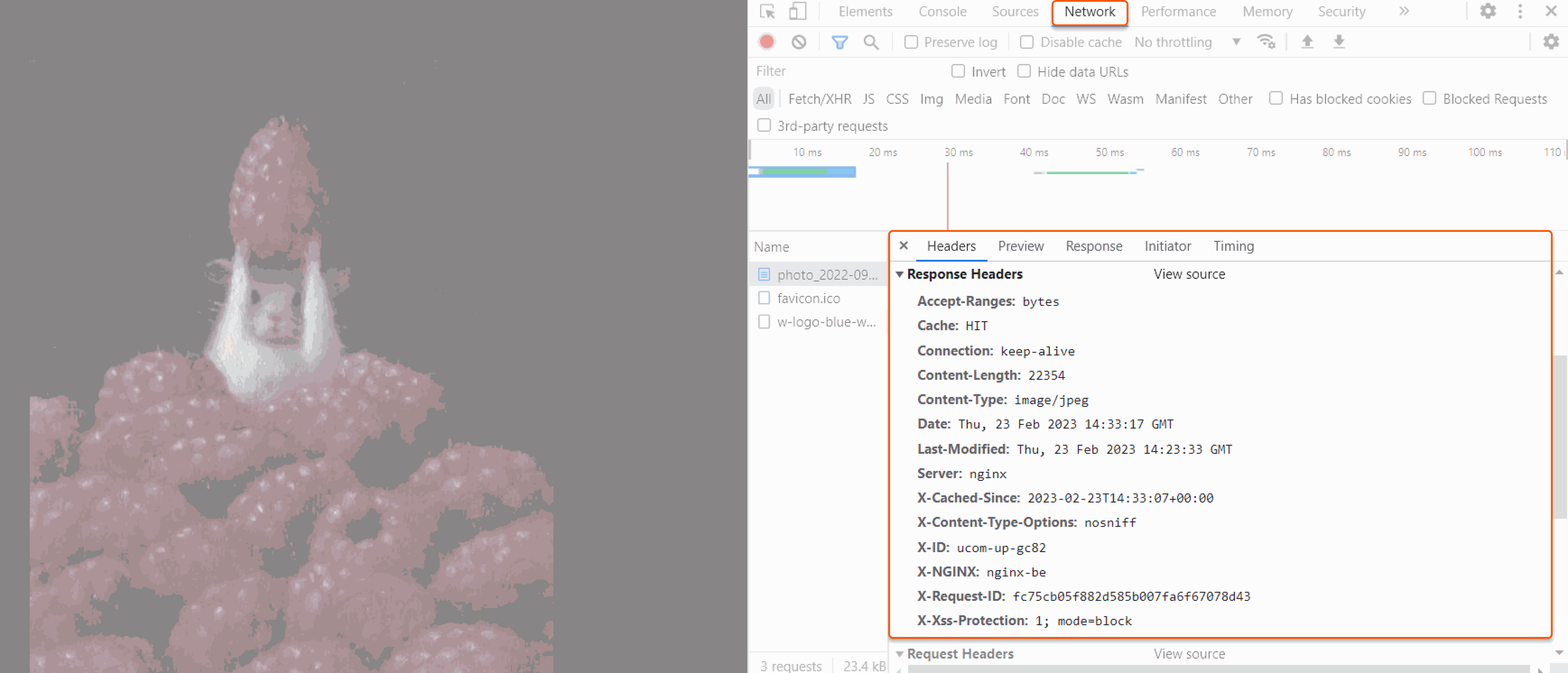
Request the file twice. A cacheable response returns cache: MISS when the CDN fetches it from the origin, then cache: HIT when the CDN serves it from cache.
HTTP/2 200
cache: HIT
x-cached-since: 2026-09-22T08:00:00+00:00
In browser DevTools, open Network, reload the page, select a CDN-delivered file, and inspect its response headers.
Caching response headers
HTTP header
Value
Explanation
cache
HIT
The file was served from the CDN cache.
cache
MISS
The file was not in the CDN cache and was fetched from the origin. If the response is cacheable under the current configuration, it is stored in cache and a later request can return cache: HIT.
cache
BYPASS
The CDN did not store the response. This happens when Cache-Control is no-store or no-cache.
X-Cached-Since
UTC time
The time when the file was stored on the CDN server.
X-ID
Edge server ID
Identifier of the edge server that delivered the file. See cache diagnostics.
For content caching issues, check the origin settings or contact CDB Support.
Set how long CDN servers store an origin response. default follows origin cache headers and supplies a fallback lifetime. value sets one lifetime on the CDN. Files with no requests for 36 hours leave the cache regardless of this setting.
ℹ️
An API token is required. The CDN resource ID is visible under CDN → CDN resources, or from the resources list call.
A resource update sets options.edge_cache_settings. Use default to follow origin cache headers with a fallback lifetime, or value to set the lifetime on the CDN. The two fields cannot be sent together, and one of them is required.
Open a terminal and export the required variables:
Set default to the fallback lifetime used when the origin sends no caching headers. The fallback applies to responses 200, 201, 204, 206, 301, 302, 303, 307, and 308. A 304 Not Modified response is not independently stored; it revalidates and extends an existing cached entry. Other codes are not cached. A duration uses nginx time, such as 4d, 12h, or 10m.
ℹ️
Send the full edge_cache_settings object on every update. Fields omitted from the object are removed.
Set value to ignore origin cache headers and store responses 200, 206, 301, and 302 for that lifetime. Responses 4xx and 5xx are not cached unless custom_values names them. Sending value removes a previously saved default.
Add custom_values next to value or default. Each key is a status code, or any for every code. A matching entry takes priority over the general setting. When value is set, codes absent from the map use value. When default is set, codes absent from the map continue to follow origin caching headers and use default only as the fallback lifetime. In the example below, 10m on 200 and 1m on 404 override the 4dvalue for those codes only.
A path-specific lifetime uses the same edge_cache_settings object on a CDN rule.
Set how long CDN servers store an origin response with the Terraform provider v2. default follows origin cache headers, and value sets one lifetime on the CDN.
Set only one of default or value. Files with no requests for 36 hours leave the cache regardless of this setting.
Follow origin cache headers
Set default when origin cache headers should control freshness and this duration is the fallback. It applies to responses 200, 201, 204, 206, 301, 302, 303, 307, and 308.
A 304 Not Modified response is not independently stored; it revalidates and extends an existing cached entry. Responses with other codes stay uncached. Edit default and run terraform apply to change the fallback.
Set value to store responses 200, 206, 301, and 302 for one lifetime and ignore origin cache headers. Responses 4xx and 5xx stay uncached unless custom_values names them.
The next terraform apply drops a saved default, because value replaces it.
Add custom_values beside value or default. Each key is a status code, and that entry overrides the general setting for that code only. When default is set, codes absent from the map follow origin cache headers, and default remains the fallback. The configuration below sets the map beside value.
10m on 200 and 1m on 404 override a 4d lifetime for those codes. Codes absent from the map keep value.
Keep custom_values in later applies. Omitting the map removes those per-code rules.
A path-specific lifetime uses the same edge_cache_settings object on a CDN rule.
Check the cache response
Request the file twice after the lifetime is saved. A cacheable response returns cache: MISS on the origin fetch, then cache: HIT when the CDN serves the stored copy.