
Specify an origin and the origin pull protocol

The Origin pull protocol and Pull content from settings control how CDN servers fetch content from the origin. Both options are in the General section of the CDN resource settings.

Origin pull protocol

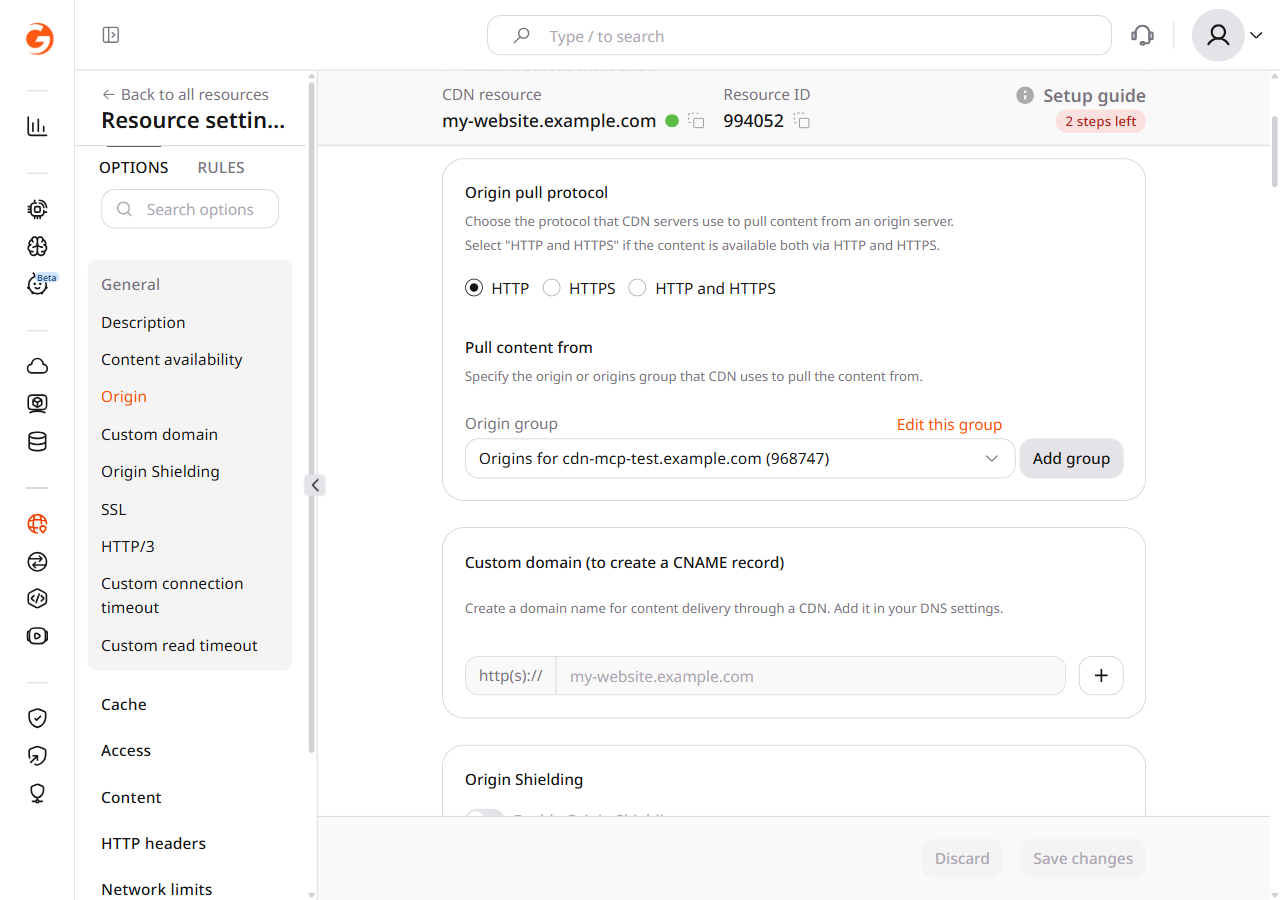
In the CDB Technical Web Portal, navigate to CDN > Resources and click the resource name. Open the OPTIONS tab and scroll to the General section.

Use the Origin pull protocol option to set the protocol that CDN servers use to pull content from an origin server: HTTP, HTTPS, or HTTP and HTTPS.

Origin pull protocol and Pull content from settings in the General section

Select the origin pull protocol based on the protocol supported by the origin server:

  1. HTTP — if the content on the origin server is available only via HTTP (port 80) or there is a redirect from HTTPS to HTTP on the origin server.
  2. HTTPS — if the content on the origin server is available only via HTTPS (port 443) or there is a redirect from HTTP to HTTPS on the origin server.
  3. HTTP and HTTPS — if the content on the origin server is available via both HTTPS and HTTP. A CDN server uses the protocol that matches the client's request:
    • Files are cached for both protocols. There are two versions of the file in the cache: one for HTTP and one for HTTPS.
    • When a user sends a request to https://cdn.example.com/image.jpg, the CDN pulls from the origin through HTTPS (port 443).
    • When a user sends a request to http://cdn.example.com/image.jpg, the CDN pulls from the origin through HTTP (port 80).

To understand the effect of an incorrect value, consider this example:

The origin server delivers content only through HTTPS (port 443), but Origin pull protocol is set to HTTP.

  1. Origin redirects from HTTP to HTTPS

    1. A user requests content at http://cdn.example.com/image.jpg.
    2. The CDN pulls from the origin at http://example.com/image.jpg.
    3. The origin redirects to https://example.com/image.jpg.

    Conclusion: the user gets content from the origin, not from the CDN. Set the protocol to HTTPS to have content delivered through the CDN.

  2. Origin does not redirect from HTTP to HTTPS

    1. A user requests content at http://cdn.example.com/image.jpg.
    2. The CDN pulls from the origin at http://example.com/image.jpg.

    Conclusion: the origin cannot provide content because it only accepts https://example.com/image.jpg. Set the protocol to HTTPS to have content delivered through the CDN.

Pull content from

Use the Pull content from section to specify the origin group that the CDN uses to pull content. The origin can be an IP address or a domain name.

To change the current origin group, click Edit this group.

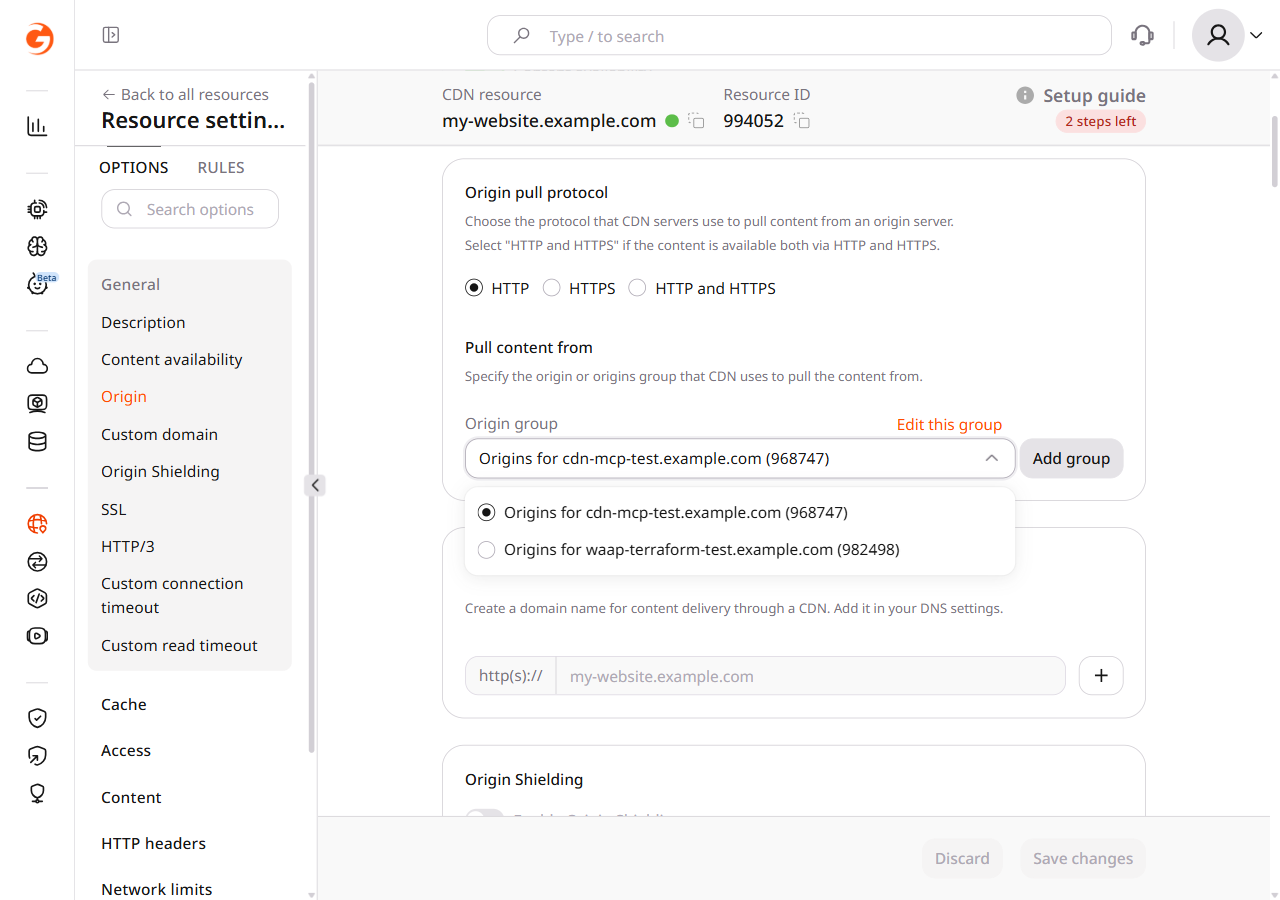
To add a new origin group, click Add group. After the group is created, select it from the origin group dropdown — it is not assigned to the resource automatically.

Origin group dropdown showing available groups to select

Set the protocol CDN servers use to pull content from the origin, and assign the origin group that supplies that content.

An API token is required. The CDN resource ID is visible under CDN → CDN Resources, or from the resources list call.

  • HTTP — CDN servers pull from the origin over HTTP.
  • HTTPS — CDN servers pull from the origin over HTTPS.
  • MATCH — the CDN uses the client request protocol. HTTP and HTTPS responses are cached separately.

Choose a protocol the origin accepts. If the CDN pulls over HTTP while the origin only serves HTTPS, the request may be redirected or fail, depending on the origin configuration.

Open a terminal and export the required variables:

export GCORE_API_KEY="{YOUR_API_KEY}"
export CDN_RESOURCE_ID="{YOUR_CDN_RESOURCE_ID}"

Set the origin pull protocol

Set originProtocol to the protocol the origin accepts.

import os

from gcore import CDB

client = CDB()
resource_id = int(os.environ["CDN_RESOURCE_ID"])

updated = client.cdn.cdn_resources.update(
    resource_id,
    origin_protocol="HTTPS",
)
print(updated.origin_protocol)
package main

import (
    "context"
    "fmt"
    "os"
    "strconv"

    gcore "github.com/G-Core/gcore-go"
    "github.com/G-Core/gcore-go/cdn"
)

func main() {
    client := gcore.NewClient()
    ctx := context.Background()
    resourceID, err := strconv.ParseInt(os.Getenv("CDN_RESOURCE_ID"), 10, 64)
    if err != nil {
        panic(err)
    }

    updated, err := client.CDN.CDNResources.Update(ctx, resourceID, cdn.CDNResourceUpdateParams{
        OriginProtocol: cdn.CDNResourceUpdateParamsOriginProtocolHTTPS,
    })
    if err != nil {
        panic(err)
    }
    fmt.Println(updated.OriginProtocol)
}
curl -X PATCH "https://api.cdb-staging.cdn.orange.com/cdn/resources/$CDN_RESOURCE_ID" \
  -H "Authorization: APIKey $GCORE_API_KEY" \
  -H "Content-Type: application/json" \
  -d '{"originProtocol": "HTTPS"}'

The API returns HTTP 200:

{
  "id": 101,
  "originProtocol": "HTTPS",
  "originGroup": 80
}

List origin groups

Return each origin group id and name. A new origin group stays unused until the update below sets originGroup to that id.

from gcore import CDB

client = CDB()

for group in client.cdn.origin_groups.list():
    print(group.id, group.name)
package main

import (
    "context"
    "fmt"

    gcore "github.com/G-Core/gcore-go"
    "github.com/G-Core/gcore-go/cdn"
)

func main() {
    client := gcore.NewClient()
    ctx := context.Background()

    page, err := client.CDN.OriginGroups.List(ctx, cdn.OriginGroupListParams{})
    if err != nil {
        panic(err)
    }
    for _, group := range page.Results {
        fmt.Println(group.ID, group.Name)
    }
}
curl "https://api.cdb-staging.cdn.orange.com/cdn/origin_groups" \
  -H "Authorization: APIKey $GCORE_API_KEY"

The API returns HTTP 200:

{
  "count": 1,
  "next": null,
  "previous": null,
  "results": [
    {
      "id": 80,
      "name": "Resource origin group"
    }
  ]
}

Set ORIGIN_GROUP_ID to an id from that list.

export ORIGIN_GROUP_ID="{YOUR_ORIGIN_GROUP_ID}"

Assign the origin group

Set originGroup to ORIGIN_GROUP_ID. originProtocol remains the value from the protocol update above.

import os

from gcore import CDB

client = CDB()
resource_id = int(os.environ["CDN_RESOURCE_ID"])
origin_group_id = int(os.environ["ORIGIN_GROUP_ID"])

updated = client.cdn.cdn_resources.update(
    resource_id,
    origin_group=origin_group_id,
)
print(updated.origin_group, updated.origin_protocol)
package main

import (
    "context"
    "fmt"
    "os"
    "strconv"

    gcore "github.com/G-Core/gcore-go"
    "github.com/G-Core/gcore-go/cdn"
)

func main() {
    client := gcore.NewClient()
    ctx := context.Background()
    resourceID, err := strconv.ParseInt(os.Getenv("CDN_RESOURCE_ID"), 10, 64)
    if err != nil {
        panic(err)
    }
    originGroupID, err := strconv.ParseInt(os.Getenv("ORIGIN_GROUP_ID"), 10, 64)
    if err != nil {
        panic(err)
    }

    updated, err := client.CDN.CDNResources.Update(ctx, resourceID, cdn.CDNResourceUpdateParams{
        OriginGroup: gcore.Int(originGroupID),
    })
    if err != nil {
        panic(err)
    }
    fmt.Println(updated.OriginGroup, updated.OriginProtocol)
}
curl -X PATCH "https://api.cdb-staging.cdn.orange.com/cdn/resources/$CDN_RESOURCE_ID" \
  -H "Authorization: APIKey $GCORE_API_KEY" \
  -H "Content-Type: application/json" \
  -d "{\"originGroup\": $ORIGIN_GROUP_ID}"

The API returns HTTP 200:

{
  "id": 101,
  "originProtocol": "HTTPS",
  "originGroup": 80
}

Set the origin pull protocol and the origin group on a CDN resource with the Terraform provider v2.

Set the origin pull protocol

The origin hostname must resolve in DNS. origin_protocol accepts HTTP, HTTPS, and MATCH. MATCH is the HTTP and HTTPS option: the CDN pulls with the protocol of the client request, and HTTP and HTTPS responses are cached separately. Set origin_protocol to HTTP when the origin accepts only HTTP. Edit the value and run terraform apply to change the protocol in place.

resource "gcore_cdn_origin_group" "example" {
  name = "my-origin-group"

  sources = [
    {
      source  = "example.com"
      enabled = true
    }
  ]
}

resource "gcore_cdn_resource" "example" {
  cname           = "pull.example.com"
  origin_group    = gcore_cdn_origin_group.example.id
  origin_protocol = "HTTPS"
}

Use the client request protocol

Set origin_protocol to MATCH when the origin accepts both HTTP and HTTPS. The next terraform apply changes the protocol in place.

resource "gcore_cdn_origin_group" "example" {
  name = "my-origin-group"

  sources = [
    {
      source  = "example.com"
      enabled = true
    }
  ]
}

resource "gcore_cdn_resource" "example" {
  cname           = "pull.example.com"
  origin_group    = gcore_cdn_origin_group.example.id
  origin_protocol = "MATCH"
}

Assign an origin group

The CDN resource uses the origin group referenced by origin_group. Adding another origin group leaves the resource on its current group. Point origin_group at the group that should serve content and run terraform apply. That apply prints an error that origin_group_name changed. The next terraform plan shows no differences, and the resource uses the referenced group.

resource "gcore_cdn_origin_group" "example" {
  name = "my-origin-group"

  sources = [
    {
      source  = "example.com"
      enabled = true
    }
  ]
}

resource "gcore_cdn_origin_group" "alternate" {
  name = "my-origin-group-2"

  sources = [
    {
      source  = "example.com"
      enabled = true
    }
  ]
}

resource "gcore_cdn_resource" "example" {
  cname           = "pull.example.com"
  origin_group    = gcore_cdn_origin_group.alternate.id
  origin_protocol = "HTTPS"
}

Delete the CDN resource

Remove the resource blocks. The next terraform apply deletes the CDN resource and every origin group the resource does not reference, then the origin group referenced by origin_group.
# Remove the CDN resource and the origin groups:
# resource "gcore_cdn_origin_group" "example" {
#   name = "my-origin-group"
#
#   sources = [
#     {
#       source  = "example.com"
#       enabled = true
#     }
#   ]
# }
#
# resource "gcore_cdn_origin_group" "alternate" {
#   name = "my-origin-group-2"
#
#   sources = [
#     {
#       source  = "example.com"
#       enabled = true
#     }
#   ]
# }
#
# resource "gcore_cdn_resource" "example" {
#   cname           = "pull.example.com"
#   origin_group    = gcore_cdn_origin_group.alternate.id
#   origin_protocol = "HTTPS"
# }
terraform apply