Add the Access-Control-Allow-Origin header to the browser response

CORS (Cross-Origin Resource Sharing) is a browser security mechanism. When a browser makes a cross-origin request, it checks Access-Control-Allow-Origin to decide whether the calling page can read the response, and blocks access without a permitting header even if the server returned 200 OK with the full content.

Consider a user visiting http://site-a.com who requests an image hosted at http://cdn.site-b.com/image.jpg. The browser sends a request to http://cdn.site-b.com/:

GET /image.jpg HTTP/1.1
Host: cdn.site-b.com
Origin: http://site-a.com

The Origin header tells the server which site sent the request. The http://cdn.site-b.com server uses this value to decide whether to include Access-Control-Allow-Origin in the response.

  • If the header is present and permits http://site-a.com, the browser allows the page to read the response and the image is displayed.
  • If the header is absent or does not permit http://site-a.com, the browser blocks access to the response — even though the server returned a 200 OK with the image.

Orange's CDN adds the Access-Control-Allow-Origin header to browser responses, which controls which origins can read the response. Without the header, the browser reports XMLHttpRequest cannot load http://domain.com and No Access-Control-Allow-Origin header is present on the requested resource.

Configure CORS header support

Add the header in one of three places:

  • Resource settings apply it to all files delivered over the CDN.
  • A rule applies it only to particular files.
  • The origin server sends Access-Control-Allow-Origin on its own response.

Configure CORS in the resource settings

Resource settings add the header to every file on the CDN resource.

  1. 1

    Open the CDN resource

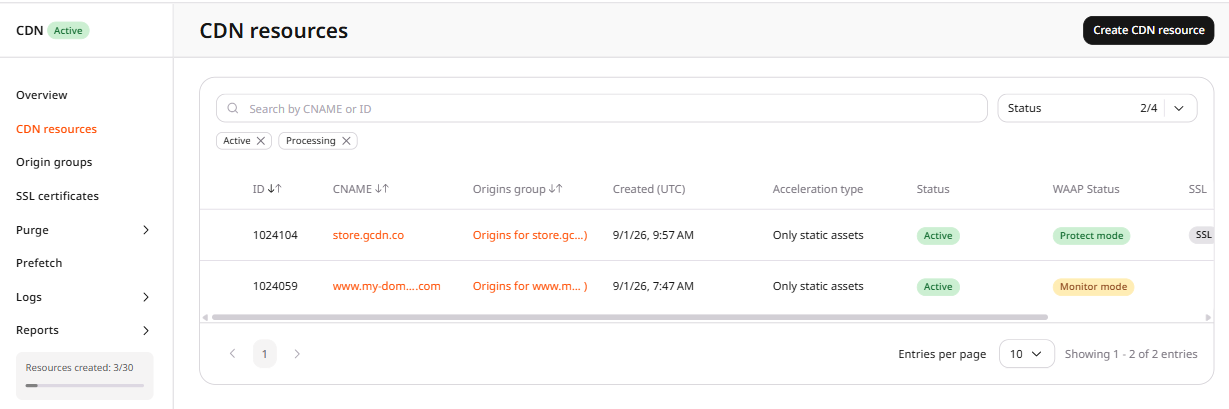
    In the CDB Technical Web Portal, navigate to CDN > CDN resources and click the CDN resource to configure.

    CDN resources list showing active CDN resources
  2. 2

    Open CORS header support

    In the resource settings panel, click HTTP headers to expand the section, then click CORS header support.

    CDN resource Options tab with the HTTP headers section expanded in the left panel
  3. 3

    Enable the toggle

    Enable the CORS header support toggle.

  4. 4

    Select an origin mode

    Select one of three options:

  5. 5

    Set the status-code behavior

    (Optional) Enable Always add the header to response from CDN regardless of response code to add Access-Control-Allow-Origin on every status code, including a response for unavailable content. With the toggle off, the header is added only on status 200, 201, 204, 206, 301, 302, 303, 304, 307, and 308.

  6. 6

    Save the resource

    Click Save changes.

Configure CORS via rule creation

A rule limits the header to particular files.

  1. 1

    Open the CDN resource

    In the Customer Portal, navigate to CDN > CDN resources and click the CDN resource to configure.

    CDN resources list showing active CDN resources
  2. 2

    Create a blank rule

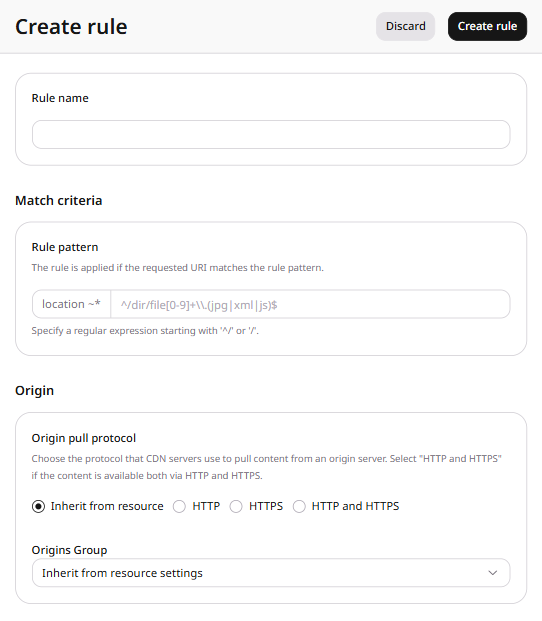
    Open the RULES tab, click Create rule, and select Create blank rule.

    RULES tab showing the Create rule button and an empty rules list
  3. 3

    Set the rule path

    Set the rule name and the file path in create a rule.

  4. 4

    Add CORS header support

    Click Add option, select CORS header support, and click Close.

    Create rule form with CORS header support added under Options
  5. 5

    Set the header behavior

    Configure the option. An enabled option adds Access-Control-Allow-Origin. An option that is added and left disabled does not add the header.

  6. 6

    Save the rule

    Click Create rule.

Configure CORS on the origin server

Apache sets * on images only when the request includes Origin, and sets * on fonts, CSS, and JavaScript for every request.

<IfModule mod_setenvif.c>
<IfModule mod_headers.c>
<FilesMatch "\.(gif|png|jpe?g|svg|svgz|ico|webp)$">
SetEnvIf Origin ":" IS_CORS
Header set Access-Control-Allow-Origin "*" env=IS_CORS
</FilesMatch>
</IfModule>
</IfModule>
<IfModule mod_headers.c>
<FilesMatch "\.(ttf|ttc|otf|eot|woff|woff2|font.css|css|js)$">
Header set Access-Control-Allow-Origin "*"
</FilesMatch>
</IfModule>

Nginx sets * on fonts, CSS, and JavaScript:

location ~ \.(ttf|ttc|otf|eot|woff|woff2|font.css|css|js)$ {
add_header Access-Control-Allow-Origin "*";
}

Check CORS

Clear the CDN resource or file cache in clear CDN cache, then confirm the header with cURL or browser DevTools.

Check CORS through cURL

Send the file URL with an Origin header. That header is required for the $http_origin modes, because without it the CDN omits Access-Control-Allow-Origin even when the option is set, while the * mode returns the header whether or not Origin is present.

  1. 1

    Request the file

    Run this command with the file URL and the site origin:

    curl -I -H "Origin: https://site-a.com" https://cdn.testdomain.com/assets/image.jpg
    
  2. 2

    Confirm the header value

    In the output, confirm that Access-Control-Allow-Origin is present and the value is * or the origin of the request.

    HTTP/1.1 200 OK
    Server: nginx/1.13.1
    Date: Fri, 24 Feb 2023 12:54:24 GMT
    Content-Type: image/jpeg
    Content-Length: 124024
    Connection: keep-alive
    X-Image-Generated: 29
    X-Image-Meta: 1024x768
    X-Image-Read: 71
    Expires: Fr, 10 March 2023 12:51:43 GMT
    Cache-Control: max-age=15552000
    Access-Control-Allow-Origin: *
    Last-Modified: Sun, 29 Jan 2023 12:00:00 GMT
    Cache-Control: max-age=315360000, public
    Cache: HIT
    X-Cached-Since: 2022-12-09T12:51:43+00:00
    X-ID: m9-up-e245
    

Check CORS with DevTools in a browser

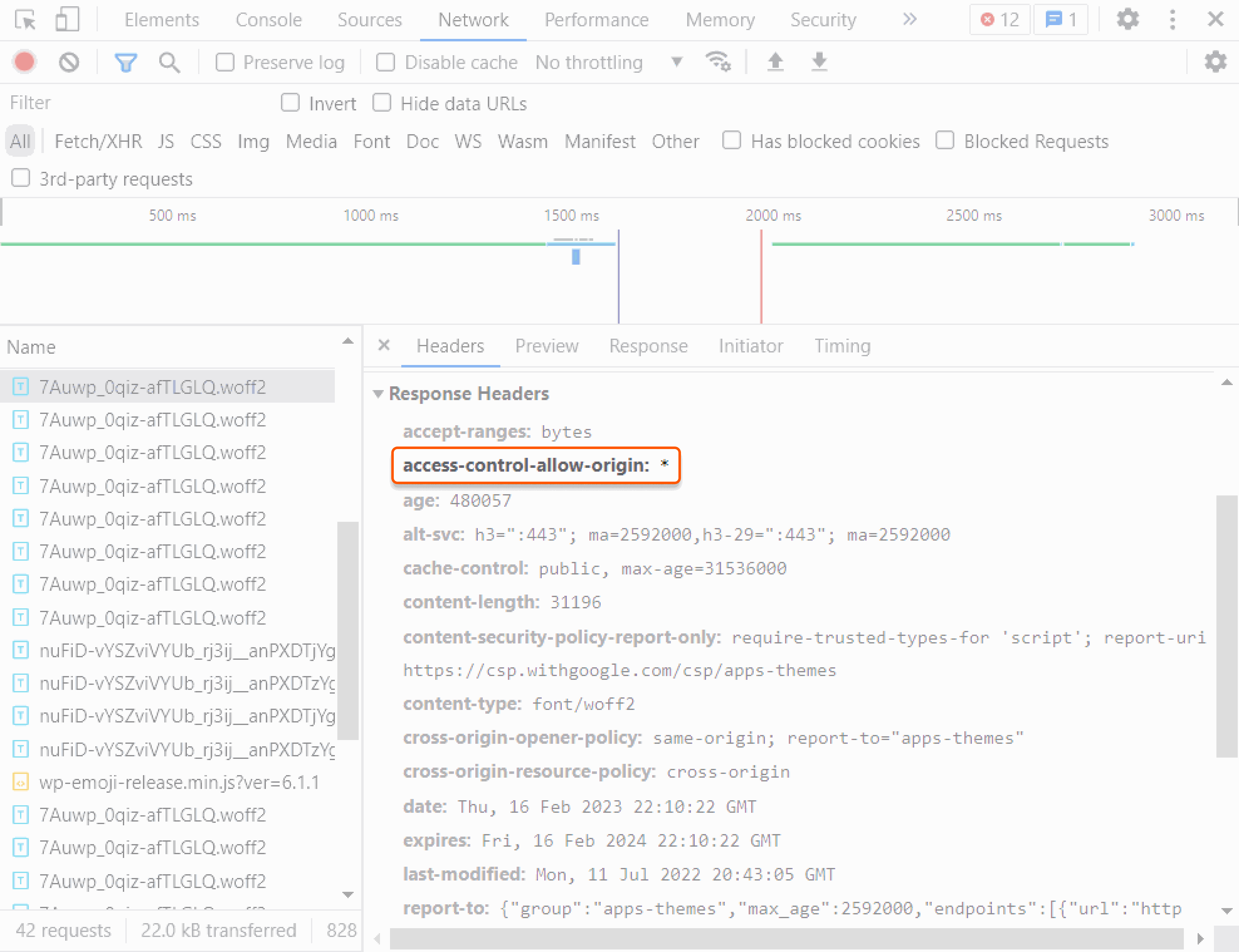
Browser DevTools shows the same header on a CDN file in the Network panel.

  1. 1

    Open the Network panel

    1. Open the site in Google Chrome.
    2. Right-click the page and select Inspect.
    3. Select the Network tab.
    4. Refresh the page.
  2. 2

    Confirm the header value

    Select a CDN-delivered JPEG, PNG, or CSS file. In the Headers tab, confirm that Access-Control-Allow-Origin is present and the value is * or the origin of the request.

    DevTools Network tab showing response headers with Access-Control-Allow-Origin header

For a page to read a file from another site, the response must include an Access-Control-Allow-Origin header that permits the requesting origin. The cors option stores those origins on the CDN resource, and Orange's CDN adds the header to the response the browser receives.

An origin web server can send the same header on its own response. A resource rule stores cors for one path, while the resource option applies it to every file.

An API token is required. The CDN resource ID is the id from the resources list call.

export GCORE_API_KEY="{YOUR_API_KEY}"
export CDN_RESOURCE_ID="{YOUR_CDN_RESOURCE_ID}"

Allow every origin

Set value to ["*"]. The response header is Access-Control-Allow-Origin: *, so a browser on any site can read it.

enabled and value are both required, and a request that omits either field returns HTTP 400. With always set to false, the header is added only on status 200, 201, 204, 206, 301, 302, 303, 304, 307, and 308.

import os

from gcore import CDB

client = CDB()
resource_id = int(os.environ["CDN_RESOURCE_ID"])

updated = client.cdn.cdn_resources.update(
    resource_id,
    options={
        "cors": &#123;
            "enabled": True,
            "value": ["*"],
            "always": False,
        &#125;
    },
)
cors = updated.options.cors
print(cors.enabled, cors.value, cors.always)
package main

import (
    "context"
    "fmt"
    "os"
    "strconv"

    gcore "github.com/G-Core/gcore-go"
    "github.com/G-Core/gcore-go/cdn"
)

func main() {
    client := gcore.NewClient()
    ctx := context.Background()
    resourceID, err := strconv.ParseInt(os.Getenv("CDN_RESOURCE_ID"), 10, 64)
    if err != nil {
        panic(err)
    }

    updated, err := client.CDN.CDNResources.Update(ctx, resourceID, cdn.CDNResourceUpdateParams{
        Options: cdn.CDNResourceUpdateParamsOptions{
            Cors: cdn.CDNResourceUpdateParamsOptionsCors{
                Enabled: true,
                Value:   []string{"*"},
                Always:  gcore.Bool(false),
            },
        },
    })
    if err != nil {
        panic(err)
    }
    fmt.Println(updated.Options.Cors.Enabled, updated.Options.Cors.Value, updated.Options.Cors.Always)
}
curl -X PATCH "https://api.cdb-staging.cdn.orange.com/cdn/resources/$CDN_RESOURCE_ID" \
  -H "Authorization: APIKey $GCORE_API_KEY" \
  -H "Content-Type: application/json" \
  -d '{
    "options": {
      "cors": &#123;
        "enabled": true,
        "value": ["*"],
        "always": false
      &#125;
    }
  }'

The API returns HTTP 200 with this option:

&#123;
  "enabled": true,
  "value": ["*"],
  "always": false
&#125;

Allow listed domains

Set value to hostnames, with no scheme and no path. A resource accepts up to 20 names.

A request whose Origin matches one name receives that origin in Access-Control-Allow-Origin, and any other origin receives no header. A value that includes https://, or that mixes * or $http_origin with a hostname, returns HTTP 400.

import os

from gcore import CDB

client = CDB()
resource_id = int(os.environ["CDN_RESOURCE_ID"])

updated = client.cdn.cdn_resources.update(
    resource_id,
    options={
        "cors": &#123;
            "enabled": True,
            "value": ["site-a.com", "site-b.com"],
            "always": False,
        &#125;
    },
)
cors = updated.options.cors
print(cors.enabled, cors.value, cors.always)
package main

import (
    "context"
    "fmt"
    "os"
    "strconv"

    gcore "github.com/G-Core/gcore-go"
    "github.com/G-Core/gcore-go/cdn"
)

func main() {
    client := gcore.NewClient()
    ctx := context.Background()
    resourceID, err := strconv.ParseInt(os.Getenv("CDN_RESOURCE_ID"), 10, 64)
    if err != nil {
        panic(err)
    }

    updated, err := client.CDN.CDNResources.Update(ctx, resourceID, cdn.CDNResourceUpdateParams{
        Options: cdn.CDNResourceUpdateParamsOptions{
            Cors: cdn.CDNResourceUpdateParamsOptionsCors{
                Enabled: true,
                Value:   []string{"site-a.com", "site-b.com"},
                Always:  gcore.Bool(false),
            },
        },
    })
    if err != nil {
        panic(err)
    }
    fmt.Println(updated.Options.Cors.Enabled, updated.Options.Cors.Value, updated.Options.Cors.Always)
}
curl -X PATCH "https://api.cdb-staging.cdn.orange.com/cdn/resources/$CDN_RESOURCE_ID" \
  -H "Authorization: APIKey $GCORE_API_KEY" \
  -H "Content-Type: application/json" \
  -d '{
    "options": {
      "cors": &#123;
        "enabled": true,
        "value": ["site-a.com", "site-b.com"],
        "always": false
      &#125;
    }
  }'

The API returns HTTP 200 with this option:

&#123;
  "enabled": true,
  "value": ["site-a.com", "site-b.com"],
  "always": false
&#125;

Echo the request origin

Set value to ["$http_origin"]. Orange's CDN copies the request Origin into Access-Control-Allow-Origin.

Use $http_origin when * is unsuitable, including a request that sends credentials. A browser that sends credentials accepts the response only when it also includes Access-Control-Allow-Credentials: true.

import os

from gcore import CDB

client = CDB()
resource_id = int(os.environ["CDN_RESOURCE_ID"])

updated = client.cdn.cdn_resources.update(
    resource_id,
    options={
        "cors": &#123;
            "enabled": True,
            "value": ["$http_origin"],
            "always": False,
        &#125;
    },
)
cors = updated.options.cors
print(cors.enabled, cors.value, cors.always)
package main

import (
    "context"
    "fmt"
    "os"
    "strconv"

    gcore "github.com/G-Core/gcore-go"
    "github.com/G-Core/gcore-go/cdn"
)

func main() {
    client := gcore.NewClient()
    ctx := context.Background()
    resourceID, err := strconv.ParseInt(os.Getenv("CDN_RESOURCE_ID"), 10, 64)
    if err != nil {
        panic(err)
    }

    updated, err := client.CDN.CDNResources.Update(ctx, resourceID, cdn.CDNResourceUpdateParams{
        Options: cdn.CDNResourceUpdateParamsOptions{
            Cors: cdn.CDNResourceUpdateParamsOptionsCors{
                Enabled: true,
                Value:   []string{"$http_origin"},
                Always:  gcore.Bool(false),
            },
        },
    })
    if err != nil {
        panic(err)
    }
    fmt.Println(updated.Options.Cors.Enabled, updated.Options.Cors.Value, updated.Options.Cors.Always)
}
curl -X PATCH "https://api.cdb-staging.cdn.orange.com/cdn/resources/$CDN_RESOURCE_ID" \
  -H "Authorization: APIKey $GCORE_API_KEY" \
  -H "Content-Type: application/json" \
  -d '{
    "options": {
      "cors": &#123;
        "enabled": true,
        "value": ["$http_origin"],
        "always": false
      &#125;
    }
  }'

The API returns HTTP 200 with this option:

&#123;
  "enabled": true,
  "value": ["$http_origin"],
  "always": false
&#125;

Add the header on every status code

Set always to true on the same cors object. The header is then added on every status code, including a response for a missing file.

value is still required. The call keeps * and sets always to true.

import os

from gcore import CDB

client = CDB()
resource_id = int(os.environ["CDN_RESOURCE_ID"])

updated = client.cdn.cdn_resources.update(
    resource_id,
    options={
        "cors": &#123;
            "enabled": True,
            "value": ["*"],
            "always": True,
        &#125;
    },
)
cors = updated.options.cors
print(cors.enabled, cors.value, cors.always)
package main

import (
    "context"
    "fmt"
    "os"
    "strconv"

    gcore "github.com/G-Core/gcore-go"
    "github.com/G-Core/gcore-go/cdn"
)

func main() {
    client := gcore.NewClient()
    ctx := context.Background()
    resourceID, err := strconv.ParseInt(os.Getenv("CDN_RESOURCE_ID"), 10, 64)
    if err != nil {
        panic(err)
    }

    updated, err := client.CDN.CDNResources.Update(ctx, resourceID, cdn.CDNResourceUpdateParams{
        Options: cdn.CDNResourceUpdateParamsOptions{
            Cors: cdn.CDNResourceUpdateParamsOptionsCors{
                Enabled: true,
                Value:   []string{"*"},
                Always:  gcore.Bool(true),
            },
        },
    })
    if err != nil {
        panic(err)
    }
    fmt.Println(updated.Options.Cors.Enabled, updated.Options.Cors.Value, updated.Options.Cors.Always)
}
curl -X PATCH "https://api.cdb-staging.cdn.orange.com/cdn/resources/$CDN_RESOURCE_ID" \
  -H "Authorization: APIKey $GCORE_API_KEY" \
  -H "Content-Type: application/json" \
  -d '{
    "options": {
      "cors": &#123;
        "enabled": true,
        "value": ["*"],
        "always": true
      &#125;
    }
  }'

The API returns HTTP 200 with this option:

&#123;
  "enabled": true,
  "value": ["*"],
  "always": true
&#125;

Turn CORS off

Set enabled to false. value is still required, and an empty list stores no origins.

import os

from gcore import CDB

client = CDB()
resource_id = int(os.environ["CDN_RESOURCE_ID"])

updated = client.cdn.cdn_resources.update(
    resource_id,
    options={
        "cors": &#123;
            "enabled": False,
            "value": [],
        &#125;
    },
)
cors = updated.options.cors
print(cors.enabled, cors.value, cors.always)
package main

import (
    "context"
    "fmt"
    "os"
    "strconv"

    gcore "github.com/G-Core/gcore-go"
    "github.com/G-Core/gcore-go/cdn"
)

func main() {
    client := gcore.NewClient()
    ctx := context.Background()
    resourceID, err := strconv.ParseInt(os.Getenv("CDN_RESOURCE_ID"), 10, 64)
    if err != nil {
        panic(err)
    }

    updated, err := client.CDN.CDNResources.Update(ctx, resourceID, cdn.CDNResourceUpdateParams{
        Options: cdn.CDNResourceUpdateParamsOptions{
            Cors: cdn.CDNResourceUpdateParamsOptionsCors{
                Enabled: false,
                Value:   []string{},
            },
        },
    })
    if err != nil {
        panic(err)
    }
    fmt.Println(updated.Options.Cors.Enabled, updated.Options.Cors.Value, updated.Options.Cors.Always)
}
curl -X PATCH "https://api.cdb-staging.cdn.orange.com/cdn/resources/$CDN_RESOURCE_ID" \
  -H "Authorization: APIKey $GCORE_API_KEY" \
  -H "Content-Type: application/json" \
  -d '{
    "options": {
      "cors": &#123;
        "enabled": false,
        "value": []
      &#125;
    }
  }'

The API returns HTTP 200 with this option:

&#123;
  "enabled": false,
  "value": [],
  "always": false
&#125;

Add CORS on a file rule

A resource rule applies cors only where rule matches. ruleType 0 is a regular expression and must start with ^/ or /.

The call adds Access-Control-Allow-Origin: * for paths under /assets/.

import os

from gcore import CDB

client = CDB()
resource_id = int(os.environ["CDN_RESOURCE_ID"])

rule = client.cdn.cdn_resources.rules.create(
    resource_id,
    name="cors-assets",
    rule="^/assets/.*",
    rule_type=0,
    options={
        "cors": &#123;
            "enabled": True,
            "value": ["*"],
            "always": False,
        &#125;
    },
)
print(rule.id, rule.rule, rule.options.cors.value, rule.options.cors.always)
package main

import (
    "context"
    "fmt"
    "os"
    "strconv"

    gcore "github.com/G-Core/gcore-go"
    "github.com/G-Core/gcore-go/cdn"
)

func main() {
    client := gcore.NewClient()
    ctx := context.Background()
    resourceID, err := strconv.ParseInt(os.Getenv("CDN_RESOURCE_ID"), 10, 64)
    if err != nil {
        panic(err)
    }

    rule, err := client.CDN.CDNResources.Rules.New(ctx, resourceID, cdn.CDNResourceRuleNewParams{
        Name:     "cors-assets",
        Rule:     "^/assets/.*",
        RuleType: 0,
        Options: cdn.CDNResourceRuleNewParamsOptions{
            Cors: cdn.CDNResourceRuleNewParamsOptionsCors{
                Enabled: true,
                Value:   []string{"*"},
                Always:  gcore.Bool(false),
            },
        },
    })
    if err != nil {
        panic(err)
    }
    fmt.Println(rule.ID, rule.Rule, rule.Options.Cors.Value, rule.Options.Cors.Always)
}
curl -X POST "https://api.cdb-staging.cdn.orange.com/cdn/resources/$CDN_RESOURCE_ID/rules" \
  -H "Authorization: APIKey $GCORE_API_KEY" \
  -H "Content-Type: application/json" \
  -d '{
    "name": "cors-assets",
    "rule": "^/assets/.*",
    "ruleType": 0,
    "options": {
      "cors": &#123;
        "enabled": true,
        "value": ["*"],
        "always": false
      &#125;
    }
  }'

The API returns HTTP 201. The saved rule includes these fields:

{
  "id": 703999,
  "rule": "^/assets/.*",
  "ruleType": 0,
  "options": {
    "cors": &#123;
      "enabled": true,
      "value": ["*"],
      "always": false
    &#125;
  }
}

Add Access-Control-Allow-Origin to the response the browser receives with the Terraform provider v2. When cors is enabled and value is ["*"], Orange's CDN adds Access-Control-Allow-Origin: *, so a browser on any site can read the response. Run terraform apply after editing options.

CORS header

Set enabled to true and value to ["*"]. With always set to false, the header is added only on status 200, 201, 204, 206, 301, 302, 303, 304, 307, and 308. Set always to true to add the header on every status code, including a response for a missing file.

Set value to ["site-a.com", "site-b.com"] to name the permitted hostnames, with no scheme and no path. A request whose Origin matches one name receives that origin in Access-Control-Allow-Origin, and any other origin receives no header. Set value to ["$http_origin"] to copy the request Origin into the header. Set enabled to false and value to an empty list to stop adding the header. The empty list stores no origins.
resource "gcore_cdn_origin_group" "example" {
  name = "my-origin-group"

  sources = [
    {
      source  = "example.com"
      enabled = true
    }
  ]
}

resource "gcore_cdn_resource" "example" {
  cname           = "cdn.example.com"
  origin_group    = gcore_cdn_origin_group.example.id
  origin_protocol = "HTTPS"

  options = {
    cors = {
      enabled = true
      value   = ["*"]
      always  = false
    }
  }
}