Configure and check the host header

The Host header identifies the target site in the request CDN servers send to the origin. The origin uses that value to select which website or application to serve. This matters when multiple sites share the same server.

The Change Host header option in CDN resource settings controls the value CDN servers send. When enabled, it offers two modes:

  • Custom Host header — CDN servers send a fixed domain or IP address as the Host header on every origin request.
  • Forward Host header — CDN servers send the host value from the end-user request to the origin.

Configure the host header

When the origin source changes after resource creation, the Change Host header value does not update automatically. CDN servers continue using the old value, sending requests to the new origin with an incorrect Host header and returning errors to end users.

To configure the option:

1. In the CDB Technical Web Portal, navigate to CDN → CDN resources.

2. Click the resource to open its settings.

3. In the left panel, click HTTP headers to expand the section, then click Host header.

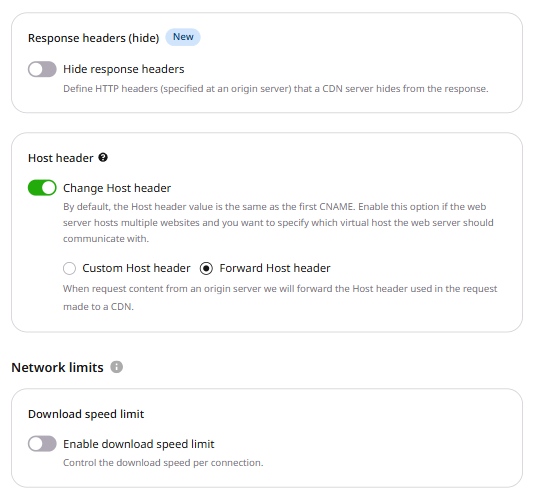
CDN resource settings, Host header section with Change Host header toggle enabled and Forward Host header selected

4. Enable the Change Host header toggle.

5. Select one of the two modes:

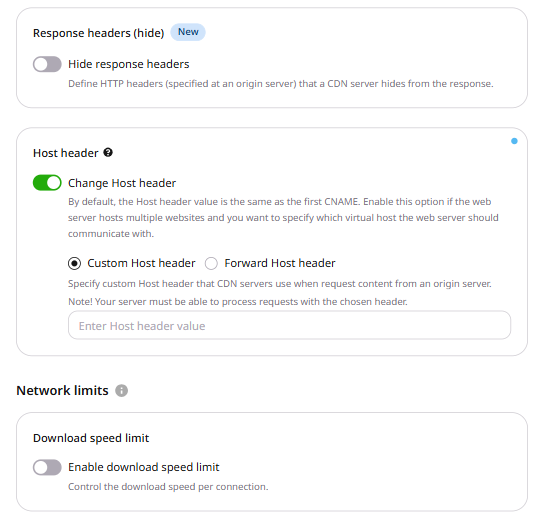
  • Custom Host header — enter the domain or IP address CDN servers will send as the Host header. Use this when the origin serves a single site with a fixed hostname.
  • Forward Host header — CDN servers send the host value from the end-user request. Use this when the origin validates the incoming Host header against the request domain.
Host header section with Custom Host header selected, showing an input field for the host header value

6. Click Save changes.

After saving, cached responses continue to be served until they expire or are purged. The next request sent to the origin uses the saved Host header.

Disable the host header

Disabling Change Host header causes CDN servers to send the CDN resource's CNAME as the Host header. Some origins reject that value and return 4xx or 5xx responses to end users. Keep the option enabled unless the origin expects the CDN resource CNAME as the Host header value.

When using a *.gvideo.io CDN resource for streaming, disabling the option sets the Host header to the CDN resource's CNAME — this is the expected behavior for that use case.

Check whether the origin accepts the Host header

To check whether the origin accepts the Host header configured for the CDN resource, send a request to the origin IP while keeping the configured hostname in the TLS server name and the Host header. For HTTPS, --resolve does that:

curl -I --resolve example.com:443:10.0.0.1 https://example.com/file.txt

Where:

  • Resolve hostname — the expected Host header value
  • https — the protocol used by the origin. For an origin without TLS, use http and port 80 in --resolve.
  • 10.0.0.1 — the IP address of the origin server
  • file.txt — any static file delivered via CDN

A 200 OK response confirms that the origin accepts the specified Host header. If the request returns 400 Bad Request or 403 Forbidden, verify that the origin accepts this value.

The origin uses the Host header to select which site to serve, so hostHeader stores a fixed host value and forward_host_header copies the host value from the viewer request. Orange's CDN puts that value on the request it sends to the origin. Only one of the two options can be enabled.

An API token is required. The CDN resource ID is the id from the resources list call.

export GCORE_API_KEY="{YOUR_API_KEY}"
export CDN_RESOURCE_ID="{YOUR_CDN_RESOURCE_ID}"

Set a custom host

Set hostHeader to the host value Orange's CDN should send, and set forward_host_header to null in the same request. A request that enables both options returns HTTP 400.

In the JSON body the field name is hostHeader. A body that sends host_header does not change the saved value. enabled and value are both required, and the API stores value in lowercase.

The value can contain letters, numbers, and . - _ :, up to 2048 characters. A blank value, a missing field, any other character, or a longer value returns HTTP 400. A hostname, an IP address, and a hostname with a port are all accepted.

import os

from gcore import CDB

client = CDB()
resource_id = int(os.environ["CDN_RESOURCE_ID"])

updated = client.cdn.cdn_resources.update(
    resource_id,
    options={
        "host_header": {"enabled": True, "value": "origin.example.com"},
        "forward_host_header": None,
    },
)
print(updated.options.host_header.enabled, updated.options.host_header.value)
package main

import (
    "context"
    "fmt"
    "os"
    "strconv"

    gcore "github.com/G-Core/gcore-go"
    "github.com/G-Core/gcore-go/cdn"
)

func main() {
    client := gcore.NewClient()
    ctx := context.Background()
    resourceID, err := strconv.ParseInt(os.Getenv("CDN_RESOURCE_ID"), 10, 64)
    if err != nil {
        panic(err)
    }

    options := cdn.CDNResourceUpdateParamsOptions{
        HostHeader: cdn.CDNResourceUpdateParamsOptionsHostHeader{
            Enabled: true,
            Value:   "origin.example.com",
        },
    }
    options.SetExtraFields(map[string]any{"forward_host_header": nil})
    updated, err := client.CDN.CDNResources.Update(ctx, resourceID, cdn.CDNResourceUpdateParams{
        Options: options,
    })
    if err != nil {
        panic(err)
    }
    fmt.Println(updated.Options.HostHeader.Enabled, updated.Options.HostHeader.Value)
}
curl -X PATCH "https://api.cdb-staging.cdn.orange.com/cdn/resources/$CDN_RESOURCE_ID" \
  -H "Authorization: APIKey $GCORE_API_KEY" \
  -H "Content-Type: application/json" \
  -d '{
    "options": {
      "hostHeader": {"enabled": true, "value": "origin.example.com"},
      "forward_host_header": null
    }
  }'

The API returns HTTP 200. The saved options are:

{
  "hostHeader": {
    "enabled": true,
    "value": "origin.example.com"
  },
  "forward_host_header": null
}

Forward the request host

Set forward_host_header to enabled with value true, and set hostHeader to null in the same request. Orange's CDN then copies the Host header from the viewer request. enabled and value are both required.

import os

from gcore import CDB

client = CDB()
resource_id = int(os.environ["CDN_RESOURCE_ID"])

updated = client.cdn.cdn_resources.update(
    resource_id,
    options={
        "host_header": None,
        "forward_host_header": {"enabled": True, "value": True},
    },
)
print(
    updated.options.forward_host_header.enabled,
    updated.options.forward_host_header.value,
)
package main

import (
    "context"
    "fmt"
    "os"
    "strconv"

    gcore "github.com/G-Core/gcore-go"
    "github.com/G-Core/gcore-go/cdn"
)

func main() {
    client := gcore.NewClient()
    ctx := context.Background()
    resourceID, err := strconv.ParseInt(os.Getenv("CDN_RESOURCE_ID"), 10, 64)
    if err != nil {
        panic(err)
    }

    options := cdn.CDNResourceUpdateParamsOptions{
        ForwardHostHeader: cdn.CDNResourceUpdateParamsOptionsForwardHostHeader{
            Enabled: true,
            Value:   true,
        },
    }
    options.SetExtraFields(map[string]any{"hostHeader": nil})
    updated, err := client.CDN.CDNResources.Update(ctx, resourceID, cdn.CDNResourceUpdateParams{
        Options: options,
    })
    if err != nil {
        panic(err)
    }
    fmt.Println(updated.Options.ForwardHostHeader.Enabled, updated.Options.ForwardHostHeader.Value)
}
curl -X PATCH "https://api.cdb-staging.cdn.orange.com/cdn/resources/$CDN_RESOURCE_ID" \
  -H "Authorization: APIKey $GCORE_API_KEY" \
  -H "Content-Type: application/json" \
  -d '{
    "options": {
      "hostHeader": null,
      "forward_host_header": {"enabled": true, "value": true}
    }
  }'

The API returns HTTP 200. The saved options are:

{
  "hostHeader": null,
  "forward_host_header": {
    "enabled": true,
    "value": true
  }
}

Turn off the host header

Set hostHeader and forward_host_header to null. The saved resource then has neither option, and a null hostHeader means the Host value is the first CNAME of the resource.

import os

from gcore import CDB

client = CDB()
resource_id = int(os.environ["CDN_RESOURCE_ID"])

updated = client.cdn.cdn_resources.update(
    resource_id,
    options={"host_header": None, "forward_host_header": None},
)
print(updated.options.host_header, updated.options.forward_host_header)
package main

import (
    "context"
    "fmt"
    "os"
    "strconv"

    gcore "github.com/G-Core/gcore-go"
    "github.com/G-Core/gcore-go/cdn"
)

func main() {
    client := gcore.NewClient()
    ctx := context.Background()
    resourceID, err := strconv.ParseInt(os.Getenv("CDN_RESOURCE_ID"), 10, 64)
    if err != nil {
        panic(err)
    }

    options := cdn.CDNResourceUpdateParamsOptions{}
    options.SetExtraFields(map[string]any{
        "hostHeader":          nil,
        "forward_host_header": nil,
    })
    updated, err := client.CDN.CDNResources.Update(ctx, resourceID, cdn.CDNResourceUpdateParams{
        Options: options,
    })
    if err != nil {
        panic(err)
    }
    fmt.Println(updated.Options.HostHeader.RawJSON(), updated.Options.ForwardHostHeader.RawJSON())
}
curl -X PATCH "https://api.cdb-staging.cdn.orange.com/cdn/resources/$CDN_RESOURCE_ID" \
  -H "Authorization: APIKey $GCORE_API_KEY" \
  -H "Content-Type: application/json" \
  -d '{
    "options": {
      "hostHeader": null,
      "forward_host_header": null
    }
  }'

The API returns HTTP 200. The saved options are:

{
  "hostHeader": null,
  "forward_host_header": null
}

Set a custom host on a file rule

A resource rule stores hostHeader only where rule matches. ruleType 0 is a regular expression and must start with ^/ or /.

The call applies the Host header on paths under /assets/.

import os

from gcore import CDB

client = CDB()
resource_id = int(os.environ["CDN_RESOURCE_ID"])

rule = client.cdn.cdn_resources.rules.create(
    resource_id,
    name="host-assets",
    rule="^/assets/.*",
    rule_type=0,
    options={"host_header": {"enabled": True, "value": "assets.example.com"}},
)
print(rule.id, rule.rule, rule.options.host_header.enabled, rule.options.host_header.value)
package main

import (
    "context"
    "fmt"
    "os"
    "strconv"

    gcore "github.com/G-Core/gcore-go"
    "github.com/G-Core/gcore-go/cdn"
)

func main() {
    client := gcore.NewClient()
    ctx := context.Background()
    resourceID, err := strconv.ParseInt(os.Getenv("CDN_RESOURCE_ID"), 10, 64)
    if err != nil {
        panic(err)
    }

    rule, err := client.CDN.CDNResources.Rules.New(ctx, resourceID, cdn.CDNResourceRuleNewParams{
        Name:     "host-assets",
        Rule:     "^/assets/.*",
        RuleType: 0,
        Options: cdn.CDNResourceRuleNewParamsOptions{
            HostHeader: cdn.CDNResourceRuleNewParamsOptionsHostHeader{
                Enabled: true,
                Value:   "assets.example.com",
            },
        },
    })
    if err != nil {
        panic(err)
    }
    fmt.Println(rule.ID, rule.Rule, rule.Options.HostHeader.Enabled, rule.Options.HostHeader.Value)
}
curl -X POST "https://api.cdb-staging.cdn.orange.com/cdn/resources/$CDN_RESOURCE_ID/rules" \
  -H "Authorization: APIKey $GCORE_API_KEY" \
  -H "Content-Type: application/json" \
  -d '{
    "name": "host-assets",
    "rule": "^/assets/.*",
    "ruleType": 0,
    "options": {
      "hostHeader": {"enabled": true, "value": "assets.example.com"}
    }
  }'

The API returns HTTP 201. The saved rule includes these fields:

{
  "id": 704011,
  "rule": "^/assets/.*",
  "ruleType": 0,
  "options": {
    "hostHeader": {
      "enabled": true,
      "value": "assets.example.com"
    }
  }
}

Forward the host on a file rule

The same rule can store forward_host_header instead of a fixed hostname. The call copies the viewer Host header for paths under /forward/.

import os

from gcore import CDB

client = CDB()
resource_id = int(os.environ["CDN_RESOURCE_ID"])

rule = client.cdn.cdn_resources.rules.create(
    resource_id,
    name="host-forward",
    rule="^/forward/.*",
    rule_type=0,
    options={"forward_host_header": {"enabled": True, "value": True}},
)
print(
    rule.id,
    rule.rule,
    rule.options.forward_host_header.enabled,
    rule.options.forward_host_header.value,
)
package main

import (
    "context"
    "fmt"
    "os"
    "strconv"

    gcore "github.com/G-Core/gcore-go"
    "github.com/G-Core/gcore-go/cdn"
)

func main() {
    client := gcore.NewClient()
    ctx := context.Background()
    resourceID, err := strconv.ParseInt(os.Getenv("CDN_RESOURCE_ID"), 10, 64)
    if err != nil {
        panic(err)
    }

    rule, err := client.CDN.CDNResources.Rules.New(ctx, resourceID, cdn.CDNResourceRuleNewParams{
        Name:     "host-forward",
        Rule:     "^/forward/.*",
        RuleType: 0,
        Options: cdn.CDNResourceRuleNewParamsOptions{
            ForwardHostHeader: cdn.CDNResourceRuleNewParamsOptionsForwardHostHeader{
                Enabled: true,
                Value:   true,
            },
        },
    })
    if err != nil {
        panic(err)
    }
    fmt.Println(rule.ID, rule.Rule, rule.Options.ForwardHostHeader.Enabled, rule.Options.ForwardHostHeader.Value)
}
curl -X POST "https://api.cdb-staging.cdn.orange.com/cdn/resources/$CDN_RESOURCE_ID/rules" \
  -H "Authorization: APIKey $GCORE_API_KEY" \
  -H "Content-Type: application/json" \
  -d '{
    "name": "host-forward",
    "rule": "^/forward/.*",
    "ruleType": 0,
    "options": {
      "forward_host_header": {"enabled": true, "value": true}
    }
  }'

The API returns HTTP 201. The saved rule includes these fields:

{
  "id": 704012,
  "rule": "^/forward/.*",
  "ruleType": 0,
  "options": {
    "forward_host_header": {
      "enabled": true,
      "value": true
    }
  }
}

Send a Host header to the origin with the Terraform provider v2. When host_header is enabled, CDN servers send value on every origin request. Run terraform apply after editing options.

Host header

Set host_header enabled to true and value to the host value in the resource block. CDN servers send that value as the Host header. To copy the Host header from the viewer request, set forward_host_header enabled to true and value to true, and set host_header enabled to false in the same configuration. The saved custom value stays unchanged while host_header is disabled. Enabling both options returns HTTP 400:

You should enable only one option from [hostHeader, forward_host_header] list
resource "gcore_cdn_origin_group" "example" {
  name = "my-origin-group"

  sources = [
    {
      source  = "example.com"
      enabled = true
    }
  ]
}

resource "gcore_cdn_resource" "example" {
  cname           = "cdn.example.com"
  origin_group    = gcore_cdn_origin_group.example.id
  origin_protocol = "HTTPS"

  options = {
    host_header = {
      enabled = true
      value   = "origin.example.com"
    }
    forward_host_header = null
  }
}