Specify HTTP headers that CDN adds to requests to the origin

A viewer calls the CDN hostname, and the origin only sees the request Orange's CDN opens next. Request headers are the names and values added to that origin request, because the viewer request does not include them. Orange's CDN attaches the saved headers on every call to the origin.

Add request headers

To configure request headers via the CDB Customer Portal:

  1. 1

    Open the resource

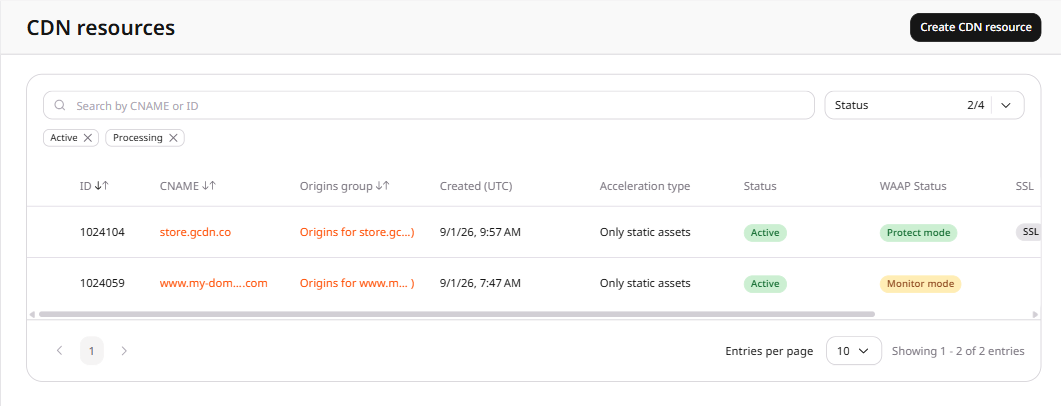
    Navigate to CDN → CDN resources and click the CDN resource to configure.

    CDN resources list showing active resources
  2. 2

    Open request headers

    In the resource settings panel, click HTTP headers to expand the section, then click Request headers.

    HTTP headers section expanded in the left panel with Request headers active
  3. 3

    Enable the option

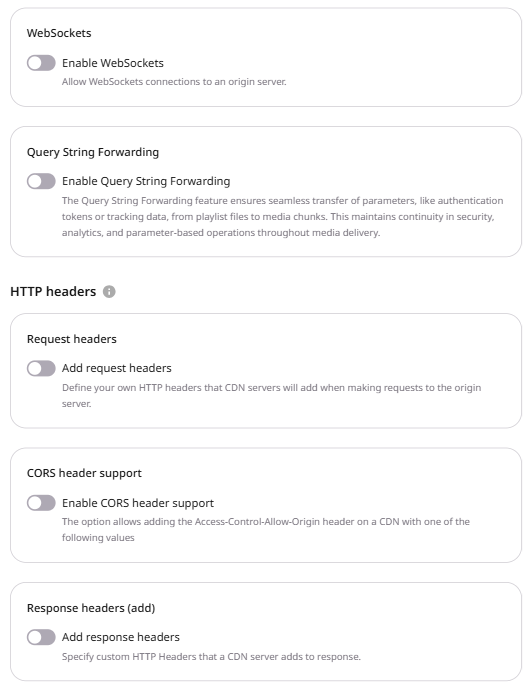
    Enable the Add request headers toggle.

    Resource settings OPTIONS tab showing the HTTP headers section with the Add request headers toggle
  4. 4

    Enter the header

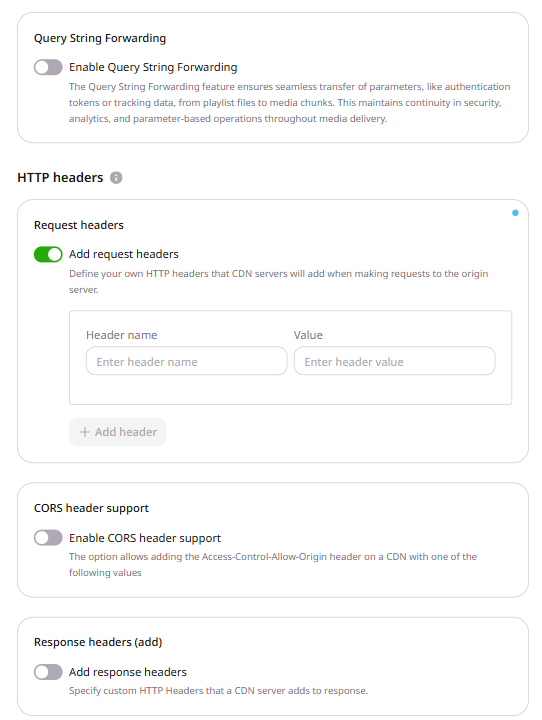
    In the form that appears, enter the name and value for the request header.

    • Header name: Accepts letters (A-Z, a-z), numbers (0-9), dashes (-), and underscores (_).
    • Value: Accepts letters (A-Z, a-z), numbers (0-9), dashes (-), underscores (_), slashes (/), colons (:), equals (=), dots (.), and spaces.
    The Value field accepts spaces between words but cannot begin or end with a space.
    Request headers form with Header name and Value fields and the + Add header button
  5. 5

    Add another header

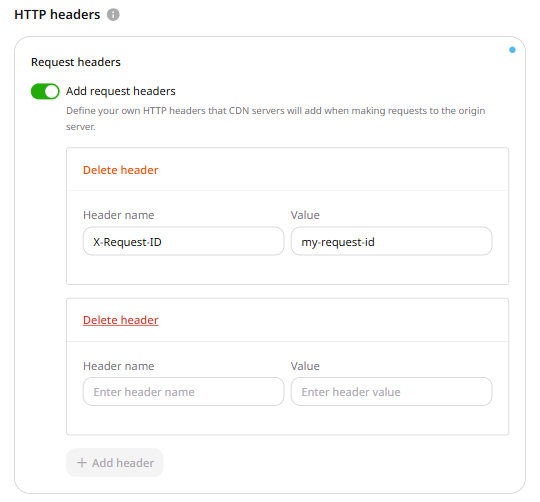
    To add more headers, click + Add header and repeat step 4.

    Multiple request header rows with filled Header name and Value fields
  6. 6

    Save changes

    Click Save changes.

Confirm the header on the origin. Check the origin request logs, or configure the origin to return the received header value. The request from CDN servers includes each saved header name and value.

Add headers to the request Orange's CDN sends to the origin. The viewer request ends at the CDN hostname, so staticRequestHeaders stores the names and values the origin should receive. Orange's CDN adds that map to every origin request.

An API token is required. The CDN resource ID is the id from the resources list call.

export GCORE_API_KEY="{YOUR_API_KEY}"
export CDN_RESOURCE_ID="{YOUR_CDN_RESOURCE_ID}"

Add request headers

Set options.staticRequestHeaders. Both enabled and value are required. A request that omits either field returns HTTP 400. A resource accepts up to 50 headers.

Each header name can contain up to 255 characters: letters, numbers, dashes, and underscores. Each value can contain up to 512 characters. It must start with a letter, number, asterisk (*), or an opening brace. After the first character, the API accepts letters, numbers, spaces, and `~!@#%^&*()-_=+/|\";:?.,><{}[]. The API removes leading and trailing spaces.

import os

from gcore import CDB

client = CDB()
resource_id = int(os.environ["CDN_RESOURCE_ID"])

updated = client.cdn.cdn_resources.update(
    resource_id,
    options={
        "static_request_headers": {
            "enabled": True,
            "value": &#123;
                "X-Custom-Header": "cdn-origin",
                "X-Request-Source": "gcore cdn",
            &#125;,
        }
    },
)
headers = updated.options.static_request_headers
print(headers.enabled, headers.value)
package main

import (
    "context"
    "fmt"
    "os"
    "strconv"

    gcore "github.com/G-Core/gcore-go"
    "github.com/G-Core/gcore-go/cdn"
)

func main() {
    client := gcore.NewClient()
    ctx := context.Background()
    resourceID, err := strconv.ParseInt(os.Getenv("CDN_RESOURCE_ID"), 10, 64)
    if err != nil {
        panic(err)
    }

    updated, err := client.CDN.CDNResources.Update(ctx, resourceID, cdn.CDNResourceUpdateParams{
        Options: cdn.CDNResourceUpdateParamsOptions{
            StaticRequestHeaders: cdn.CDNResourceUpdateParamsOptionsStaticRequestHeaders{
                Enabled: true,
                Value: map[string]string&#123;
                    "X-Custom-Header":  "cdn-origin",
                    "X-Request-Source": "gcore cdn",
                &#125;,
            },
        },
    })
    if err != nil {
        panic(err)
    }
    fmt.Println(updated.Options.StaticRequestHeaders.Enabled, updated.Options.StaticRequestHeaders.Value)
}
curl -X PATCH "https://api.cdb-staging.cdn.orange.com/cdn/resources/$CDN_RESOURCE_ID" \
  -H "Authorization: APIKey $GCORE_API_KEY" \
  -H "Content-Type: application/json" \
  -d '{
    "options": {
      "staticRequestHeaders": {
        "enabled": true,
        "value": &#123;
          "X-Custom-Header": "cdn-origin",
          "X-Request-Source": "gcore cdn"
        &#125;
      }
    }
  }'

The API returns HTTP 200. The saved option is:

{
  "enabled": true,
  "value": &#123;
    "X-Custom-Header": "cdn-origin",
    "X-Request-Source": "gcore cdn"
  &#125;
}

Turn off request headers

Set enabled to false to stop adding headers to origin requests. value is still required. An empty value stores no headers.

import os

from gcore import CDB

client = CDB()
resource_id = int(os.environ["CDN_RESOURCE_ID"])

updated = client.cdn.cdn_resources.update(
    resource_id,
    options={
        "static_request_headers": {
            "enabled": False,
            "value": {},
        }
    },
)
headers = updated.options.static_request_headers
print(headers.enabled, headers.value)
package main

import (
    "context"
    "fmt"
    "os"
    "strconv"

    gcore "github.com/G-Core/gcore-go"
    "github.com/G-Core/gcore-go/cdn"
)

func main() {
    client := gcore.NewClient()
    ctx := context.Background()
    resourceID, err := strconv.ParseInt(os.Getenv("CDN_RESOURCE_ID"), 10, 64)
    if err != nil {
        panic(err)
    }

    updated, err := client.CDN.CDNResources.Update(ctx, resourceID, cdn.CDNResourceUpdateParams{
        Options: cdn.CDNResourceUpdateParamsOptions{
            StaticRequestHeaders: cdn.CDNResourceUpdateParamsOptionsStaticRequestHeaders{
                Enabled: false,
                Value:   map[string]string{},
            },
        },
    })
    if err != nil {
        panic(err)
    }
    fmt.Println(updated.Options.StaticRequestHeaders.Enabled, updated.Options.StaticRequestHeaders.Value)
}
curl -X PATCH "https://api.cdb-staging.cdn.orange.com/cdn/resources/$CDN_RESOURCE_ID" \
  -H "Authorization: APIKey $GCORE_API_KEY" \
  -H "Content-Type: application/json" \
  -d '{
    "options": {
      "staticRequestHeaders": {
        "enabled": false,
        "value": {}
      }
    }
  }'

The API returns HTTP 200:

{
  "enabled": false,
  "value": {}
}

Add headers to the request CDN servers send to the origin with the Terraform provider v2. When static_request_headers is enabled, CDN servers add each name and value on every origin request. A resource accepts up to 50 headers. Run terraform apply after editing options.

Request headers

Set enabled to true. value maps each header name to one header value. X-Request-Source is gcore cdn, with a space between the words. Set enabled to false and value to an empty map to stop adding headers. The empty map stores no headers.
resource "gcore_cdn_origin_group" "example" {
  name = "my-origin-group"

  sources = [
    {
      source  = "example.com"
      enabled = true
    }
  ]
}

resource "gcore_cdn_resource" "example" {
  cname           = "cdn.example.com"
  origin_group    = gcore_cdn_origin_group.example.id
  origin_protocol = "HTTPS"

  options = {
    static_request_headers = {
      enabled = true
      value = {
        "X-Custom-Header"  = "cdn-origin"
        "X-Request-Source" = "gcore cdn"
      }
    }
  }
}