Network limits: set the content delivery speed to end users
A large file can take the whole connection while it downloads. Download speed limit holds each connection to a lower rate. Static mode uses the same rate for every connection, and dynamic mode reads a different rate from each request.
To configure the download speed limit:
1. Navigate to CDN and select the CDN resource to configure.
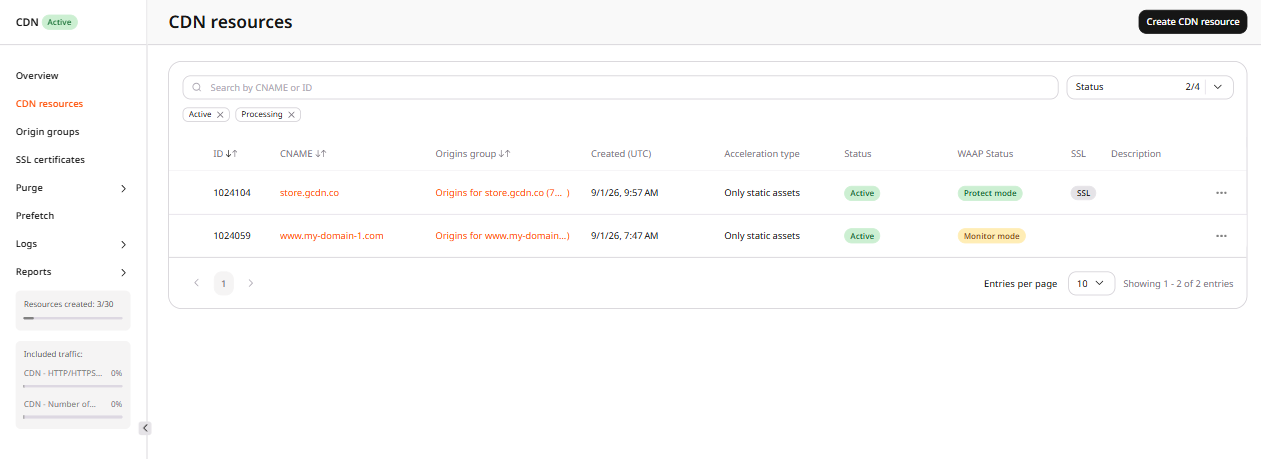
2. In the sidebar, under Network limits, click Download speed limit.
3. Enable the Download speed limit toggle.
The option has two modes: Static and Dynamic.
Static
This mode applies the same limit to every connection on the CDN resource. When this mode is selected, configure the Connection speed and Limit after parameters.
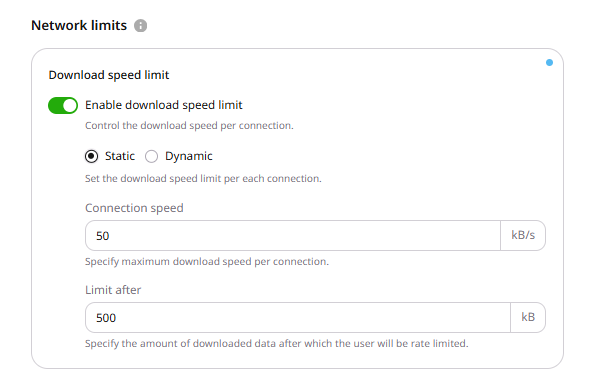
Connection speed
This setting defines the maximum download speed per connection in kilobytes per second (kB/s). The minimum accepted value is 1 kB/s.
Limit after
This setting defines the amount of data that downloads without a speed limit before the Connection speed setting takes effect. If set to 0, the download speed is limited immediately from the first byte.
Dynamic
This mode sets a different download speed on each request. The speed is adjusted based on the speed and buffer query string arguments.
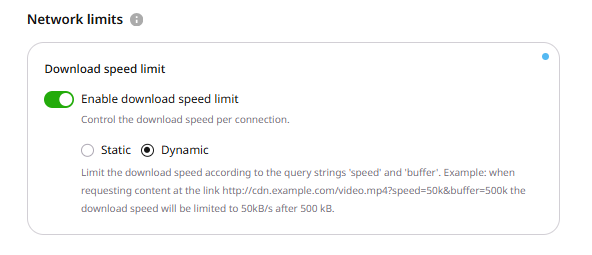
The speed argument sets the maximum download speed, while buffer sets how much data transfers without the speed limit. The buffer argument is optional.
Pass the arguments as query string parameters. This URL limits download speed to 50 kB/s after downloading 500 kB:
http://cdn.example.com/video.mp4?speed=50k&buffer=500k
Click Save changes.
Option features
- For both modes, the limit is set per connection, so if a client opens two connections at the same time, the total speed is twice the specified limit.
- Ignore Query String does not affect the Download speed limit option. They can be used together.
A viewer downloading a large file keeps the full speed of that connection until the file ends. Orange's CDN can hold the connection to one rate for every request, or read a different rate from the request URL.
An API token is required. The CDN resource ID is the id from the resources list call.
export GCORE_API_KEY="{YOUR_API_KEY}"
export CDN_RESOURCE_ID="{YOUR_CDN_RESOURCE_ID}"
Set a static limit
Orange's CDN sends the file at 100 kB/s after the first 200 kB.
enabled, limit_type, and speed are required. The JSON field is limit_bandwidth. speed is at least 1 kB/s and at most 1,000,000,000 kB/s. buffer is the amount of data, in kB, downloaded before that speed applies: 0 starts the limit at the first byte, and omitting buffer stores 0. A value outside that range returns HTTP 400.
import os

from gcore import CDB

client = CDB()
resource_id = int(os.environ["CDN_RESOURCE_ID"])

updated = client.cdn.cdn_resources.update(
    resource_id,
    options={
        "limit_bandwidth": {
            "enabled": True,
            "limit_type": "static",
            "speed": 100,
            "buffer": 200,
        }
    },
)
saved = updated.options.limit_bandwidth
print(saved.enabled, saved.limit_type, saved.speed, saved.buffer)
package main

import (
    "context"
    "fmt"
    "os"
    "strconv"

    gcore "github.com/G-Core/gcore-go"
    "github.com/G-Core/gcore-go/cdn"
)

func main() {
    client := gcore.NewClient()
    ctx := context.Background()
    resourceID, err := strconv.ParseInt(os.Getenv("CDN_RESOURCE_ID"), 10, 64)
    if err != nil {
        panic(err)
    }

    updated, err := client.CDN.CDNResources.Update(ctx, resourceID, cdn.CDNResourceUpdateParams{
        Options: cdn.CDNResourceUpdateParamsOptions{
            LimitBandwidth: cdn.CDNResourceUpdateParamsOptionsLimitBandwidth{
                Enabled:   true,
                LimitType: "static",
                Speed:     gcore.Int(100),
                Buffer:    gcore.Int(200),
            },
        },
    })
    if err != nil {
        panic(err)
    }
    fmt.Println(updated.Options.LimitBandwidth.Enabled, updated.Options.LimitBandwidth.LimitType, updated.Options.LimitBandwidth.Speed, updated.Options.LimitBandwidth.Buffer)
}
curl -X PATCH "https://api.cdb-staging.cdn.orange.com/cdn/resources/$CDN_RESOURCE_ID" \
  -H "Authorization: APIKey $GCORE_API_KEY" \
  -H "Content-Type: application/json" \
  -d '{
    "options": {
      "limit_bandwidth": {
        "enabled": true,
        "limit_type": "static",
        "speed": 100,
        "buffer": 200
      }
    }
  }'
The API returns HTTP 200. The saved option is:
{
  "enabled": true,
  "limit_type": "static",
  "speed": 100,
  "buffer": 200
}
Set a dynamic limit
The request URL sets the speed for that download, and buffer can be left off the URL. This URL delivers the file at 50 kB/s after 500 kB:
http://cdn.example.com/video.mp4?speed=50k&buffer=500k
The API stores only the mode. speed and buffer sent in the request body are not saved. enabled and limit_type are required.
import os

from gcore import CDB

client = CDB()
resource_id = int(os.environ["CDN_RESOURCE_ID"])

updated = client.cdn.cdn_resources.update(
    resource_id,
    options={"limit_bandwidth": {"enabled": True, "limit_type": "dynamic"}},
)
saved = updated.options.limit_bandwidth
print(saved.enabled, saved.limit_type)
package main

import (
    "context"
    "fmt"
    "os"
    "strconv"

    gcore "github.com/G-Core/gcore-go"
    "github.com/G-Core/gcore-go/cdn"
)

func main() {
    client := gcore.NewClient()
    ctx := context.Background()
    resourceID, err := strconv.ParseInt(os.Getenv("CDN_RESOURCE_ID"), 10, 64)
    if err != nil {
        panic(err)
    }

    updated, err := client.CDN.CDNResources.Update(ctx, resourceID, cdn.CDNResourceUpdateParams{
        Options: cdn.CDNResourceUpdateParamsOptions{
            LimitBandwidth: cdn.CDNResourceUpdateParamsOptionsLimitBandwidth{
                Enabled:   true,
                LimitType: "dynamic",
            },
        },
    })
    if err != nil {
        panic(err)
    }
    fmt.Println(updated.Options.LimitBandwidth.Enabled, updated.Options.LimitBandwidth.LimitType)
}
curl -X PATCH "https://api.cdb-staging.cdn.orange.com/cdn/resources/$CDN_RESOURCE_ID" \
  -H "Authorization: APIKey $GCORE_API_KEY" \
  -H "Content-Type: application/json" \
  -d '{
    "options": {
      "limit_bandwidth": {"enabled": true, "limit_type": "dynamic"}
    }
  }'
The API returns HTTP 200. The saved option is:
{
  "enabled": true,
  "limit_type": "dynamic"
}
Turn a static limit off
Orange's CDN keeps the saved speed and buffer and stops limiting downloads.
Send enabled as false with the same limit_type, speed, and buffer. enabled alone returns HTTP 400, and a static limit without speed also returns HTTP 400.
import os

from gcore import CDB

client = CDB()
resource_id = int(os.environ["CDN_RESOURCE_ID"])

updated = client.cdn.cdn_resources.update(
    resource_id,
    options={
        "limit_bandwidth": {
            "enabled": False,
            "limit_type": "static",
            "speed": 100,
            "buffer": 200,
        }
    },
)
saved = updated.options.limit_bandwidth
print(saved.enabled, saved.limit_type, saved.speed, saved.buffer)
package main

import (
    "context"
    "fmt"
    "os"
    "strconv"

    gcore "github.com/G-Core/gcore-go"
    "github.com/G-Core/gcore-go/cdn"
)

func main() {
    client := gcore.NewClient()
    ctx := context.Background()
    resourceID, err := strconv.ParseInt(os.Getenv("CDN_RESOURCE_ID"), 10, 64)
    if err != nil {
        panic(err)
    }

    updated, err := client.CDN.CDNResources.Update(ctx, resourceID, cdn.CDNResourceUpdateParams{
        Options: cdn.CDNResourceUpdateParamsOptions{
            LimitBandwidth: cdn.CDNResourceUpdateParamsOptionsLimitBandwidth{
                Enabled:   false,
                LimitType: "static",
                Speed:     gcore.Int(100),
                Buffer:    gcore.Int(200),
            },
        },
    })
    if err != nil {
        panic(err)
    }
    fmt.Println(updated.Options.LimitBandwidth.Enabled, updated.Options.LimitBandwidth.LimitType, updated.Options.LimitBandwidth.Speed, updated.Options.LimitBandwidth.Buffer)
}
curl -X PATCH "https://api.cdb-staging.cdn.orange.com/cdn/resources/$CDN_RESOURCE_ID" \
  -H "Authorization: APIKey $GCORE_API_KEY" \
  -H "Content-Type: application/json" \
  -d '{
    "options": {
      "limit_bandwidth": {
        "enabled": false,
        "limit_type": "static",
        "speed": 100,
        "buffer": 200
      }
    }
  }'
The API returns HTTP 200. The saved option is:
{
  "enabled": false,
  "limit_type": "static",
  "speed": 100,
  "buffer": 200
}
Turn a dynamic limit off
Orange's CDN keeps the dynamic mode and stops applying the URL limit.
Send enabled as false and limit_type as dynamic. speed and buffer are not part of this request.
import os

from gcore import CDB

client = CDB()
resource_id = int(os.environ["CDN_RESOURCE_ID"])

updated = client.cdn.cdn_resources.update(
    resource_id,
    options={"limit_bandwidth": {"enabled": False, "limit_type": "dynamic"}},
)
saved = updated.options.limit_bandwidth
print(saved.enabled, saved.limit_type)
package main

import (
    "context"
    "fmt"
    "os"
    "strconv"

    gcore "github.com/G-Core/gcore-go"
    "github.com/G-Core/gcore-go/cdn"
)

func main() {
    client := gcore.NewClient()
    ctx := context.Background()
    resourceID, err := strconv.ParseInt(os.Getenv("CDN_RESOURCE_ID"), 10, 64)
    if err != nil {
        panic(err)
    }

    updated, err := client.CDN.CDNResources.Update(ctx, resourceID, cdn.CDNResourceUpdateParams{
        Options: cdn.CDNResourceUpdateParamsOptions{
            LimitBandwidth: cdn.CDNResourceUpdateParamsOptionsLimitBandwidth{
                Enabled:   false,
                LimitType: "dynamic",
            },
        },
    })
    if err != nil {
        panic(err)
    }
    fmt.Println(updated.Options.LimitBandwidth.Enabled, updated.Options.LimitBandwidth.LimitType)
}
curl -X PATCH "https://api.cdb-staging.cdn.orange.com/cdn/resources/$CDN_RESOURCE_ID" \
  -H "Authorization: APIKey $GCORE_API_KEY" \
  -H "Content-Type: application/json" \
  -d '{
    "options": {
      "limit_bandwidth": {"enabled": false, "limit_type": "dynamic"}
    }
  }'
The API returns HTTP 200. The saved option is:
{
  "enabled": false,
  "limit_type": "dynamic"
}
Remove the limit
Send limit_bandwidth as JSON null to remove the option. The next read returns null.
import os

from gcore import CDB

client = CDB()
resource_id = int(os.environ["CDN_RESOURCE_ID"])

updated = client.cdn.cdn_resources.update(
    resource_id,
    options={"limit_bandwidth": None},
)
print(updated.options.limit_bandwidth)
package main

import (
    "context"
    "fmt"
    "os"
    "strconv"

    gcore "github.com/G-Core/gcore-go"
    "github.com/G-Core/gcore-go/cdn"
)

func main() {
    client := gcore.NewClient()
    ctx := context.Background()
    resourceID, err := strconv.ParseInt(os.Getenv("CDN_RESOURCE_ID"), 10, 64)
    if err != nil {
        panic(err)
    }

    options := cdn.CDNResourceUpdateParamsOptions{}
    options.SetExtraFields(map[string]any{
        "limit_bandwidth": nil,
    })
    updated, err := client.CDN.CDNResources.Update(ctx, resourceID, cdn.CDNResourceUpdateParams{
        Options: options,
    })
    if err != nil {
        panic(err)
    }
    fmt.Println(updated.Options.LimitBandwidth.RawJSON())
}
curl -X PATCH "https://api.cdb-staging.cdn.orange.com/cdn/resources/$CDN_RESOURCE_ID" \
  -H "Authorization: APIKey $GCORE_API_KEY" \
  -H "Content-Type: application/json" \
  -d '{
    "options": {
      "limit_bandwidth": null
    }
  }'
The API returns HTTP 200. The saved option is:
null
Download speed limit holds each connection to a lower rate, so a large file cannot occupy the whole connection. Static mode uses the same rate for every connection, and dynamic mode reads a different rate from each request. Two open connections deliver twice that rate. The limit works together with Ignore Query String.
Declare the option with the Terraform provider v2. A new resource without limit_bandwidth has no download speed limit. After the option is saved, keep the object in the configuration. Setting limit_bandwidth to null, or removing the options block, leaves the saved speed, buffer, and mode in place. A REST API call removes the option by sending JSON null.
Set a static limit
Static mode uses one rate for every connection. speed is required and sets that rate in kB/s, from 1 to 1,000,000,000. buffer is the amount of data, in kB, downloaded before the rate applies, and 0 starts the limit at the first byte. An omitted buffer stays unset, so set 0 when the limit should start immediately.
This configuration holds each connection to 100 kB/s after the first 200 kB. Run terraform apply to save it.
resource "gcore_cdn_origin_group" "example" {
  name = "my-origin-group"

  sources = [
    {
      source  = "example.com"
      enabled = true
    }
  ]
}

resource "gcore_cdn_resource" "example" {
  cname           = "cdn.example.com"
  origin_group    = gcore_cdn_origin_group.example.id
  origin_protocol = "HTTPS"

  options = {
    limit_bandwidth = {
      enabled    = true
      limit_type = "static"
      speed      = 100
      buffer     = 200
    }
  }
}
Set a dynamic limit
Dynamic mode reads a different rate from each request. The URL carries speed and buffer as query arguments, and buffer can be absent from the URL. This URL delivers the file at 50 kB/s after 500 kB:
http://cdn.example.com/video.mp4?speed=50k&buffer=500k
Each request takes its rate from the speed and buffer query arguments on the URL. The configuration below sets enabled and limit_type only. The Terraform provider stores speed and buffer when a dynamic object includes them, so those fields stay out of this object. A REST API dynamic limit stores only the mode.
resource "gcore_cdn_origin_group" "example" {
  name = "my-origin-group"

  sources = [
    {
      source  = "example.com"
      enabled = true
    }
  ]
}

resource "gcore_cdn_resource" "example" {
  cname           = "cdn.example.com"
  origin_group    = gcore_cdn_origin_group.example.id
  origin_protocol = "HTTPS"

  options = {
    limit_bandwidth = {
      enabled    = true
      limit_type = "dynamic"
    }
  }
}
Turn a static limit off
The CDN stops limiting downloads, and the saved speed and buffer stay on the resource. Set enabled to false, keep the same limit_type, speed, and buffer, and run terraform apply.
resource "gcore_cdn_origin_group" "example" {
  name = "my-origin-group"

  sources = [
    {
      source  = "example.com"
      enabled = true
    }
  ]
}

resource "gcore_cdn_resource" "example" {
  cname           = "cdn.example.com"
  origin_group    = gcore_cdn_origin_group.example.id
  origin_protocol = "HTTPS"

  options = {
    limit_bandwidth = {
      enabled    = false
      limit_type = "static"
      speed      = 100
      buffer     = 200
    }
  }
}
Turn a dynamic limit off
The URL limit stops, and the resource stays in dynamic mode. Set enabled to false and limit_type to dynamic, and leave speed and buffer out of the object.
resource "gcore_cdn_origin_group" "example" {
  name = "my-origin-group"

  sources = [
    {
      source  = "example.com"
      enabled = true
    }
  ]
}

resource "gcore_cdn_resource" "example" {
  cname           = "cdn.example.com"
  origin_group    = gcore_cdn_origin_group.example.id
  origin_protocol = "HTTPS"

  options = {
    limit_bandwidth = {
      enabled    = false
      limit_type = "dynamic"
    }
  }
}