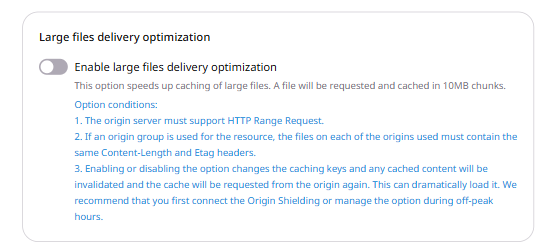
Optimize large file delivery

Large File Delivery Optimization is designed for CDN resources that serve files larger than 10 MB. When enabled, Orange's CDN requests content from the origin in 10 MB chunks using HTTP range requests, caches each chunk independently, and assembles the response from the cached portions.

A range request includes the Range HTTP header to indicate the byte or part of the content to be returned. If the request has a Range: bytes=123537047-123545047 header, the CDN requests a 10 MB chunk (10,485,760 bytes, range 115343360-125829119) from the origin, caches this chunk, and serves the requested range (123537047-123545047) to the end user.

For this option to work, the origin server must support range requests.

Configuration guidelines

Large File Delivery Optimization is set in Resource settings in the steps below. A rule can apply it to one path. Review these requirements and recommendations before configuring the option:

  • The origin server must support HTTP Range Requests.
  • The Content-Length and Etag headers must be consistent across the origin.
  • When enabled in Resource settings, the option applies to all content in the CDN resource, which can increase the load on the origin. Consider activating Origin Shielding before enabling this feature, or enable it during off-peak hours.
  • Remember to purge the cache after enabling Large File Delivery Optimization.
  • Large File Delivery Optimization cannot be used in conjunction with Fetch Compressed, Gzip Compression, and Brotli Compression within the Resource Settings or within the same rule.
  • Large File Delivery Optimization is generally unnecessary for HLS and MPEG-DASH because these formats already split media into small segments that are cached independently.

Configuration steps

To enable Large File Delivery Optimization via the CDB Technical Web Portal:

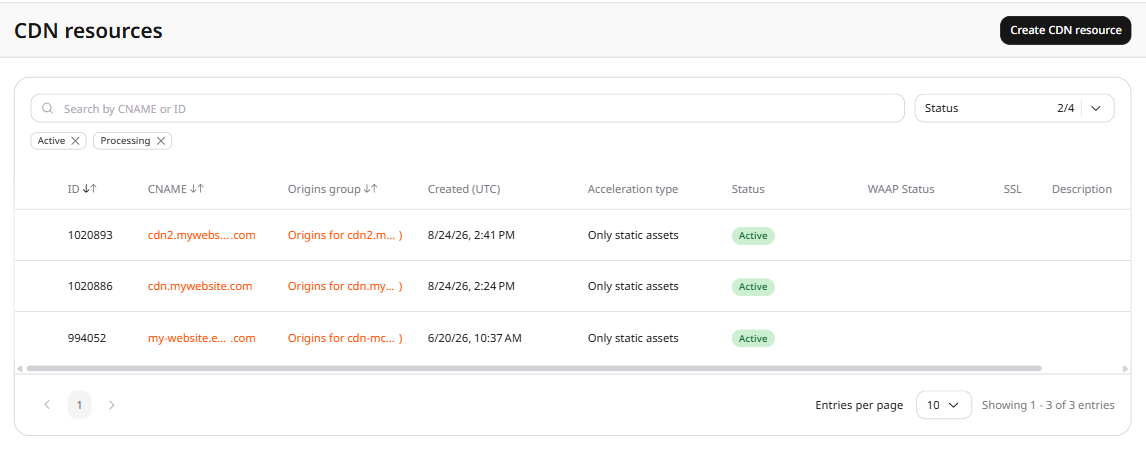
1. In the CDB Technical Web Portal, navigate to CDN > CDN resources.

2. Click the CNAME of the required CDN resource to open Resource settings.

CDN resources list

3. Navigate to the OPTIONS tab.

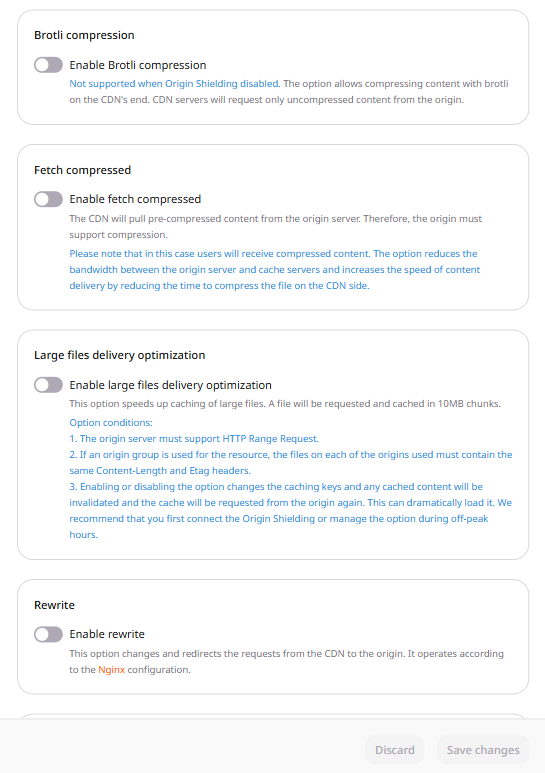
4. In the left menu, click Content to scroll to the Content section.

Resource settings with Content section

5. Enable the Large files delivery optimization toggle.

Large files delivery optimization toggle

6. Click Save changes.

When Large files delivery optimization is enabled, the HTTP Etag header is concealed in responses.

A file larger than 10 MB keeps the origin busy when Orange's CDN fetches it in one piece. Slice fetches that file in parts no larger than 10 MB, caches each part, and sends the viewer the first bytes without waiting for the whole file. The origin must support HTTP range requests and send a consistent Content-Length and Etag. Responses conceal the HTTP Etag header. Purge the cache after turning slice on.

An API token is required. The CDN resource ID is the id from the resources list call.

export GCORE_API_KEY="{YOUR_API_KEY}"
export CDN_RESOURCE_ID="{YOUR_CDN_RESOURCE_ID}"

Turn slice on

Orange's CDN requests each large file from the origin in parts of up to 10 MB. The origin must accept HTTP range requests.

enabled and value are required. Setting both to true turns slice on. The JSON field is slice; the key Slice is ignored. A request that also enables gzipOn, brotli_compression, or fetch_compressed returns HTTP 400.

import os

from gcore import CDB

client = CDB()
resource_id = int(os.environ["CDN_RESOURCE_ID"])

updated = client.cdn.cdn_resources.update(
    resource_id,
    options={"slice": {"enabled": True, "value": True}},
)
saved = updated.options.slice
print(saved.enabled, saved.value)
package main

import (
    "context"
    "fmt"
    "os"
    "strconv"

    gcore "github.com/G-Core/gcore-go"
    "github.com/G-Core/gcore-go/cdn"
)

func main() {
    client := gcore.NewClient()
    ctx := context.Background()
    resourceID, err := strconv.ParseInt(os.Getenv("CDN_RESOURCE_ID"), 10, 64)
    if err != nil {
        panic(err)
    }

    updated, err := client.CDN.CDNResources.Update(ctx, resourceID, cdn.CDNResourceUpdateParams{
        Options: cdn.CDNResourceUpdateParamsOptions{
            Slice: cdn.CDNResourceUpdateParamsOptionsSlice{
                Enabled: true,
                Value:   true,
            },
        },
    })
    if err != nil {
        panic(err)
    }
    fmt.Println(updated.Options.Slice.Enabled, updated.Options.Slice.Value)
}
curl -X PATCH "https://api.cdb-staging.cdn.orange.com/cdn/resources/$CDN_RESOURCE_ID" \
  -H "Authorization: APIKey $GCORE_API_KEY" \
  -H "Content-Type: application/json" \
  -d '{
    "options": {
      "slice": {"enabled": true, "value": true}
    }
  }'

The API returns HTTP 200. The saved option is:

{
  "enabled": true,
  "value": true
}

Turn slice off

Orange's CDN keeps value and stops fetching the file in parts.

Send enabled as false and the same value. enabled alone, or value alone, returns HTTP 400.

import os

from gcore import CDB

client = CDB()
resource_id = int(os.environ["CDN_RESOURCE_ID"])

updated = client.cdn.cdn_resources.update(
    resource_id,
    options={"slice": {"enabled": False, "value": True}},
)
saved = updated.options.slice
print(saved.enabled, saved.value)
package main

import (
    "context"
    "fmt"
    "os"
    "strconv"

    gcore "github.com/G-Core/gcore-go"
    "github.com/G-Core/gcore-go/cdn"
)

func main() {
    client := gcore.NewClient()
    ctx := context.Background()
    resourceID, err := strconv.ParseInt(os.Getenv("CDN_RESOURCE_ID"), 10, 64)
    if err != nil {
        panic(err)
    }

    updated, err := client.CDN.CDNResources.Update(ctx, resourceID, cdn.CDNResourceUpdateParams{
        Options: cdn.CDNResourceUpdateParamsOptions{
            Slice: cdn.CDNResourceUpdateParamsOptionsSlice{
                Enabled: false,
                Value:   true,
            },
        },
    })
    if err != nil {
        panic(err)
    }
    fmt.Println(updated.Options.Slice.Enabled, updated.Options.Slice.Value)
}
curl -X PATCH "https://api.cdb-staging.cdn.orange.com/cdn/resources/$CDN_RESOURCE_ID" \
  -H "Authorization: APIKey $GCORE_API_KEY" \
  -H "Content-Type: application/json" \
  -d '{
    "options": {
      "slice": {"enabled": false, "value": true}
    }
  }'

The API returns HTTP 200. The saved option is:

{
  "enabled": false,
  "value": true
}

Remove slice

Send slice as JSON null to remove the option. The next read returns null.

import os

from gcore import CDB

client = CDB()
resource_id = int(os.environ["CDN_RESOURCE_ID"])

updated = client.cdn.cdn_resources.update(
    resource_id,
    options={"slice": None},
)
print(updated.options.slice)
package main

import (
    "context"
    "fmt"
    "os"
    "strconv"

    gcore "github.com/G-Core/gcore-go"
    "github.com/G-Core/gcore-go/cdn"
)

func main() {
    client := gcore.NewClient()
    ctx := context.Background()
    resourceID, err := strconv.ParseInt(os.Getenv("CDN_RESOURCE_ID"), 10, 64)
    if err != nil {
        panic(err)
    }

    options := cdn.CDNResourceUpdateParamsOptions{}
    options.SetExtraFields(map[string]any{
        "slice": nil,
    })
    updated, err := client.CDN.CDNResources.Update(ctx, resourceID, cdn.CDNResourceUpdateParams{
        Options: options,
    })
    if err != nil {
        panic(err)
    }
    fmt.Println(updated.Options.Slice.RawJSON())
}
curl -X PATCH "https://api.cdb-staging.cdn.orange.com/cdn/resources/$CDN_RESOURCE_ID" \
  -H "Authorization: APIKey $GCORE_API_KEY" \
  -H "Content-Type: application/json" \
  -d '{
    "options": {
      "slice": null
    }
  }'

The API returns HTTP 200. The saved option is:

null

Slice one path

A resource rule fetches files under /video/ in parts. ruleType 0 is a regular expression and must start with ^/ or /.

import os

from gcore import CDB

client = CDB()
resource_id = int(os.environ["CDN_RESOURCE_ID"])

rule = client.cdn.cdn_resources.rules.create(
    resource_id,
    name="slice-large",
    rule="^/video/.*",
    rule_type=0,
    options={"slice": {"enabled": True, "value": True}},
)
print(rule.id, rule.options.slice.enabled, rule.options.slice.value)
package main

import (
    "context"
    "fmt"
    "os"
    "strconv"

    gcore "github.com/G-Core/gcore-go"
    "github.com/G-Core/gcore-go/cdn"
)

func main() {
    client := gcore.NewClient()
    ctx := context.Background()
    resourceID, err := strconv.ParseInt(os.Getenv("CDN_RESOURCE_ID"), 10, 64)
    if err != nil {
        panic(err)
    }

    rule, err := client.CDN.CDNResources.Rules.New(ctx, resourceID, cdn.CDNResourceRuleNewParams{
        Name:     "slice-large",
        Rule:     "^/video/.*",
        RuleType: 0,
        Options: cdn.CDNResourceRuleNewParamsOptions{
            Slice: cdn.CDNResourceRuleNewParamsOptionsSlice{
                Enabled: true,
                Value:   true,
            },
        },
    })
    if err != nil {
        panic(err)
    }
    fmt.Println(rule.ID, rule.Options.Slice.Enabled, rule.Options.Slice.Value)
}
curl -X POST "https://api.cdb-staging.cdn.orange.com/cdn/resources/$CDN_RESOURCE_ID/rules" \
  -H "Authorization: APIKey $GCORE_API_KEY" \
  -H "Content-Type: application/json" \
  -d '{
    "name": "slice-large",
    "rule": "^/video/.*",
    "ruleType": 0,
    "options": {
      "slice": {"enabled": true, "value": true}
    }
  }'

The API returns HTTP 201. The saved option is:

{
  "enabled": true,
  "value": true
}

Large files delivery optimization fetches a file larger than 10 MB from the origin in parts no larger than 10 MB, caches each part, and returns the requested bytes without waiting for the whole file. The origin must support HTTP range requests and send a consistent Content-Length and Etag. Responses conceal the HTTP Etag header. Purge the cache after turning slice on. Declare the option with the Terraform provider v2.

A new resource without slice leaves the option unset. After the option is saved, keep the object in the configuration. Setting slice to null, or removing the options block, leaves the saved enabled and value in place. A REST API call removes the option by sending JSON null.

Slice cannot be enabled in the same configuration as gzip, Brotli, or fetch compressed. Each pairing returns HTTP 400, and the error names those two options.

Turn slice on

Set enabled and value to true. Both fields are required. After terraform apply, Orange's CDN fetches files larger than 10 MB in parts no larger than 10 MB and caches each part. On the resource, the option applies to every file.
resource "gcore_cdn_origin_group" "example" {
  name = "my-origin-group"

  sources = [
    {
      source  = "example.com"
      enabled = true
    }
  ]
}

resource "gcore_cdn_resource" "example" {
  cname           = "cdn.example.com"
  origin_group    = gcore_cdn_origin_group.example.id
  origin_protocol = "HTTPS"

  options = {
    slice = {
      enabled = true
      value   = true
    }
  }
}

Turn slice off

The CDN keeps value and stops fetching files in parts. Set enabled to false, keep value as true, and run terraform apply.

resource "gcore_cdn_origin_group" "example" {
  name = "my-origin-group"

  sources = [
    {
      source  = "example.com"
      enabled = true
    }
  ]
}

resource "gcore_cdn_resource" "example" {
  cname           = "cdn.example.com"
  origin_group    = gcore_cdn_origin_group.example.id
  origin_protocol = "HTTPS"

  options = {
    slice = {
      enabled = false
      value   = true
    }
  }
}

Slice one path

A rule fetches files under /video/ in parts while the resource keeps slicing turned off. rule_type 0 matches a regular expression.

resource "gcore_cdn_origin_group" "example" {
  name = "my-origin-group"

  sources = [
    {
      source  = "example.com"
      enabled = true
    }
  ]
}

resource "gcore_cdn_resource" "example" {
  cname           = "cdn.example.com"
  origin_group    = gcore_cdn_origin_group.example.id
  origin_protocol = "HTTPS"

  options = {
    slice = {
      enabled = false
      value   = true
    }
  }
}

resource "gcore_cdn_resource_rule" "example" {
  resource_id = gcore_cdn_resource.example.id
  name        = "slice-large"
  rule        = "^/video/.*"
  rule_type   = 0

  options = {
    slice = {
      enabled = true
      value   = true
    }
  }
}