A template is a preset rule for CDN resources — it contains all necessary settings: file paths, an origin pull protocol, and enabled and disabled options. A template pre-fills those settings when a rule is created.
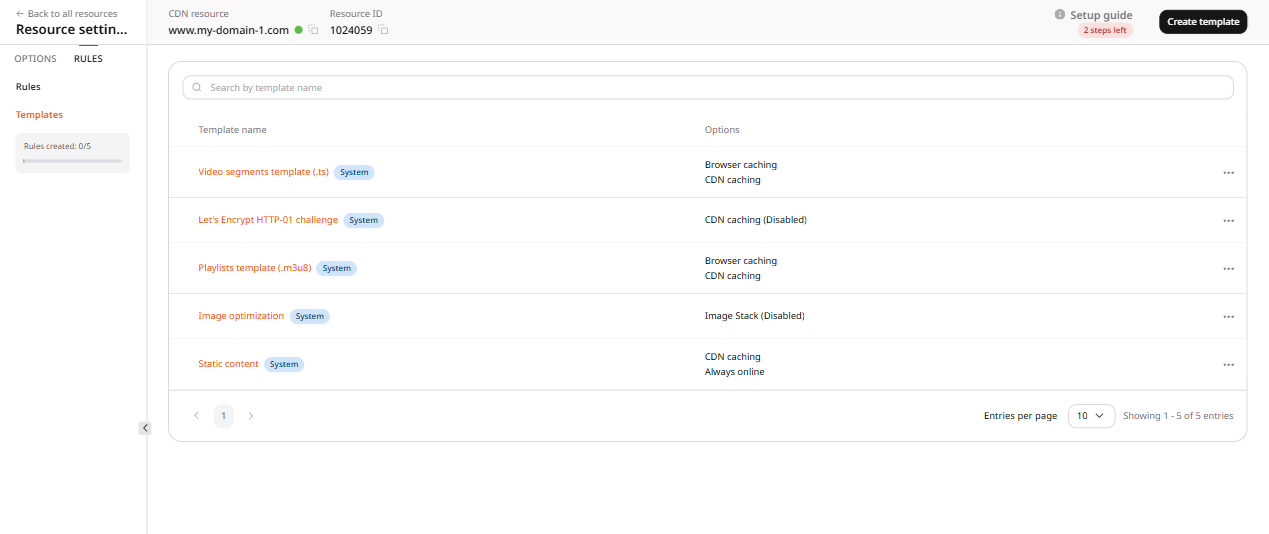
CDB provides built-in templates called System, while custom templates store a path and options for one account.
Custom template
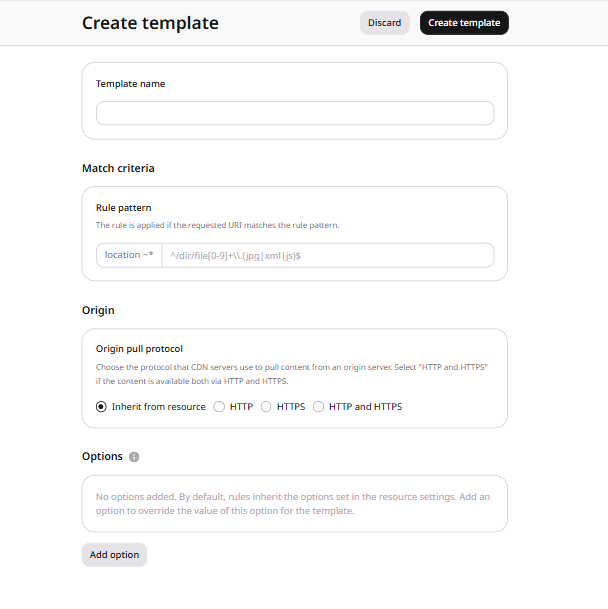
Set the file path, origin pull protocol, and any option overrides that the template should store.
1
Open the template form
In the CDB Customer Portal, open the CDN resource settings. On the Rules tab, open the Templates section and click Create template.
2
Set the template fields
Complete the form:
Specify the template name. Templates can be searched by name after creation.
Specify the path to the file or folder. The path must start with ^/ or / and can be a regular expression.
Select the protocol the CDN uses to pull those files. If the files are available over the same protocol configured for the origin, select Inherit from resource. Otherwise select HTTP, HTTPS, or both protocols.
(Optional) Set any option overrides the template should store.
3
Create the template
Click Create template.
System templates
System templates are built-in presets covering common CDN use cases. They are labeled System in the Templates section.
Video segments template (.ts) is a rule template for caching chunks (streaming via CDN).
Playlists template (.m3u8) is a rule template for caching playlists.
Let's Encrypt HTTP-01 challenge validates a certificate issued with the HTTP-01 challenge outside the Customer Portal. Create the CDN resource and a rule from this template before requesting the certificate, because the resource settings block validation until that rule exists.
Static content is a rule template for caching static files of the resources integrated with the DNS.
Image optimization applies Image Stack, a paid add-on, to matching image files. Turn it on from the resource options before adding the template, and narrow the file path when only some files should match.
Rule from a template
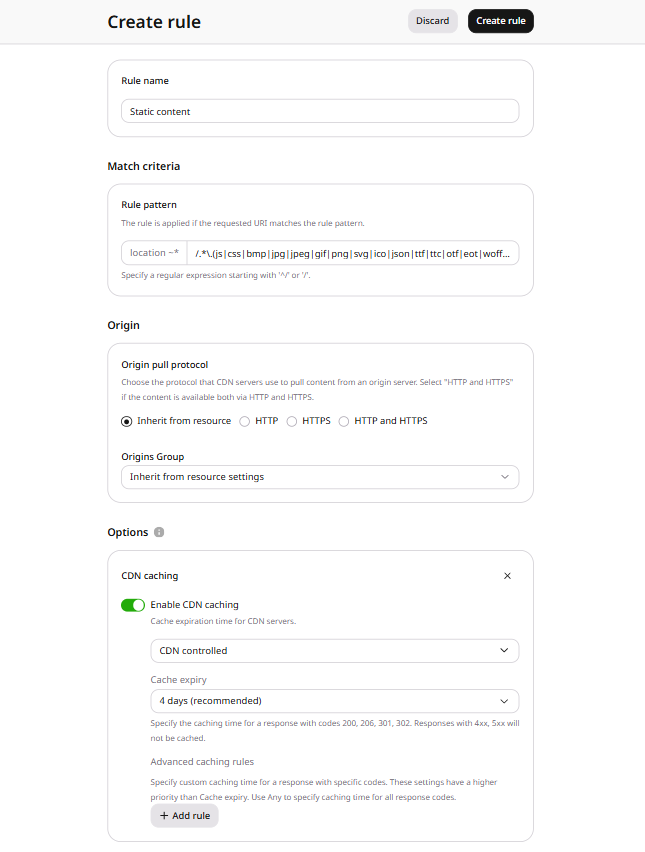
A template pre-fills the rule form, so only the final adjustments remain before saving.
1
Select a template
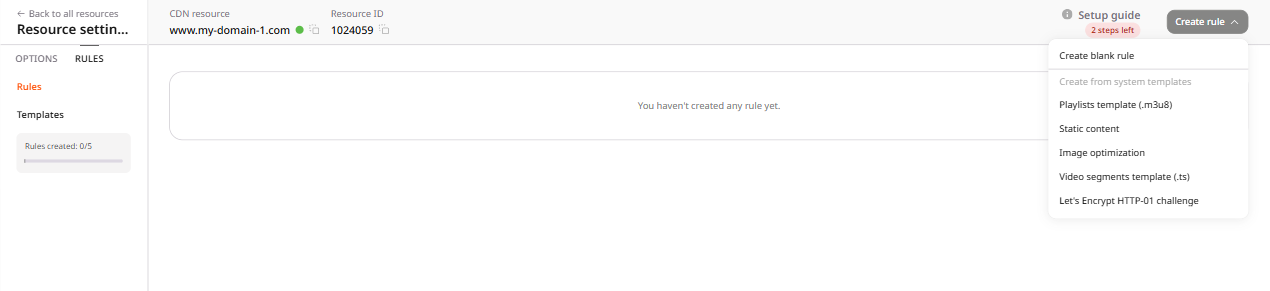
Open the CDN resource settings. On the Rules tab, click Create rule and select a template.
2
Confirm the pre-filled settings
The form opens with settings from the template. Review them and edit them when the saved path or options should differ.
3
Create the rule
Click Create rule.
Store a path and option overrides as a custom template, or create a CDN resource rule from the settings of a system template. Find the resource ID in list CDN resources.
ℹ️
An API token is required, along with the ID of the CDN resource that receives the rule.
Match files with rule, as a path or a regular expression. For ruleType0, start that pattern with ^/ or /.
Set overrideOriginProtocol to HTTP or HTTPS to pull over that protocol, or to MATCH when the origin serves the files over both. Leave the field out to keep the protocol already set on the resource.
A custom template belongs to one account, while a system template is shared. default is true on a system template, and changing or deleting it fails with HTTP 403.
{"message": "You do not have permission to perform this action."}
from gcore import CDB

client = CDB()

for template in client.cdn.rule_templates.list(limit=100):
    print(template.id, template.name, template.default, template.rule, template.weight)
Read the template, then use its rule, ruleType, and configured options to create the rule. If overrideOriginProtocol is empty, leave it out and the rule keeps the resource protocol.
Skip weight. Playlist and video templates store 0, but a rule needs 1 or higher, so leaving the field out gives the rule weight 1.
{"errors": {"weight": ["Ensure this value is greater than or equal to 1."]}}
A custom rule template stores a path and cache options. A CDN rule created from the playlist system template applies that template to .m3u8 files with the Terraform provider v2.
Create a custom template
Store the path, the origin pull protocol, and the CDN cache lifetime on the template. Set weight to 1. Leaving weight unset makes the next plan clear the value the API stored.
After terraform apply, the account has a custom template named static-images. default is false. The template stores the path /images/*.png, origin pull over HTTPS, and a CDN cache lifetime of 4d.
Create a rule from a system template
Read the templates and select Playlists template (.m3u8). Copy its path and cache options onto the rule. The template stores weight 0. Set the rule weight to 1 and active to true. Leaving weight or active unset makes the next plan change the rule. Plan can warn that deprecated option fields on other templates in the list were read. The playlist rule is still created.
After terraform apply, requests for .m3u8 files match /.*\.m3u8$. Browser caching uses the value 0, and CDN caching uses 2s.
Delete the template and the rule
Run terraform destroy to delete the resources that configuration declares. With only the custom template block, destroy deletes that template. With the playlist rule block, destroy also deletes the CDN resource and the origin group.