
Block crawling of a CDN domain

When the same website content is available through both the origin domain and a CDN custom domain, web crawlers can discover and index both URLs. Block crawling on the CDN domain with a dedicated robots.txt response so that compliant crawlers do not crawl that domain.

Create a CDN rule that matches /robots.txt and returns a Disallow: / directive. The rule changes only that response, so other CDN URLs keep serving their configured content while compliant crawlers do not crawl them.

CDN domain crawling

Open the resource and set the path, the status code, and the disallow body.

  1. 1

    Open the CDN resource

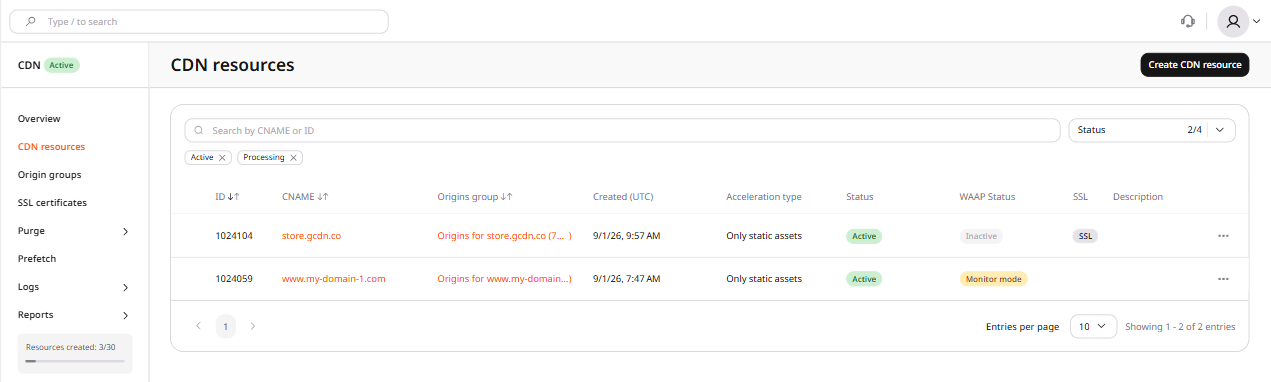
    In the CDB Customer Portal, navigate to CDN → CDN resources and click the CNAME of the resource.

    CDN resources list with CNAME links
  2. 2

    Start a blank rule

    1. Navigate to the RULES tab.
    2. Click Create rule.
    3. Select Create blank rule.
  3. 3

    Set the name and path

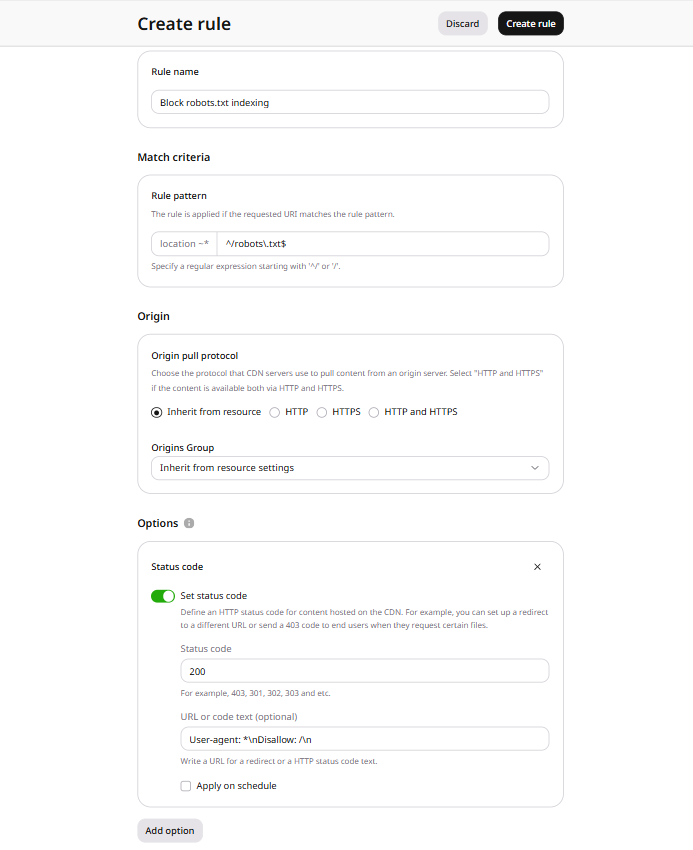
    1. In the Rule name field, enter Block CDN crawling.
    2. In the Rule pattern field, enter ^/robots\.txt$.
  4. 4

    Return the disallow text

    1. Click Add option.
    2. Under Content, click Add next to Status code, then close the panel.
    3. In the Status code section, enable the Set status code option.
    4. In the Status code field, enter 200.
    5. In the URL or code text (optional) field, enter:
    User-agent: *\nDisallow: /\n
    
    1. Click Create rule.
    Create rule form with Status code section configured: status 200 and robots.txt disallow directive

The origin website keeps serving its own files and its own robots.txt. Crawlers that request the origin domain follow that file, while the CDN rule applies only when the request uses the CDN custom domain.

Check the robots.txt response

Request /robots.txt on the CDN domain after the rule is in place. The response status is 200, and the body contains the disallow directive. The origin domain still serves its own robots.txt.
curl -i "http://<cdn-domain>/robots.txt"
User-agent: *
Disallow: /

Create a CDN rule for /robots.txt that returns a disallow directive. The exact ^/robots\.txt$ match limits the override to that path, so other responses stay as configured on the resource.

An API token is required, along with a CDN resource ID from list CDN resources.

export GCORE_API_KEY="{YOUR_API_KEY}"
export CDN_RESOURCE_ID="{YOUR_RESOURCE_ID}"

Robots.txt rule

Send rule ^/robots\.txt$ and ruleType 0. Set options.force_return to status 200 and body User-agent: *\nDisallow: /\n, and leave time_interval out of the request.

import os

from gcore import CDB

client = CDB()
resource_id = int(os.environ["CDN_RESOURCE_ID"])

rule = client.cdn.cdn_resources.rules.create(
    resource_id,
    name="Block CDN crawling",
    rule=r"^/robots\.txt$",
    rule_type=0,
    options={
        "force_return": &#123;
            "enabled": True,
            "code": 200,
            "body": "User-agent: *\\nDisallow: /\\n",
        &#125;,
    },
)
print(rule.id, rule.rule, rule.options.force_return.body)
package main

import (
    "context"
    "fmt"
    "os"
    "strconv"

    gcore "github.com/G-Core/gcore-go"
    "github.com/G-Core/gcore-go/cdn"
)

func main() {
    client := gcore.NewClient()
    ctx := context.Background()
    resourceID, err := strconv.ParseInt(os.Getenv("CDN_RESOURCE_ID"), 10, 64)
    if err != nil {
        panic(err)
    }

    rule, err := client.CDN.CDNResources.Rules.New(ctx, resourceID, cdn.CDNResourceRuleNewParams{
        Name:     "Block CDN crawling",
        Rule:     `^/robots\.txt$`,
        RuleType: 0,
        Options: cdn.CDNResourceRuleNewParamsOptions{
            ForceReturn: cdn.CDNResourceRuleNewParamsOptionsForceReturn{
                Enabled: true,
                Code:    200,
                Body:    "User-agent: *\\nDisallow: /\\n",
            },
        },
    })
    if err != nil {
        panic(err)
    }
    fmt.Println(rule.ID, rule.Rule, rule.Options.ForceReturn.Body)
}
curl -X POST "https://api.cdb-staging.cdn.orange.com/cdn/resources/$CDN_RESOURCE_ID/rules" \
  -H "Authorization: APIKey $GCORE_API_KEY" \
  -H "Content-Type: application/json" \
  -d '{
    "name": "Block CDN crawling",
    "rule": "^/robots\\.txt$",
    "ruleType": 0,
    "options": {
      "force_return": &#123;
        "enabled": true,
        "code": 200,
        "body": "User-agent: *\\nDisallow: /\\n"
      &#125;
    }
  }'

The API returns HTTP 201:

{
  "id": 10001,
  "name": "Block CDN crawling",
  "rule": "^/robots\\.txt$",
  "ruleType": 0,
  "active": true,
  "options": {
    "force_return": &#123;
      "enabled": true,
      "code": 200,
      "body": "User-agent: *\\nDisallow: /\\n",
      "time_interval": null
    &#125;
  }
}

Check the robots.txt response

Request /robots.txt on the CDN domain after the rule is in place. The response status is 200, and the body contains the disallow directive. The origin domain still serves its own robots.txt.

curl -i "http://<cdn-domain>/robots.txt"
User-agent: *
Disallow: /

Declare a CDN rule for /robots.txt with the Terraform provider v2. A request for that path on the CDN domain returns status 200 and Disallow: /, so compliant crawlers skip the CDN domain while the origin keeps its own robots.txt.

Block CDN crawling

The pattern ^/robots\.txt$ matches only /robots.txt on the CDN resource already declared in the configuration, so other CDN URLs keep the resource configuration.

resource "gcore_cdn_resource_rule" "robots" {
  resource_id = gcore_cdn_resource.example.id
  name        = "Block CDN crawling"
  rule        = "^/robots\\.txt$"
  rule_type   = 0
  active      = true

  options = {
    force_return = {
      enabled = true
      code    = 200
      body    = "User-agent: *\\nDisallow: /\\n"
    }
  }
}

Delete the rule

Remove the rule block so the next terraform apply deletes the rule and leaves the CDN resource in place. /robots.txt then follows the resource configuration.

# Remove or comment out this block:
# resource "gcore_cdn_resource_rule" "robots" {
#   resource_id = gcore_cdn_resource.example.id
#   name        = "Block CDN crawling"
#   rule        = "^/robots\\.txt$"
#   rule_type   = 0
#   active      = true
#
#   options = {
#     force_return = {
#       enabled = true
#       code    = 200
#       body    = "User-agent: *\\nDisallow: /\\n"
#     }
#   }
# }
terraform apply

Check the robots.txt response

Request /robots.txt on the CDN domain after the rule is in place. The response status is 200, and the body contains the disallow directive. The origin domain still serves its own robots.txt.

curl -i "http://<cdn-domain>/robots.txt"
User-agent: *
Disallow: /