Customer Portal REST API Terraform
The Change TLS versions option controls which TLS protocol versions end users can use when connecting to a CDN resource over HTTPS. By default, it is disabled, so SSLv3, TLSv1, TLSv1.1, TLSv1.2, and TLSv1.3 are all allowed.
When it is enabled, only the listed versions are accepted, so clients that use any other version are rejected.
TLSv1.2 and TLSv1.3 are the recommended versions, while SSLv3, TLSv1, and TLSv1.1 are deprecated and insecure.
Allowed TLS versions Set the allowed versions on the CDN resource.
1
2
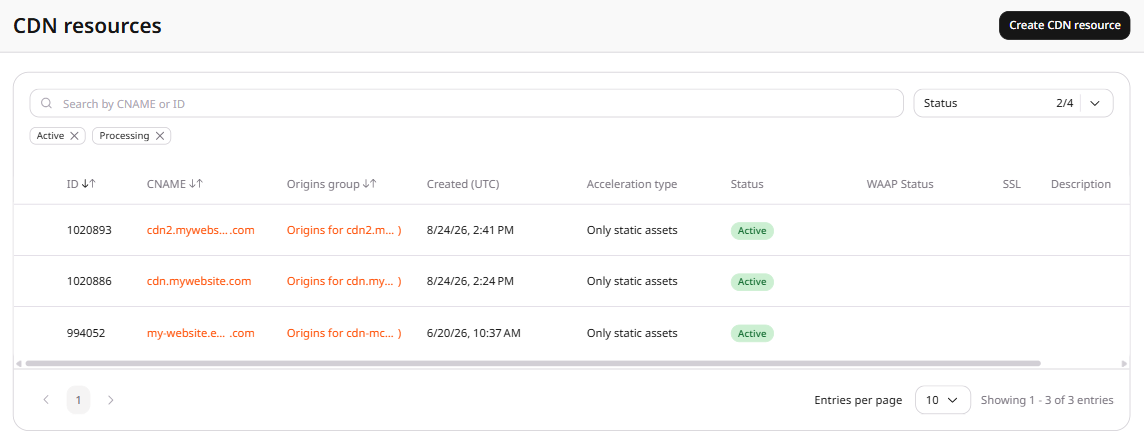
Open resource settings Click the CNAME of the resource to open its settings.
3
Open TLS versions Open the OPTIONS tab and scroll to the Access section. Click TLS versions in the left sidebar.
4
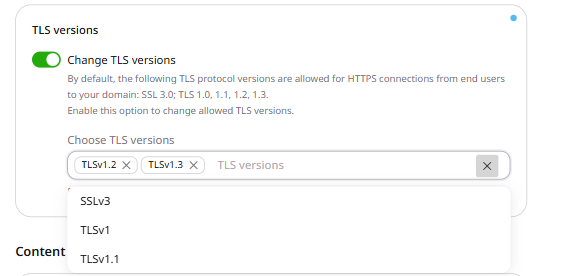
Enable TLS versions Turn on the Change TLS versions toggle. The Choose TLS versions field appears, pre-populated with TLSv1.2 and TLSv1.3.
5
Select protocol versions Add or remove protocol versions. To add a version, click the field and select it from the dropdown. To remove a version, click × next to it.
6
When tls_versions is enabled, HTTPS clients can use only the versions in value, so any other version is rejected.
When enabled is false, clients can use any of the five versions.
Export these variables. CDN_RESOURCE_ID is the id from list CDN resources .
export GCORE_API_KEY="{YOUR_API_KEY}"
export CDN_RESOURCE_ID="{YOUR_RESOURCE_ID}"
TLS versions value accepts the case-sensitive names SSLv3, TLSv1, TLSv1.1, TLSv1.2, and TLSv1.3.
TLSv1.2 and TLSv1.3 are the recommended versions, while SSLv3, TLSv1, and TLSv1.1 are older versions.
Both enabled and value are required, so an empty value while enabled is true returns HTTP 400.
Send tls_versions with enabled true and value set to TLSv1.2 and TLSv1.3.
Python SDK Go SDK curl
import os

from gcore import CDB

client = CDB()
resource_id = int(os.environ["CDN_RESOURCE_ID"])

resource = client.cdn.cdn_resources.update(
    resource_id,
    options={
        "tls_versions": {"enabled": True, "value": ["TLSv1.2", "TLSv1.3"]},
    },
)
print(resource.options.tls_versions.enabled, resource.options.tls_versions.value)
package main

import (
    "context"
    "fmt"
    "os"
    "strconv"

    gcore "github.com/G-Core/gcore-go"
    "github.com/G-Core/gcore-go/cdn"
)

func main() {
    client := gcore.NewClient()
    ctx := context.Background()
    resourceID, err := strconv.ParseInt(os.Getenv("CDN_RESOURCE_ID"), 10, 64)
    if err != nil {
        panic(err)
    }

    resource, err := client.CDN.CDNResources.Update(ctx, resourceID, cdn.CDNResourceUpdateParams{
        Options: cdn.CDNResourceUpdateParamsOptions{
            TlsVersions: cdn.CDNResourceUpdateParamsOptionsTlsVersions{
                Enabled: true,
                Value:   []string{"TLSv1.2", "TLSv1.3"},
            },
        },
    })
    if err != nil {
        panic(err)
    }
    fmt.Println(resource.Options.TlsVersions.Enabled, resource.Options.TlsVersions.Value)
}
curl -X PATCH "https://api.cdb-staging.cdn.orange.com/cdn/resources/$CDN_RESOURCE_ID" \
  -H "Authorization: APIKey $GCORE_API_KEY" \
  -H "Content-Type: application/json" \
  -d '{
    "options": {
      "tls_versions": {
        "enabled": true,
        "value": ["TLSv1.2", "TLSv1.3"]
      }
    }
  }'
The API returns HTTP 200:
{
  "id": 12345,
  "options": {
    "tls_versions": {
      "enabled": true,
      "value": ["TLSv1.2", "TLSv1.3"]
    }
  }
}
Limit HTTPS clients to TLSv1.2 and TLSv1.3 with the Terraform provider v2. When tls_versions is enabled, clients can use only the versions in value, so any other version is rejected. When enabled is false, clients can use SSLv3, TLSv1, TLSv1.1, TLSv1.2, and TLSv1.3.
value accepts SSLv3, TLSv1, TLSv1.1, TLSv1.2, and TLSv1.3. An empty value while enabled is true returns HTTP 400 and the message This list should not be empty while option is enabled. Run terraform apply after editing options.
Allow TLSv1.2 and TLSv1.3 Set enabled to true and value to TLSv1.2 and TLSv1.3. HTTPS clients that use another version are rejected.
resource "gcore_cdn_origin_group" "example" {
  name = "my-origin-group"

  sources = [
    {
      source  = "example.com"
      enabled = true
    }
  ]
}

resource "gcore_cdn_resource" "example" {
  cname           = "cdn.example.com"
  origin_group    = gcore_cdn_origin_group.example.id
  origin_protocol = "HTTPS"

  options = {
    tls_versions = {
      enabled = true
      value   = ["TLSv1.2", "TLSv1.3"]
    }
  }
}
Allow all five versions Set enabled to false and keep value as TLSv1.2 and TLSv1.3, then run terraform apply. Clients can use SSLv3, TLSv1, TLSv1.1, TLSv1.2, and TLSv1.3.
resource "gcore_cdn_origin_group" "example" {
  name = "my-origin-group"

  sources = [
    {
      source  = "example.com"
      enabled = true
    }
  ]
}

resource "gcore_cdn_resource" "example" {
  cname           = "cdn.example.com"
  origin_group    = gcore_cdn_origin_group.example.id
  origin_protocol = "HTTPS"

  options = {
    tls_versions = {
      enabled = false
      value   = ["TLSv1.2", "TLSv1.3"]
    }
  }
}