Set the hostname passed in SNI requests to the origin
Server Name Indication (SNI) is a TLS extension that tells the origin server which hostname the CDN is connecting to during a TLS handshake. It allows an origin serving multiple hostnames over the same IP address to select the appropriate SSL certificate.
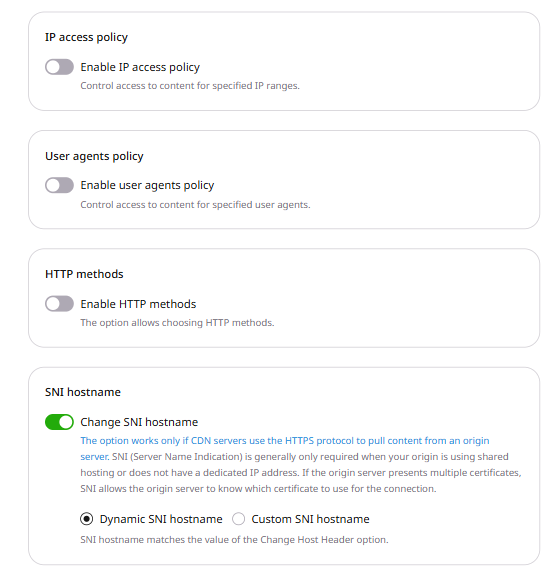
The Change SNI hostname option controls this hostname. It is enabled by default on all CDN resources and takes effect only when CDN servers pull content from the origin over HTTPS.
2. Click the CNAME of the resource to open its settings.
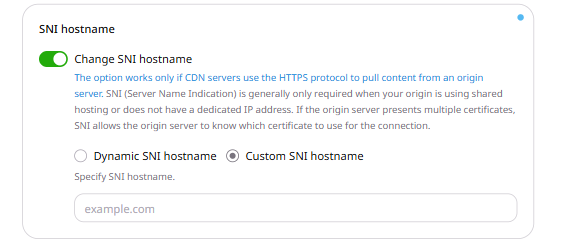
3. On the OPTIONS tab, scroll to the SNI hostname section and select a mode:
Dynamic SNI hostname (default) — the CDN uses the hostname set in the Change Host Header option.
Custom SNI hostname — enter a specific hostname in the Specify SNI hostname field. IP addresses are not accepted.
4. Click Save changes.
5. Confirm the hostname on the origin.
Inspect the TLS logs for connections from CDN servers. The SNI extension contains the selected hostname. Dynamic SNI hostname uses the hostname from Change Host Header. Custom SNI hostname uses the value in Specify SNI hostname.
options.sni sets the hostname CDN servers include in SNI requests to the origin. The option works only when the origin protocol is HTTPS or MATCH.
With sni_typedynamic, the SNI hostname comes from the Host header options:
hostHeader enabled: the SNI hostname matches that Host header.
forward_host_header true: the SNI hostname matches the Host header of the request to the CDN.
Both disabled: the SNI hostname matches the primary CNAME.
Both enabled and custom_hostname are required by the API. For dynamic mode, send custom_hostname as an empty string. sni_type accepts dynamic or custom. Any other value returns HTTP 400.
For custom, an empty custom_hostname returns HTTP 400. custom_hostname must be a domain name. An IP address returns HTTP 400.
Omitting sni_type stores dynamic and clears custom_hostname. enabled false keeps the stored sni_type and custom_hostname. Sending null removes options.sni.
Set the hostname CDN servers send in SNI requests to an HTTPS origin with the Terraform provider v2. sni_typecustom sends custom_hostname during the TLS handshake. sni_typedynamic takes the hostname from the Host header options: an enabled Host header, a forwarded Host header, or the primary CNAME when both are disabled. An IP address in custom_hostname returns HTTP 400 and the message Incorrect field value. Must be a valid domain name. Run terraform apply after editing options.
Custom SNI hostname
Set enabled to true, sni_type to custom, and custom_hostname to the origin hostname. For dynamic, set sni_type to dynamic and custom_hostname to an empty string.