Set up a redirect from HTTP to HTTPS
HTTP to HTTPS redirect sends all HTTP requests for a CDN resource to HTTPS. The redirect can be turned on only after HTTPS is enabled and an SSL certificate is issued.
Enable the redirect
1. Log in to the CDB Technical Web Portal and navigate to CDN > CDN resources. Open the resource.
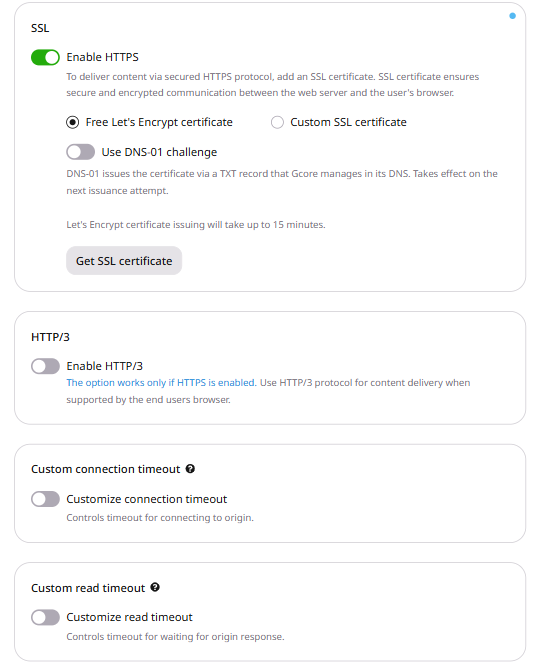
2. On the OPTIONS tab, navigate to General > SSL.
3. If HTTPS isn't enabled for the resource, turn on Enable HTTPS and select Free Let's Encrypt certificate or Custom SSL certificate.
Let's Encrypt issuance takes up to 15 minutes. Certificate setup is covered in SSL certificates.
4. Navigate to Access > Redirect HTTP to HTTPS.
5. Turn on Enable redirect HTTP to HTTPS and click Save changes.
If the resource uses a custom CNAME, the SSL certificate must include that hostname.
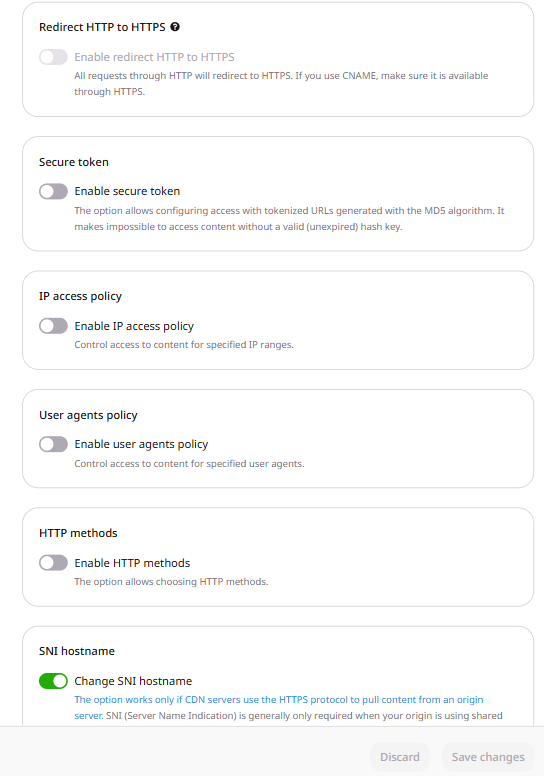
The Enable redirect HTTP to HTTPS toggle stays disabled until HTTPS and a certificate are active.
6. Confirm the redirect:
curl -I http://cdn.example.com/path/file.css
The response includes a Location header with the same path on HTTPS.
Send HTTP requests for a CDN resource to HTTPS. HTTPS must already be enabled and an SSL certificate must already be attached. With either missing, the API returns HTTP 400 and the message You cannot enable redirect HTTP to HTTPS when HTTPS is disabled. Please enable HTTPS and add SSL certificate first.
An API token is required. The CDN resource ID is visible under CDN → CDN Resources, or from the resources list call.
A resource update sets options.redirect_http_to_https. That option and redirect_https_to_http cannot be enabled at the same time.
Open a terminal and export the required variables:
export GCORE_API_KEY="{YOUR_API_KEY}"
export CDN_RESOURCE_ID="{YOUR_CDN_RESOURCE_ID}"
Enable the redirect
Set enabled and value to true.
import os

from gcore import CDB

client = CDB()
resource_id = int(os.environ["CDN_RESOURCE_ID"])

updated = client.cdn.cdn_resources.update(
    resource_id,
    options={"redirect_http_to_https": {"enabled": True, "value": True}},
)
redirect = updated.options.redirect_http_to_https
print(redirect.enabled, redirect.value)
package main

import (
    "context"
    "fmt"
    "os"
    "strconv"

    gcore "github.com/G-Core/gcore-go"
    "github.com/G-Core/gcore-go/cdn"
)

func main() {
    client := gcore.NewClient()
    ctx := context.Background()
    resourceID, err := strconv.ParseInt(os.Getenv("CDN_RESOURCE_ID"), 10, 64)
    if err != nil {
        panic(err)
    }

    updated, err := client.CDN.CDNResources.Update(ctx, resourceID, cdn.CDNResourceUpdateParams{
        Options: cdn.CDNResourceUpdateParamsOptions{
            RedirectHTTPToHTTPS: cdn.CDNResourceUpdateParamsOptionsRedirectHTTPToHTTPS{
                Enabled: true,
                Value:   true,
            },
        },
    })
    if err != nil {
        panic(err)
    }
    fmt.Println(updated.Options.RedirectHTTPToHTTPS.Enabled, updated.Options.RedirectHTTPToHTTPS.Value)
}
curl -X PATCH "https://api.cdb-staging.cdn.orange.com/cdn/resources/$CDN_RESOURCE_ID" \
  -H "Authorization: APIKey $GCORE_API_KEY" \
  -H "Content-Type: application/json" \
  -d '{
    "options": {
      "redirect_http_to_https": {
        "enabled": true,
        "value": true
      }
    }
  }'
The API returns HTTP 200. The saved option is:
{
  "enabled": true,
  "value": true
}
Turn the redirect off
Set enabled and value to false. The Go SDK omits a false boolean, so that call sends the JSON object explicitly.
import os

from gcore import CDB

client = CDB()
resource_id = int(os.environ["CDN_RESOURCE_ID"])

updated = client.cdn.cdn_resources.update(
    resource_id,
    options={"redirect_http_to_https": {"enabled": False, "value": False}},
)
redirect = updated.options.redirect_http_to_https
print(redirect.enabled, redirect.value)
package main

import (
    "context"
    "encoding/json"
    "fmt"
    "os"
    "strconv"

    gcore "github.com/G-Core/gcore-go"
    "github.com/G-Core/gcore-go/cdn"
    "github.com/G-Core/gcore-go/packages/param"
)

func main() {
    client := gcore.NewClient()
    ctx := context.Background()
    resourceID, err := strconv.ParseInt(os.Getenv("CDN_RESOURCE_ID"), 10, 64)
    if err != nil {
        panic(err)
    }

    updated, err := client.CDN.CDNResources.Update(ctx, resourceID, cdn.CDNResourceUpdateParams{
        Options: cdn.CDNResourceUpdateParamsOptions{
            RedirectHTTPToHTTPS: param.Override[cdn.CDNResourceUpdateParamsOptionsRedirectHTTPToHTTPS](
                json.RawMessage(`{"enabled":false,"value":false}`),
            ),
        },
    })
    if err != nil {
        panic(err)
    }
    fmt.Println(updated.Options.RedirectHTTPToHTTPS.Enabled, updated.Options.RedirectHTTPToHTTPS.Value)
}
curl -X PATCH "https://api.cdb-staging.cdn.orange.com/cdn/resources/$CDN_RESOURCE_ID" \
  -H "Authorization: APIKey $GCORE_API_KEY" \
  -H "Content-Type: application/json" \
  -d '{
    "options": {
      "redirect_http_to_https": {
        "enabled": false,
        "value": false
      }
    }
  }'
The API returns HTTP 200. The saved option is:
{
  "enabled": false,
  "value": false
}
Send HTTP requests for a CDN resource to HTTPS with the Terraform provider v2. The configuration enables HTTPS, attaches an SSL certificate, and sets redirect_http_to_https. An HTTP request receives HTTP 301, and the Location header keeps the same path on HTTPS.
The certificate includes the CDN hostname in its SAN extension. Set validate_root_ca to false for a self-signed certificate. ssl_certificate_wo is the certificate chain and ssl_private_key_wo is the private key. The PEM layout is on the SSL certificate page. Enabling redirect_https_to_http while redirect_http_to_https is enabled returns HTTP 400 and the message You should enable only one option from [redirect_http_to_https, redirect_https_to_http] list, so leave redirect_https_to_http unset. Run terraform apply after editing options.
Enable the redirect
Set enabled and value to true. The CDN answers the HTTP request with HTTP 301 and a Location header for the same path on HTTPS.
resource "gcore_cdn_origin_group" "example" {
  name = "my-origin-group"

  sources = [
    {
      source  = "example.com"
      enabled = true
    }
  ]
}

resource "gcore_cdn_certificate" "example" {
  name                       = "cdn-certificate"
  automated                  = false
  ssl_certificate_wo         = file("fullchain.pem")
  ssl_private_key_wo         = file("privkey.pem")
  ssl_certificate_wo_version = 1
  validate_root_ca           = false
}

resource "gcore_cdn_resource" "example" {
  cname           = "cdn.example.com"
  origin_group    = gcore_cdn_origin_group.example.id
  origin_protocol = "HTTPS"
  ssl_enabled     = true
  ssl_data        = gcore_cdn_certificate.example.id

  options = {
    redirect_http_to_https = {
      enabled = true
      value   = true
    }
  }
}
Turn the redirect off
Set enabled and value to false and run terraform apply. The HTTP response no longer redirects to HTTPS.
resource "gcore_cdn_origin_group" "example" {
  name = "my-origin-group"

  sources = [
    {
      source  = "example.com"
      enabled = true
    }
  ]
}

resource "gcore_cdn_certificate" "example" {
  name                       = "cdn-certificate"
  automated                  = false
  ssl_certificate_wo         = file("fullchain.pem")
  ssl_private_key_wo         = file("privkey.pem")
  ssl_certificate_wo_version = 1
  validate_root_ca           = false
}

resource "gcore_cdn_resource" "example" {
  cname           = "cdn.example.com"
  origin_group    = gcore_cdn_origin_group.example.id
  origin_protocol = "HTTPS"
  ssl_enabled     = true
  ssl_data        = gcore_cdn_certificate.example.id

  options = {
    redirect_http_to_https = {
      enabled = false
      value   = false
    }
  }
}