
Integrate a CDN resource with Google Cloud Storage

Google Cloud Storage can store public assets while Orange's CDN caches and delivers them through a custom domain. This setup uses the public path-style endpoint, so origin requests follow storage.googleapis.com/bucket-name/object-name.

Access to a Google Cloud project with permission to create buckets and edit bucket IAM policies, an active CDN subscription, and control of the DNS zone for the CDN domain are required.

Google Cloud Storage origin

  1. 1

    Create a Google Cloud Storage bucket

    In the Google Cloud console, navigate to Cloud Storage > Buckets and click Create. Configure the bucket:

    1. Enter a globally unique bucket name.

    2. Select the location and storage class for the content.

    3. Select uniform bucket-level access.

    4. Configure public access prevention so it is not enforced for this bucket.

    5. Configure the required data protection settings and click Create.

    If an organization policy enforces public access prevention, use a different project or ask a Google Cloud administrator to allow public access for the project.

  2. 2

    Upload the content

    Open the bucket, click Upload files or Upload folder, and upload the assets to deliver through the CDN.

  3. 3

    Allow public object access

    On the bucket page, open Permissions and click Grant access:

    1. In New principals, enter allUsers.

    2. In Select a role, select Storage Object Viewer.

    3. Click Save, then click Allow public access.

    This IAM binding makes every object in the bucket anonymously readable. Store only content intended for public delivery in the bucket.

  4. 4

    Verify the Google Cloud Storage URL

    Open a public object through the path-style endpoint:

    https://storage.googleapis.com/my-bucket-1/images/image.png
    

    Replace my-bucket-1/images/image.png with the bucket name and object path. The request must return the object without requiring Google authentication.

  5. 5

    Create the CDN resource

    In the CDB Technical Web Portal, click Create CDN resource and configure the resource:

    1. In Add domain, enter the CDN domain — cdn.example.com.

    2. Select Do not delegate to keep DNS at the current provider.

    3. Under Origin, select Specify content origin and URL.

    4. In Origin source, enter storage.googleapis.com.

    5. Keep Use default port enabled.

    6. In Host header override, enter storage.googleapis.com.

    7. Under SSL, enable Enable HTTPS.

    8. Select Get free Let's Encrypt certificate or Custom SSL certificate. A Let's Encrypt certificate is issued after the custom domain CNAME is in place.

    9. Click Create.
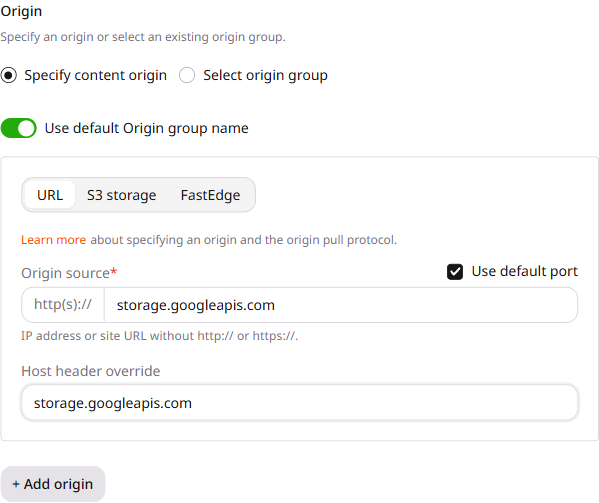
    URL origin configured with storage.googleapis.com as the source and host header

    After creation, open the resource settings. Under General > Origin pull protocol, select HTTPS, then click Save changes.

  6. 6

    Configure DNS

    At the DNS provider, create a CNAME record for cdn.example.com that points to the generated *.gcdn.co hostname shown by the Customer Portal.

    Follow the custom domain setup to verify the DNS record and resource activation.

  7. 7

    Verify the CDN object path

    Keep the bucket name in the CDN URL when Rewrite is not configured:

    https://cdn.example.com/my-bucket-1/images/image.png
    

    The path after the CDN domain is forwarded to storage.googleapis.com, so it must match the bucket name and object path.

  8. 8

    (Optional) Hide the bucket name

    To expose /images/image.png instead of /my-bucket-1/images/image.png, open the resource settings and navigate to Content. Add the Rewrite option and enter:

    /(.*) /my-bucket-1/$1
    

    Replace my-bucket-1 with the bucket name. Click Save changes. The public URL becomes https://cdn.example.com/images/image.png, while the origin request uses /my-bucket-1/images/image.png.

  9. 9

    Update asset URLs and verify delivery

    Update the website or application to use the CDN URLs. In the browser developer tools:

    1. Open the Network panel.

    2. Reload the page.

    3. Select an asset request.

    4. Confirm that the request uses cdn.example.com and returns a successful response.

    If the request returns 403, verify the bucket IAM policy and public access prevention. For a 404 response, compare the CDN request path with the bucket name and object path.

Create a CDN resource that pulls public objects from storage.googleapis.com over HTTPS and serves them on a custom domain.

An API token is required. The bucket objects must already be readable at the public path-style URL.

export GCORE_API_KEY="{YOUR_API_KEY}"

Create the CDN resource

Set origin to storage.googleapis.com and originProtocol to HTTPS. Enable options.hostHeader with the same hostname, because path-style requests must send that Host header. The create endpoint stores the hostname as the source of a new origin group.

ParameterRequiredDescription
cnameYesCDN domain that viewers request
originYesstorage.googleapis.com, without a scheme or an object path
originProtocolNoOptional in the API. Set to HTTPS for this origin; otherwise it defaults to HTTP
options.hostHeader.enabledNoOptional in the API. Set to true for this origin
options.hostHeader.valueNostorage.googleapis.com when the override is enabled
from gcore import CDB

client = CDB()  # Reads GCORE_API_KEY from env

resource = client.cdn.cdn_resources.create(
    cname="cdn.site.com",
    origin="storage.googleapis.com",
    origin_protocol="HTTPS",
    options={
        "host_header": {"enabled": True, "value": "storage.googleapis.com"},
    },
)
print(resource.id, resource.origin_protocol, resource.options.host_header.value)
package main

import (
    "context"
    "fmt"

    gcore "github.com/G-Core/gcore-go"
    "github.com/G-Core/gcore-go/cdn"
)

func main() {
    client := gcore.NewClient() // Reads GCORE_API_KEY from env
    ctx := context.Background()

    resource, err := client.CDN.CDNResources.New(ctx, cdn.CDNResourceNewParams{
        Cname:          "cdn.site.com",
        Origin:         gcore.String("storage.googleapis.com"),
        OriginProtocol: cdn.CDNResourceNewParamsOriginProtocolHTTPS,
        Options: cdn.CDNResourceNewParamsOptions{
            HostHeader: cdn.CDNResourceNewParamsOptionsHostHeader{
                Enabled: true,
                Value:   "storage.googleapis.com",
            },
        },
    })
    if err != nil {
        panic(err)
    }
    fmt.Println(resource.ID, resource.OriginProtocol, resource.Options.HostHeader.Value)
}
curl -X POST "https://api.cdb-staging.cdn.orange.com/cdn/resources" \
  -H "Authorization: APIKey $GCORE_API_KEY" \
  -H "Content-Type: application/json" \
  -d '{
    "cname": "cdn.site.com",
    "origin": "storage.googleapis.com",
    "originProtocol": "HTTPS",
    "options": {
      "hostHeader": {"enabled": true, "value": "storage.googleapis.com"}
    }
  }'

The API returns:

{
  "id": 1001,
  "cname": "cdn.site.com",
  "active": true,
  "originProtocol": "HTTPS",
  "originGroup": 1002,
  "options": {
    "hostHeader": {
      "enabled": true,
      "value": "storage.googleapis.com"
    }
  }
}

Point the CDN domain CNAME at the *.gcdn.co hostname shown for the resource. Viewer HTTPS uses a Let's Encrypt certificate after that CNAME is in place.

Keep the bucket name in the request path. Open the object at https://cdn.site.com/my-bucket-1/images/image.png.

Hide the bucket name

A resource update sets options.rewrite and prepends the bucket name to the path sent to storage.googleapis.com. Updating options.rewrite does not replace the other resource options, so the existing Host header stays storage.googleapis.com.

ParameterRequiredDescription
options.rewrite.enabledYesEnables the Rewrite option
options.rewrite.bodyYes/(.*) /my-bucket-1/$1. Replace my-bucket-1 with the bucket name
options.rewrite.flagNobreak stops further rewrite processing
from gcore import CDB

client = CDB()

resource = client.cdn.cdn_resources.update(
    1001,
    options={
        "rewrite": {
            "enabled": True,
            "body": "/(.*) /my-bucket-1/$1",
            "flag": "break",
        },
    },
)
print(resource.options.rewrite.body, resource.options.host_header.value)
package main

import (
    "context"
    "fmt"

    gcore "github.com/G-Core/gcore-go"
    "github.com/G-Core/gcore-go/cdn"
)

func main() {
    client := gcore.NewClient()
    ctx := context.Background()

    resource, err := client.CDN.CDNResources.Update(ctx, 1001, cdn.CDNResourceUpdateParams{
        Options: cdn.CDNResourceUpdateParamsOptions{
            Rewrite: cdn.CDNResourceUpdateParamsOptionsRewrite{
                Enabled: true,
                Body:    "/(.*) /my-bucket-1/$1",
                Flag:    "break",
            },
        },
    })
    if err != nil {
        panic(err)
    }
    fmt.Println(resource.Options.Rewrite.Body, resource.Options.HostHeader.Value)
}
curl -X PATCH "https://api.cdb-staging.cdn.orange.com/cdn/resources/1001" \
  -H "Authorization: APIKey $GCORE_API_KEY" \
  -H "Content-Type: application/json" \
  -d '{
    "options": {
      "rewrite": {
        "enabled": true,
        "body": "/(.*) /my-bucket-1/$1",
        "flag": "break"
      }
    }
  }'

The API returns:

{
  "id": 1001,
  "options": {
    "hostHeader": {
      "enabled": true,
      "value": "storage.googleapis.com"
    },
    "rewrite": {
      "enabled": true,
      "body": "/(.*) /my-bucket-1/$1",
      "flag": "break"
    }
  }
}

After the rule is saved, viewers request https://cdn.site.com/images/image.png. The origin request path is /my-bucket-1/images/image.png.

Declare a CDN resource that pulls public objects from storage.googleapis.com over HTTPS with the Terraform provider v2.

Create the CDN resource

Path-style requests need the Host header storage.googleapis.com on the origin and on the CDN resource. Set origin_protocol to HTTPS.

resource "gcore_cdn_origin_group" "example" {
  name = "my-origin-group"

  sources = [
    {
      source               = "storage.googleapis.com"
      enabled              = true
      host_header_override = "storage.googleapis.com"
    }
  ]
}

resource "gcore_cdn_resource" "example" {
  cname           = "cdn.example.com"
  origin_group    = gcore_cdn_origin_group.example.id
  origin_protocol = "HTTPS"

  options = {
    host_header = {
      enabled = true
      value   = "storage.googleapis.com"
    }
  }
}

Point the custom domain CNAME record at the *.gcdn.co hostname in the CDN resource setup guide. Viewer HTTPS uses a Let's Encrypt certificate after that CNAME is in place.

Keep the bucket name in the request path. Open the object at https://cdn.example.com/my-bucket-1/images/image.png.

Hide the bucket name

Add rewrite in the same options block and keep host_header. The next terraform apply prepends the bucket name to the path sent to storage.googleapis.com.

resource "gcore_cdn_origin_group" "example" {
  name = "my-origin-group"

  sources = [
    {
      source               = "storage.googleapis.com"
      enabled              = true
      host_header_override = "storage.googleapis.com"
    }
  ]
}

resource "gcore_cdn_resource" "example" {
  cname           = "cdn.example.com"
  origin_group    = gcore_cdn_origin_group.example.id
  origin_protocol = "HTTPS"

  options = {
    host_header = {
      enabled = true
      value   = "storage.googleapis.com"
    }
    rewrite = {
      enabled = true
      body    = "/(.*) /my-bucket-1/$1"
      flag    = "break"
    }
  }
}

Viewers request https://cdn.example.com/images/image.png. The origin request path is /my-bucket-1/images/image.png.

Delete the CDN resource

Remove both resource blocks. The next terraform apply deletes the CDN resource, then the origin group.

# Remove the CDN resource and the origin group:
# resource "gcore_cdn_origin_group" "example" {
#   name = "my-origin-group"
#
#   sources = [
#     {
#       source               = "storage.googleapis.com"
#       enabled              = true
#       host_header_override = "storage.googleapis.com"
#     }
#   ]
# }
#
# resource "gcore_cdn_resource" "example" {
#   cname           = "cdn.example.com"
#   origin_group    = gcore_cdn_origin_group.example.id
#   origin_protocol = "HTTPS"
#
#   options = {
#     host_header = {
#       enabled = true
#       value   = "storage.googleapis.com"
#     }
#   }
# }
terraform apply