
CDN content prefetching

Prefetch requests files from the origin and stores them in CDN cache before visitors request them, so edge locations can serve the content without fetching it from the origin on the first request. A CDN resource is required.

Prefetch causes CDN servers to request the listed files from the origin, which increases origin load and traffic.

Prefetch is recommended for files larger than 200 MB and smaller than 5 GB. Each request is limited to 100 paths, and one prefetch request is allowed per CDN resource per minute. To prefetch more than 100 files, divide the paths into batches of up to 100 and wait at least 1 minute between batches for the same CDN resource.

Prefetch request

  1. 1

    Open Prefetch

    In the CDB Customer Portal, navigate to CDN > Prefetch.

  2. 2

    Select the CDN resource

    Select the resource whose origin holds the files. The dropdown shows each option as CNAME and ID.

  3. 3

    Enter file paths

    Enter one path per line without a domain, starting with a slash: /path/file1.jpg.
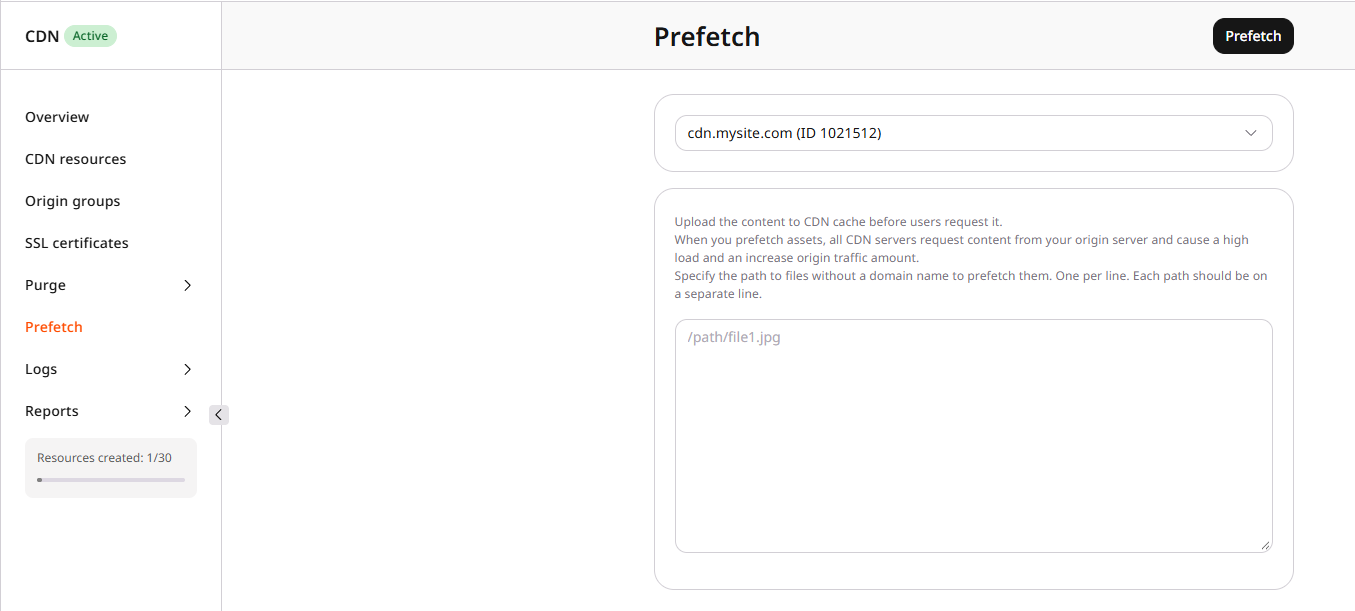
    Prefetch form with resource dropdown and path field

  4. 4

    Submit the prefetch request

    Click Prefetch.

  5. 5

    Confirm the files are cached

    Prefetch processing time depends on the number and size of the files — allow time for the operation to complete before testing.

    To verify, send a request to a listed path and inspect the Cache response header. The following command performs a GET request and prints only the response headers:

    curl -sS -D - -o /dev/null https://cdn.example.com/path/file1.jpg
    
    • Cache: HIT means the file was already cached at that edge location when tested. To attribute the hit specifically to prefetch, test a new URL or purge the file before prefetching.
    • Cache: MISS on the first request followed by Cache: HIT on the next means the first request filled the cache. That edge was not populated by prefetch — either prefetch has not yet completed, or that location was not reached.

To replace files that are already in cache, purge those files, then prefetch.

Prefetch requests are not retained in a history log and do not appear in purge history, which contains only cache-purge operations.

Prefetch pulls listed files from the origin into CDN cache before visitors request them. A CDN resource ID is required — it is visible in the Customer Portal under CDN → CDN Resources, or from the List CDN resources API call.

An API token is required.

export GCORE_API_KEY="{YOUR_API_KEY}"
export CDN_RESOURCE_ID="{YOUR_RESOURCE_ID}"

Prefetch causes CDN servers to request the listed files from the origin, which increases origin load and traffic. One prefetch request is allowed per CDN resource per minute. One request is limited to 100 paths.

Prefetch files

Send paths without a protocol or domain. Each path must start with /. Prefetch has no history endpoint — only purge operations appear in purge history. To replace content that is already cached, purge those paths first, then prefetch.

from gcore import CDB

client = CDB()

client.cdn.cdn_resources.prefetch(
    12345,  # CDN resource ID
    paths=["/video/intro.mp4", "/images/hero.jpg"],
)
package main

import (
    "context"
    "fmt"

    gcore "github.com/G-Core/gcore-go"
    "github.com/G-Core/gcore-go/cdn"
)

func main() {
    client := gcore.NewClient()
    ctx := context.Background()

    err := client.CDN.CDNResources.Prefetch(ctx, 12345, cdn.CDNResourcePrefetchParams{
        Paths: []string{"/video/intro.mp4", "/images/hero.jpg"},
    })
    if err != nil {
        fmt.Printf("error: %v\n", err)
    }
}
curl -X POST "https://api.cdb-staging.cdn.orange.com/cdn/resources/$CDN_RESOURCE_ID/prefetch" \
  -H "Authorization: APIKey $GCORE_API_KEY" \
  -H "Content-Type: application/json" \
  -d '{
    "paths": [
      "/video/intro.mp4",
      "/images/hero.jpg"
    ]
  }'

A successful request returns HTTP 201 with the accepted paths:

{
  "paths": ["/video/intro.mp4", "/images/hero.jpg"]
}

Confirm the files are cached

Prefetch processing time depends on file size and count. After the request completes, send a GET to a listed path and inspect the Cache response header.

curl -sS -D - -o /dev/null https://cdn.example.com/video/intro.mp4
  • Cache: HIT means the file was already cached at that edge location. To attribute the hit to prefetch, test a new URL or purge the file before prefetching.
  • Cache: MISS on the first request followed by Cache: HIT on the next means that edge filled the cache from this GET, not from prefetch.