
CDN resource logs in Log viewer

Log viewer shows request logs for CDN resources from the last three days. Each query covers at most six hours, and a download can include up to 10,000 records. For continuous export to storage, use Logs uploader.

  1. 1

    Open Log viewer

    In the CDB Customer Portal, navigate to CDN > Logs > Log viewer.
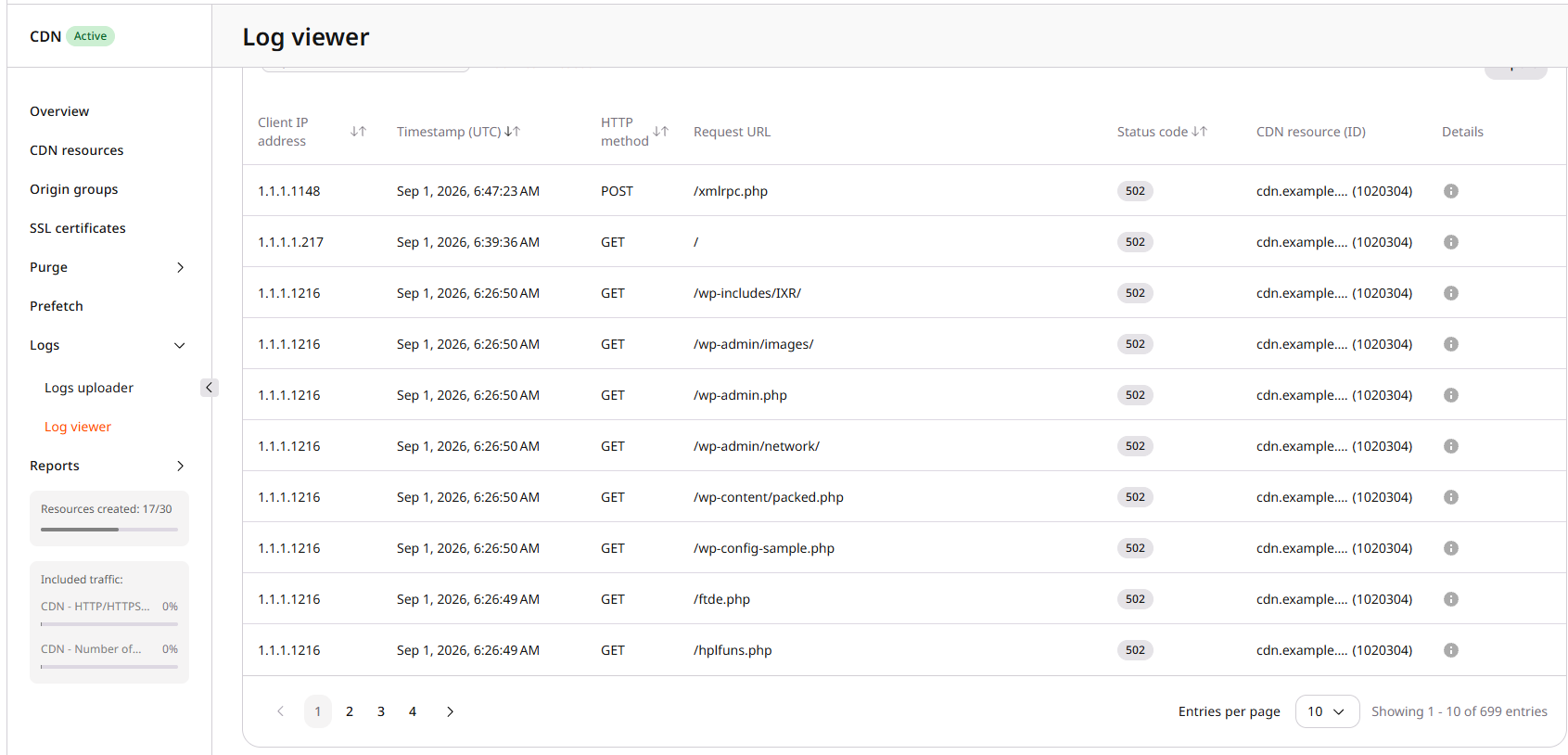
    Log viewer table with filters, status codes, and sample request rows

  2. 2

    Filter the log table

    In Search by CNAME or ID, enter a resource CNAME or ID. The CDN resource is filter is applied. Click the time range to pick any interval of up to six hours within the last three days. Click Add filter to narrow results by client IP address, HTTP method, status code, data center, or cache status. Click Reset all to clear filters.

  3. 3

    Read a log row

    The table columns are Client IP address, Timestamp (UTC), HTTP method, Request URL, Status code, CDN resource (ID), and Details. Hover the i icon in Details for the remaining request fields: referer, size, data center, User-Agent, cache status, resource ID, and CNAME. HIT means the response came from cache, while MISS means the response was fetched from the origin.

  4. 4

    Export logs

    Click Export. In Export settings, keep Current to use the active filters and time range, or select Custom period to set a different interval. Select CSV or TSV, then click Export. The file is saved to the browser download location. An export is limited to 10,000 records.
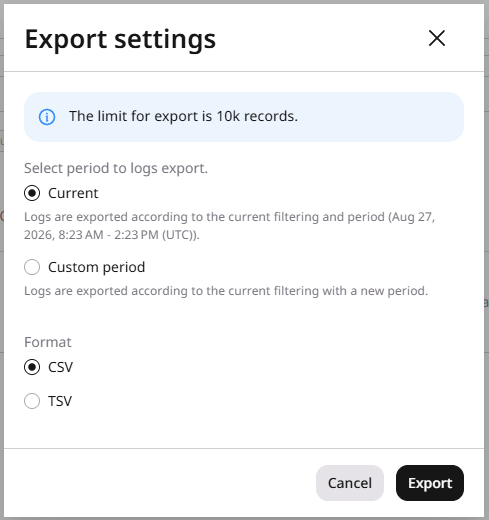
    Export settings dialog with current period, CSV format, and Export

The Log viewer API lists request logs in JSON and downloads the same log fields as CSV or TSV. JSON list requests return at most 1,000 rows. Downloads return at most 10,000 rows.

Authentication

All requests authenticate with an API token. Set it as an environment variable before running the examples:

export GCORE_API_KEY="{YOUR_API_KEY}"

Filters and limits

from and to are required, must be UTC in ISO 8601 or RFC 3339 format, and cannot span more than six hours. Logs are available for the last three days. Filter operators and field names are in the Log viewer API reference. In the examples below, replace FROM_TIME and TO_TIME with UTC timestamps from the last three days, for example 2026-09-06T00:00:00Z and 2026-09-06T06:00:00Z.

JSON list

GET https://api.cdb-staging.cdn.orange.com/cdn/advanced/v1/logs returns matching log rows. The limit default is 100 and the maximum is 1,000.

import os
from gcore import CDB

client = CDB(
    api_key=os.environ.get("GCORE_API_KEY"),
)
page = client.cdn.logs.list(
    from_="FROM_TIME",
    to="TO_TIME",
)
if page.data:
    print(page.data[0].resource_id)
package main

import (
	"context"
	"fmt"
	"os"

	"github.com/G-Core/gcore-go"
	"github.com/G-Core/gcore-go/cdn"
	"github.com/G-Core/gcore-go/option"
)

func main() {
	client := gcore.NewClient(
		option.WithAPIKey(os.Getenv("GCORE_API_KEY")),
	)
	page, err := client.CDN.Logs.List(context.TODO(), cdn.LogListParams{
		From: "FROM_TIME",
		To:   "TO_TIME",
	})
	if err != nil {
		panic(err.Error())
	}
	fmt.Printf("%+v\n", page)
}
curl --request GET \
  --url "https://api.cdb-staging.cdn.orange.com/cdn/advanced/v1/logs?from=FROM_TIME&to=TO_TIME" \
  --header "Authorization: APIKey ${GCORE_API_KEY}"

Download

GET https://api.cdb-staging.cdn.orange.com/cdn/advanced/v1/logs/download returns a zip file. format is required (csv or tsv). The limit default and maximum is 10,000.

import os
from gcore import CDB

client = CDB(
    api_key=os.environ.get("GCORE_API_KEY"),
)
response = client.cdn.logs.download(
    format="csv",
    from_="FROM_TIME",
    to="TO_TIME",
)
with open("cdn-logs.zip", "wb") as f:
    f.write(response.read())
package main

import (
	"context"
	"io"
	"os"

	"github.com/G-Core/gcore-go"
	"github.com/G-Core/gcore-go/cdn"
	"github.com/G-Core/gcore-go/option"
)

func main() {
	client := gcore.NewClient(
		option.WithAPIKey(os.Getenv("GCORE_API_KEY")),
	)
	response, err := client.CDN.Logs.Download(context.TODO(), cdn.LogDownloadParams{
		Format: "csv",
		From:   "FROM_TIME",
		To:     "TO_TIME",
	})
	if err != nil {
		panic(err.Error())
	}
	defer response.Body.Close()
	f, err := os.Create("cdn-logs.zip")
	if err != nil {
		panic(err.Error())
	}
	defer f.Close()
	if _, err := io.Copy(f, response.Body); err != nil {
		panic(err.Error())
	}
}
curl --request GET \
  --url "https://api.cdb-staging.cdn.orange.com/cdn/advanced/v1/logs/download?from=FROM_TIME&to=TO_TIME&format=csv" \
  --header "Authorization: APIKey ${GCORE_API_KEY}" \
  --output cdn-logs.zip