Raw Logs export
Raw Logs is the account-level hourly export of CDN request logs to Amazon Simple Storage Service (S3), File Transfer Protocol (FTP), or SSH File Transfer Protocol (SFTP) storage. Logs include requests to edge cache servers. Pre-cache server requests are included only when Origin Shielding is enabled and Add logs from Origin Shielding is selected.
Raw Logs remains available for existing hourly S3, FTP, or SFTP exports. For new log-export setups, use Logs Uploader. Logs Uploader is the current workflow: it supports 5–60-minute delivery, selectable fields, HTTP(S) and Alibaba Cloud Simple Log Service (SLS) destinations, and per-resource policies. To move an existing Raw Logs configuration to Logs Uploader, contact CDB Support.
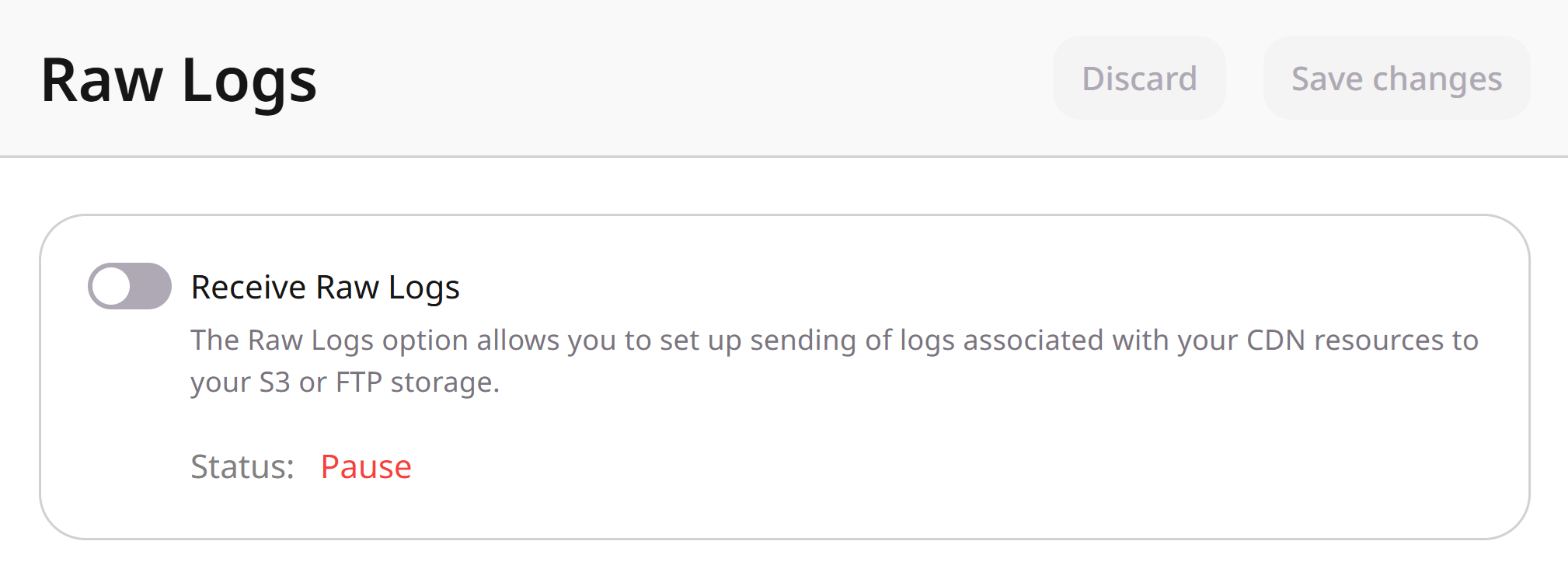
This is a paid feature. Contact CDB Support to activate Raw Logs. After activation, enable Receive Raw Logs in the CDB Technical Web Portal and configure export to S3, FTP, or SFTP storage.
Raw Logs settings
The CDN > Logs > Raw Logs page stores the export destination, empty-file preference, and Origin Shielding inclusion. Status, the hourly interval, and traffic totals come from that configuration.
Origin Shielding log inclusion
When Origin Shielding is enabled for the account, the Add logs from Origin Shielding checkbox appears in Raw Logs settings. Select it so the export includes requests to both edge servers and the pre-cache server.

If Add logs from Origin Shielding is not visible, Origin Shielding is not activated for the account. See the Origin Shielding guide.
Raw Logs statuses
The Raw Logs status in the Customer Portal can be:
- Pending: interval between connecting to storage and the first export
- OK: logs are exported from at least one CDN server
- Failed: a storage connection error occurred, or no export completed within 24 hours
- Pause: Raw Logs is paused
Export interval
Logs are exported at the end of each hour. If Raw Logs is activated at 00:30, the first export runs between 00:45 and 01:00, and the next between 01:45 and 02:00.
If the covered CDN resources receive no requests during the export interval and Do not send empty logs is not selected, an empty log file (about 20 bytes) is sent to storage.
Log traffic calculation
Raw Logs traffic totals depend on whether Add logs from Origin Shielding is selected. For CDN report metrics, see View statistics on CDN resources.
Log totals can differ from billing statistics when some files are missing. Common causes:
- Origin Shielding is enabled, but Add logs from Origin Shielding is not selected
- The storage imposes a rate limit, so some files are not delivered to storage
Log path example
s3://log-bucket-name/2019/08/20/15/nodename_cdn.example.com_access.log.gz
Log example
"203.0.113.45" "-" "-" "[26/Apr/2019:09:47:40 +0000]" "GET /ContentCommon/images/image.png HTTP/1.1"
"200" "1514283" "https://example.com/videos/10" "Mozilla/5.0 (Macintosh; Intel Mac OS X 10_12_1)
AppleWebKit/537.36 (KHTML, like Gecko) Chrome/53.0.2785.116 YaBrowser/16.10.0.2309 Safari/537.36"
"1514848" "[dh-up-gc18]" "https" "origin.example.com" "1.500" "0.445" "157" "bytes=0-1901653" "[dh]"
"MISS" "10485760" "192.0.2.1:80" "2510" "7399" "-" "-" "KZ" "-" "shield_no" "198.51.100.1" "80" "206" "-" "0.000"
"0.200" "198.51.100.2" "asnumber" "106980391" "1" "00-d5fe1dc9035165ce36952daf29686b6c-14330be33197dd1a-01" "-" "-"
"ECDHE-RSA-AES256-GCM-SHA384" "28a4184139cb43cdc79006cf2d1a4ac93bdc****" "r"
"application/json" "21" "PL" "45" "10" "100700"
Log format
"$remote_addr" "-" "$remote_user" "[$time_local]" "$request" "$status"
"$body_bytes_sent" "$http_referer" "$http_user_agent" "$bytes_sent"
"$edgename" "$scheme" "$host" "$request_time"
"$upstream_response_time" "$request_length" "$http_range" "[$responding_node]"
"$upstream_cache_status" "$upstream_response_length" "$upstream_addr"
"$gcdn_api_client_id" "$gcdn_api_resource_id" "$uid_got" "$uid_set"
"$geoip_country_code" "$geoip_city" "$shield_type" "$server_addr" "$server_port"
"$upstream_status" "-" "$upstream_connect_time" "$upstream_header_time"
"$shard_addr" "$geoip2_data_asnumber" "$connection" "$connection_requests"
"$http_traceparent" "$http_x_forwarded_proto" "$gcdn_internal_status_code" "$ssl_cipher"
"$ssl_session_id" "$ssl_session_reused" "$sent_http_content_type" "$tcpinfo_rtt"
"$server_country_code" "$gcdn_tcpinfo_snd_cwnd" "$gcdn_tcpinfo_total_retrans" "$gcdn_rule_id"
"$request_completion" "$sent_http_content_length" "$gcdn_finalize_reason"
New fields can appear at the end of the line. When fields are added, CDB sends an email notification.
Log fields
The following table lists the available log fields. Fields marked as internal system variables belong to the CDN control plane and can be ignored for most analytics.
Internal status codes
$gcdn_internal_status_code identifies the CDN rule or feature that generated the response.
| Reason | HTTP code | Internal code | Comment |
|---|---|---|---|
| Country ACL | 403 | 1001 | |
| Referer ACL | 403 | 1002 | |
| IP ACL | 403 | 1003 | |
| User-Agent ACL | 403 | 1004 | |
| Secure Token | 403 | 1005 | Returned when Secure Token validation fails and $secure_link is empty |
| Secure Token | 410 | 1006 | Returned when the link lifetime has expired and $secure_link is "0" |
| WAF | 403 | 1007 | Request blocked by WAF |
| Bot challenge / Testcookie | 307 | 1008 | Redirection sent by bot challenge (testcookie) |
| Blocklist | 403 | 1009 | Request blocked by bot protection blocklist |
| HTTP method | 405 | 1200 | Returned when AllowedHttpMethods is enabled and the request method is not in the allowed list |
Streaming disabled (.ts or .m3u8 files) | 402 | 1201 | Streaming feature disabled for the client |
| LE validation /.well-known/acme-challenge/ | 404 | 1202 | Returned when http_user_agent is not cert-manager-challenges, acme.zerossl.com, Cpanel-HTTP-Client, Buypass validation client, Google-Certificates-Bridge, vercel-fetch, win-acme, Typhoeus, or Go-http-client |
| Shield requestor header | 403 | 1203 | Unauthorized request to the shield |
| Force Return | ANY | 1204 | Response generated by the Force Return status code option |
When a Secure Token link passes the authenticity check, $secure_link is set to the link extracted from the request URI. That successful validation does not produce a 403 or 410.
S3 export
- 1
Open Raw Logs
In the CDB Technical Web Portal, navigate to CDN > Logs > Raw Logs.
- 2
Enable the export
Turn on Receive Raw Logs. Keep Do not send empty logs selected to skip empty files, or clear it to receive empty files.
- 3
Include Origin Shielding logs
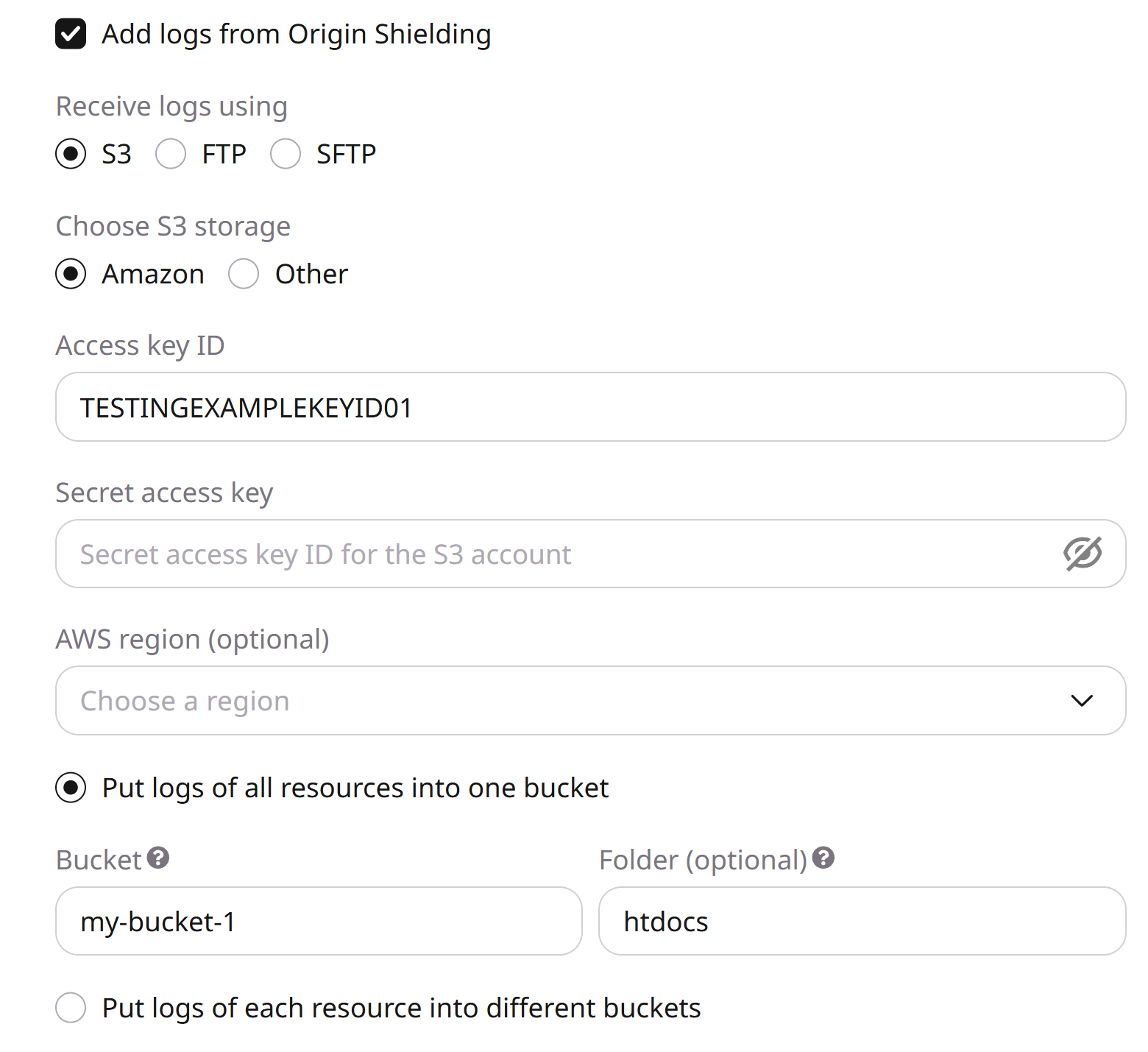
If Origin Shielding is enabled, select Add logs from Origin Shielding to include edge and pre-cache logs.
- 4
Select Amazon S3
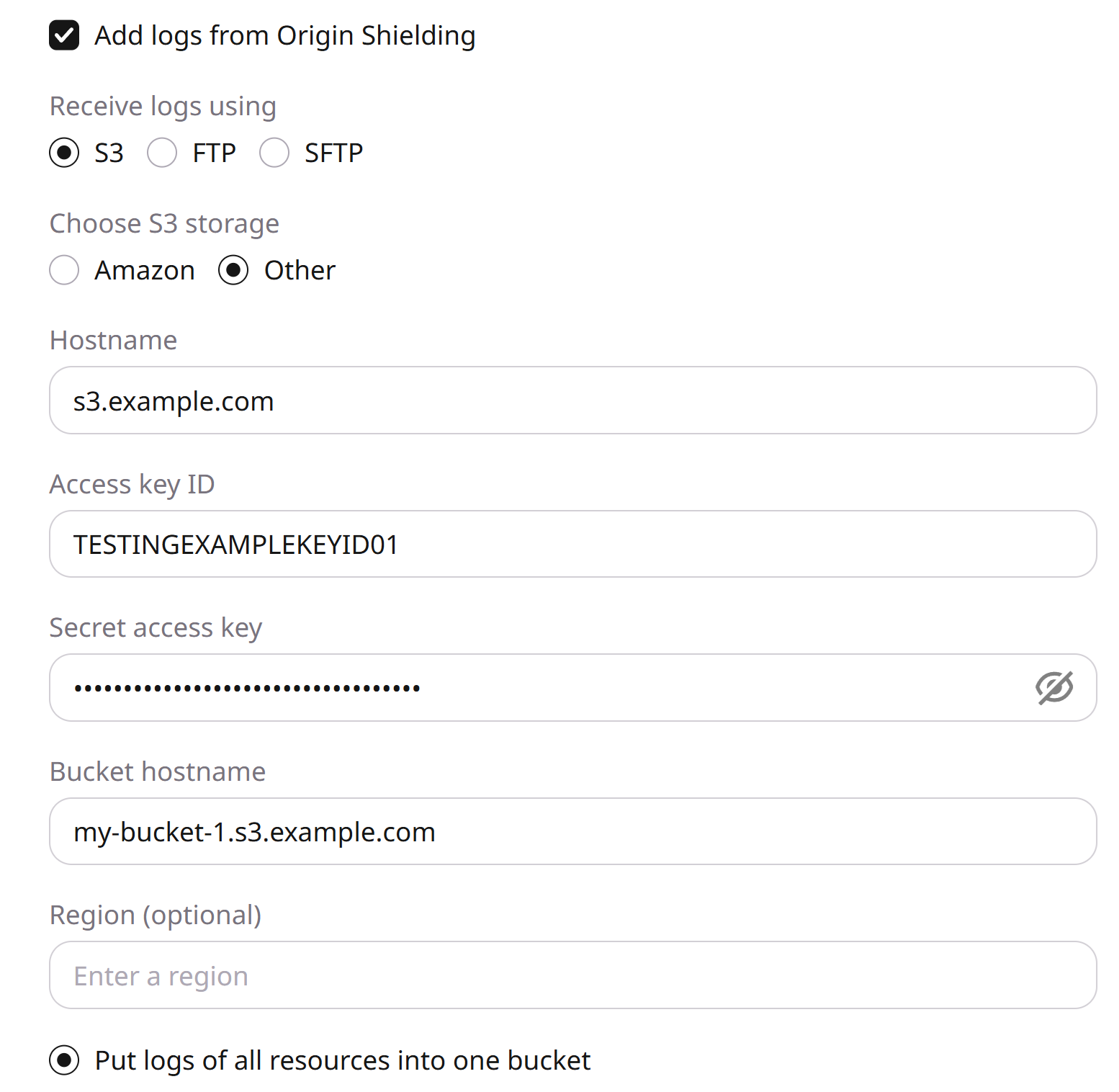
Under Receive logs using, select S3. Under Choose S3 storage, select Amazon.
- 5
Enter credentials
Enter the AWS access key ID and AWS secret access key. See the Amazon access key guide.
- 6
Set region and buckets
Optionally choose an AWS region. Then choose one bucket for all CDN resources or a separate bucket per resource, and enter an existing bucket name. Add a folder name to write files inside that bucket.
- 7
Save the configuration
Click Save changes.
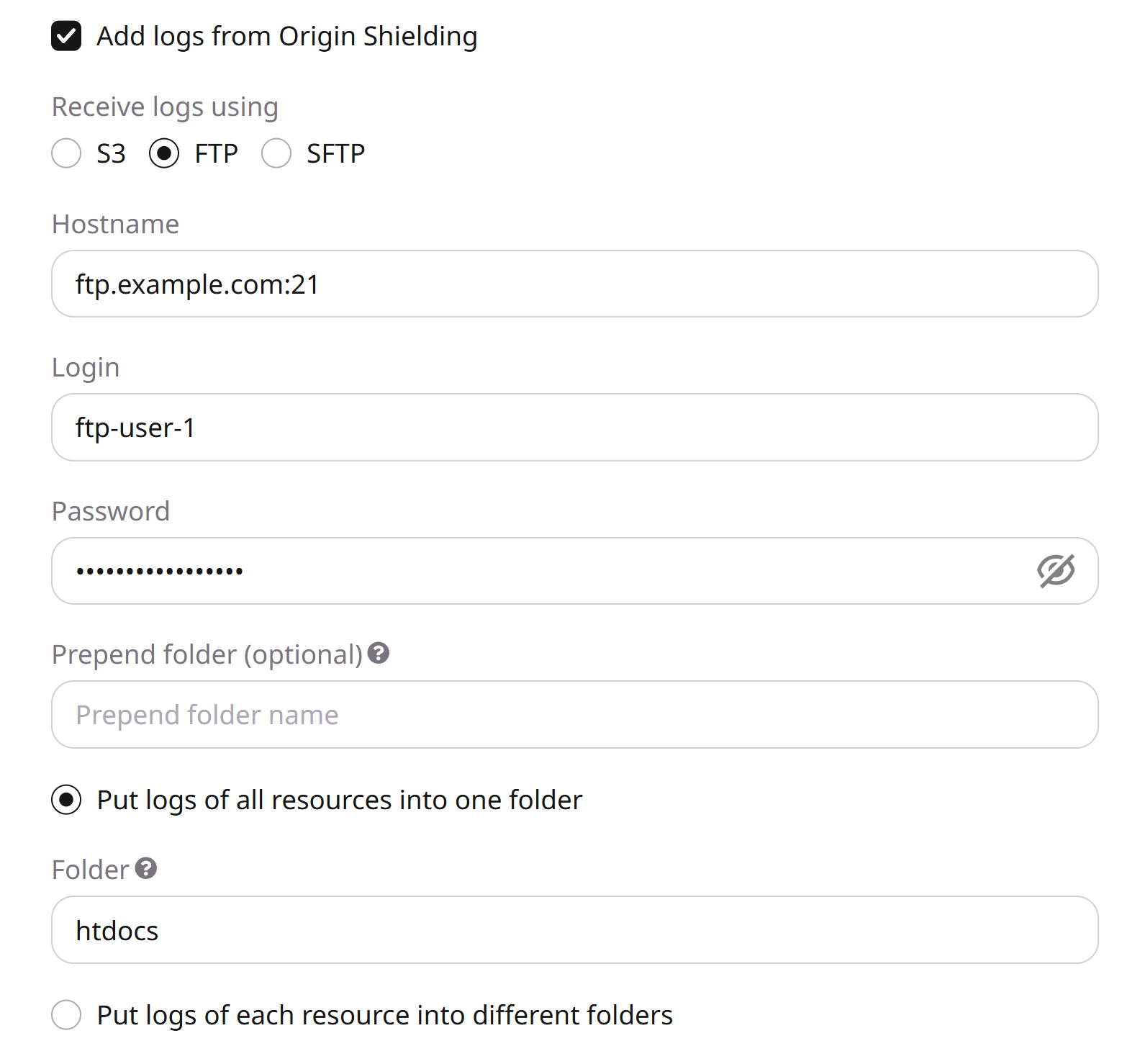
FTP and SFTP export
- 1
Open Raw Logs
In the CDB Technical Web Portal, navigate to CDN > Logs > Raw Logs.
- 2
Enable the export
Turn on Receive Raw Logs. Keep Do not send empty logs selected to skip empty files, or clear it to receive empty files.
- 3
Include Origin Shielding logs
If Origin Shielding is enabled, select Add logs from Origin Shielding to include edge and pre-cache logs.
- 4
Select SFTP
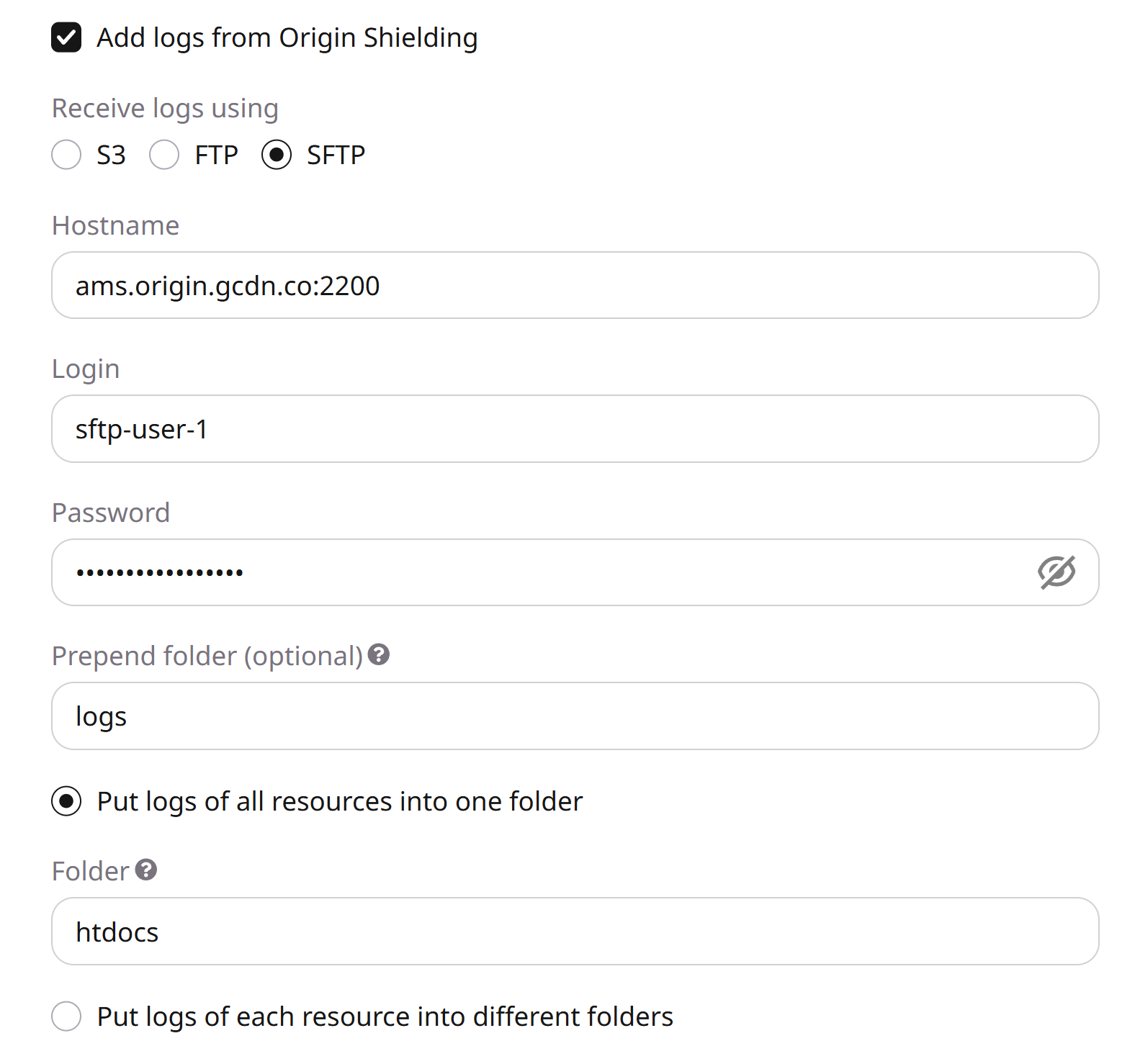
Under Receive logs using, select SFTP.
- 5
Enter the hostname and port
Enter
hostname:port. For CDB SFTP Storage, copy the hostname from Details and append port2200, for exampleams.origin.gcdn.co:2200. For another provider, use that host and its SFTP port.Omitting the port returns a wrong connection settings error.
- 6
Enter credentials
Enter the Login and Password. For CDB SFTP Storage, the login is Storage/User name in Details.
- 7
Enter the destination folder
Optionally enter a Prepend folder. Then enter the Folder. For CDB SFTP Storage, use the root folder at the end of the Upload path in Details. The home folder is receive-only and cannot be written to directly. The only writable default folder is htdocs. For another provider, enter the folder that should receive files, or leave the field empty if the account starts in that folder.
- 8
Organize folders
Choose one folder for all CDN resources or a separate folder per resource. A missing folder name sends files to the root folder.
- 9
Save the configuration
Click Save changes.
Raw Logs deactivation
- 1
Turn off the export
In the CDB Technical Web Portal, navigate to CDN > Logs > Raw Logs and turn off Receive Raw Logs.
- 2
Save the change
Click Save changes. Delivery stops only after this save. The stored S3, FTP, or SFTP settings remain and apply again when Receive Raw Logs is turned on and saved.
Discard changes restores the last saved configuration. If Receive Raw Logs was on when the page was last saved, Discard changes turns the toggle back on and does not deactivate the export.