Orange's CDN error status codes
HTTP status codes in CDN logs show the outcome of a request. This article covers selected codes that have CDB-specific causes or resolution steps. Several causes can produce the same code, so each table lists the CDB-specific causes and the matching fix.
Status codes in Log viewer
In the CDB Technical Web Portal, navigate to CDN > Logs > Log viewer. Use Search by CNAME or ID, the time range, or Add filter. Delivery outcomes appear in the Status code column. The Log viewer stores the last 3 days of requests, with a maximum view interval of 6 hours.
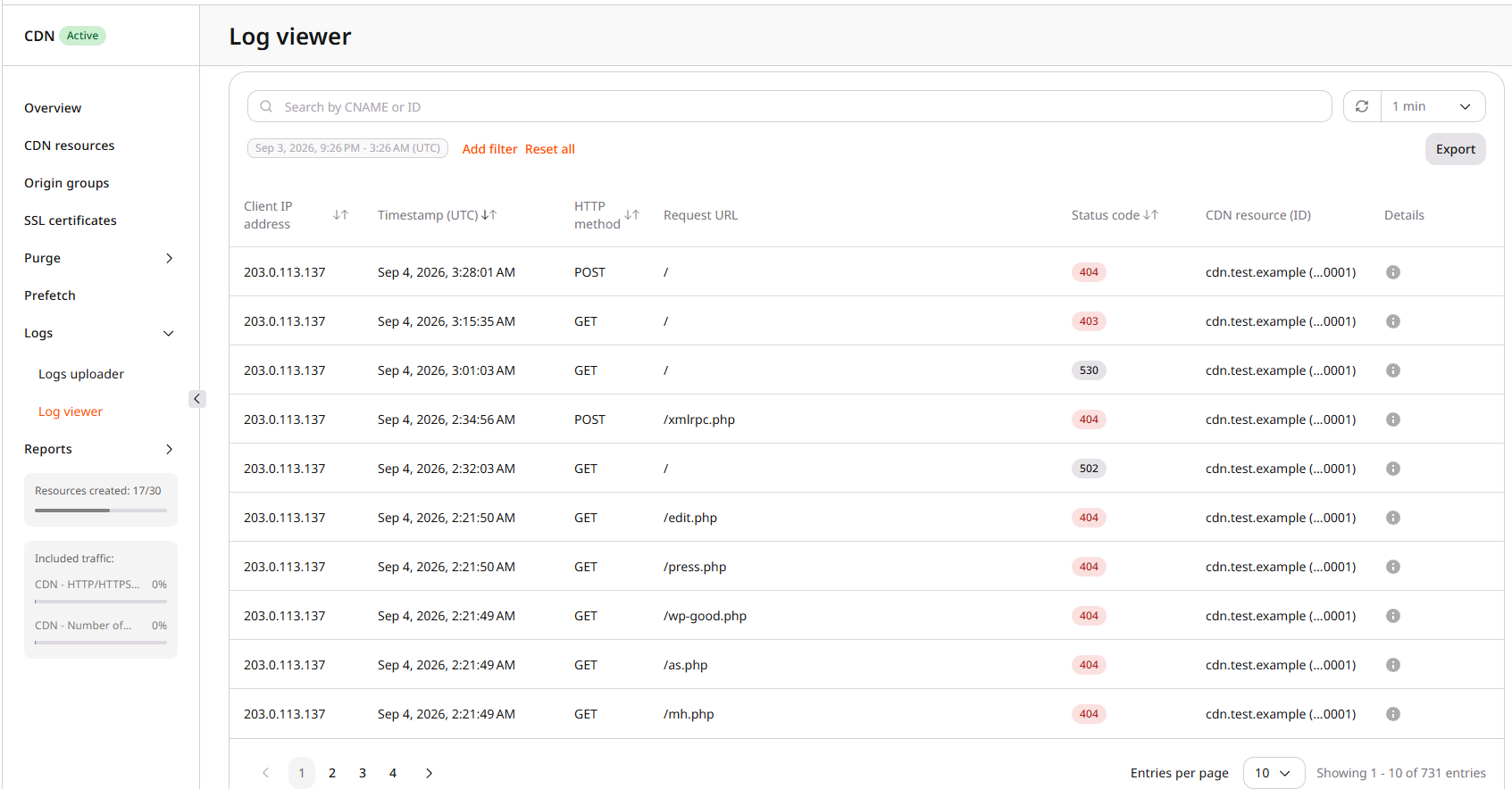
Error status codes
Status codes 403, 404, and 410 each cover more than one cause. The tables list the cause, what it means, and how to resolve it.
403 errors
A 403 can originate from the CDN or from the origin. CDN-side causes include a suspended resource, an access policy, and Secure Token validation failures. The table below covers the most common CDN causes.
| Cause | Details | Solution |
|---|---|---|
| The CDN resource is suspended. | The Content availability toggle controls whether the resource serves content. When the toggle is off, the resource does not serve content. | In CDN > CDN resources, select the resource. Enable Content availability. Automatic and manual resource suspension share this toggle. |
| An access policy blocks the client. | Country, referrer, IP, or user-agent policies can return 403. | In resource settings, open Access and review Country access policy, Referrer access policy, IP access policy, and User agents policy. Disable or adjust the policy that matches the blocked client. If a country policy blocks Angola, clients in Angola receive 403. |
| Secure Token validation fails. | A Secure Token request is rejected when the token is missing or invalid, when the request path does not match the signed path, or when the client IP does not match the IP bound to the token. An expired token returns 403 or 410 depending on the CDN resource configuration. | Review the token generation logic in Secure Token. Verify the token is present, covers the correct path, and — if IP binding is enabled — matches the client IP. For expired tokens, check the expiry time and whether the resource is configured to return 403 or 410. |
Each policy supports an allow list or a block list in access policies.
410 errors
A 410 from Orange's CDN means a Secure Token request was rejected because the token has expired, and the CDN resource is configured to return 410 for expired tokens. Resources configured to return 403 for the same condition will not produce 410.
| Cause | Details | Solution |
|---|---|---|
The Secure Token has expired and the resource returns 410 for expired tokens. | Token expiry produces 403 or 410 depending on the CDN resource configuration. | Regenerate a valid token. In Secure Token settings, check the expiry time and adjust the configured response code if needed. |
404 errors
A 404 can mean the origin has no object at that path. Some CDN options also return 404 when the origin fetch fails.
A missing object on the origin is the usual case:
| Cause | Details | Solution |
|---|---|---|
| The origin does not have the requested file. | The HTML file links to an object through the CDN, but that path does not exist on the origin. Example: https://cdn.example.com/files/image.png when image.png is missing from the files directory. | Place the object on the origin at the same name and path as the HTML link, or edit the HTML link. To stop delivering the object through CDN, remove the link from the page. |
These resource options can also produce 404 even when the path exists:
| Cause | Details | Solution |
|---|---|---|
| WebP compression and WebSockets conflict. | WebP compression and WebSockets cannot be enabled at the same time. | Disable one of the two options. |
| The Host header is incorrect. | The Host header option tells CDN nodes which origin hostname to request. A mismatched value can route the request to the wrong virtual host on the origin and produce a 4xx or 5xx response. Some origins accept multiple hostnames or use a default virtual host and may not return an error. Example: origin mycontent.com with Host header website.com. The header does not change automatically when the origin changes. | Set the correct value in the Host header option. |
| Origin access is restricted for the CDN. | The CDN cannot fetch content when the origin ACL blocks CDB addresses. This case can also return 504. | Allowlist CDN servers in the origin ACL. If IP allowlisting is not practical, send an identifying header with Request headers. |
Other errors (402, 504, 508, 556, 557)
These additional codes each have a primary cause. A 504 means the CDN did not get a timely origin response. A blocked origin ACL is one cause. Timeouts, an unreachable origin, or origin overload can produce the same code.
| Status code | Cause | Details | Solution |
|---|---|---|---|
402 | Video delivery is not enabled for the CDN account. | HLS and DASH types .m3u8, .mpd, .ts, .m4s, .m4v, and .m4a can return 402 until CDB Support enables video delivery. | Request enablement in streaming activation. |
504 | The origin did not respond in time. | The CDN timed out waiting for the origin. A blocked origin ACL is one cause. An unreachable origin, a slow origin, or origin overload can also return 504. | Test the origin directly with the correct TLS SNI by targeting the origin IP while keeping the origin hostname in the URL: curl -sS -D - -o /dev/null --resolve origin.example.com:443:192.0.2.10 https://origin.example.com/path. If the origin does not respond, check its reachability and firewall rules. If an ACL blocks CDB addresses, apply the origin ACL or Request headers fix from the 404 table above. |
508 | The configured origin resolves back to the same CDN resource, forming a loop. | A loop occurs when the custom domain or CDB-provided CDN hostname is set as the resource origin instead of the actual origin server. The custom domain CNAME must point to the CDB target shown in resource setup, and the resource origin must identify the actual origin server — not the CDN hostname or custom domain. | Set the resource origin to the actual origin server address. Fix the custom domain CNAME in content unavailability. Confirm that the custom domain's CNAME record points to the *.gcdn.co target shown in the resource's Setup guide. |
556 | The origin did not respond within the configured timeout. | Slow origins or overloaded servers can exceed connection or read limits. The default connection timeout is 5 seconds (time allowed to establish a connection). The default read timeout is 30 seconds between successive read operations from the origin. | Review the connection and read timeout settings for the CDN resource and confirm the origin responds reliably within those limits. |
557 | Simultaneous connections to one origin exceeded the limit. | Orange's CDN returns 557 when the number of simultaneous connections from one CDN location to a single origin server reaches 10,000. The limit is per origin server per CDN location. | Add origins to the origin group to distribute connections across multiple origin servers. |
HLS and DASH 402 responses
Requests for HLS or DASH manifests and segments can return 402 even when the files exist on the origin, because video delivery is not enabled yet.
TypeScript source files and 402
HLS media playlists often request MPEG Transport Stream segments with a .ts extension, so CDB treats .ts as video delivery. Those requests can return 402 until streaming is enabled. The same extension is also used for TypeScript source files. If TypeScript files return 402, compile them to JavaScript (.js) before delivery. Renaming a .ts file to .js without compiling does not produce valid JavaScript. Alternatively, contact CDB Support to review the CDN resource configuration.