CDB MCP Server overview
CDB MCP Server enables AI assistants to manage CDB services through natural language commands. The server implements the Model Context Protocol (MCP), exposing CDB API operations as callable tools used to provision infrastructure, query resources, and chain multi-step workflows.
Supported products
| Product | Description |
|---|---|
| CDN | Content Delivery Network resources, origins, caching rules, and SSL certificates |
| Cloud | Virtual machines, bare metal, GPU clusters, networking |
| DNS | DNS zones and records |
| CDB EdgeCompute | Edge computing applications |
| IAM | Users, roles, permissions |
| Security | Security groups, SSH keys, and secrets |
| Storage | S3-compatible object storage |
| Streaming | Live and VOD video streaming |
| WAAP | Web application and API protection |
CDB EdgeCompute also has a separate AI-assisted development plugin and MCP server, dedicated to scaffolding, deploying, and testing edge applications from Claude Code, Codex, or Cursor.
Supported AI clients
| Client | Compatibility | Notes |
|---|---|---|
| Claude Code | Full | Recommended due to tool search capability |
| Cursor IDE | Limited | Under 50 tools before context issues |
| MCP Inspector | Full | Web-based interface for testing and exploration |
Claude Code handles large tool sets through deferred schema loading — tool schemas are fetched on demand when they match a query, preventing context window bloat. Other clients require tool filtering via the GCORE_TOOLS environment variable to reduce the number of exposed tools.
Natural language requests
Requests are written in plain language — no fixed commands or syntax required. The AI client reads the available tool names and descriptions, matches them to the request, calls the appropriate tool, and returns the result in a readable format.
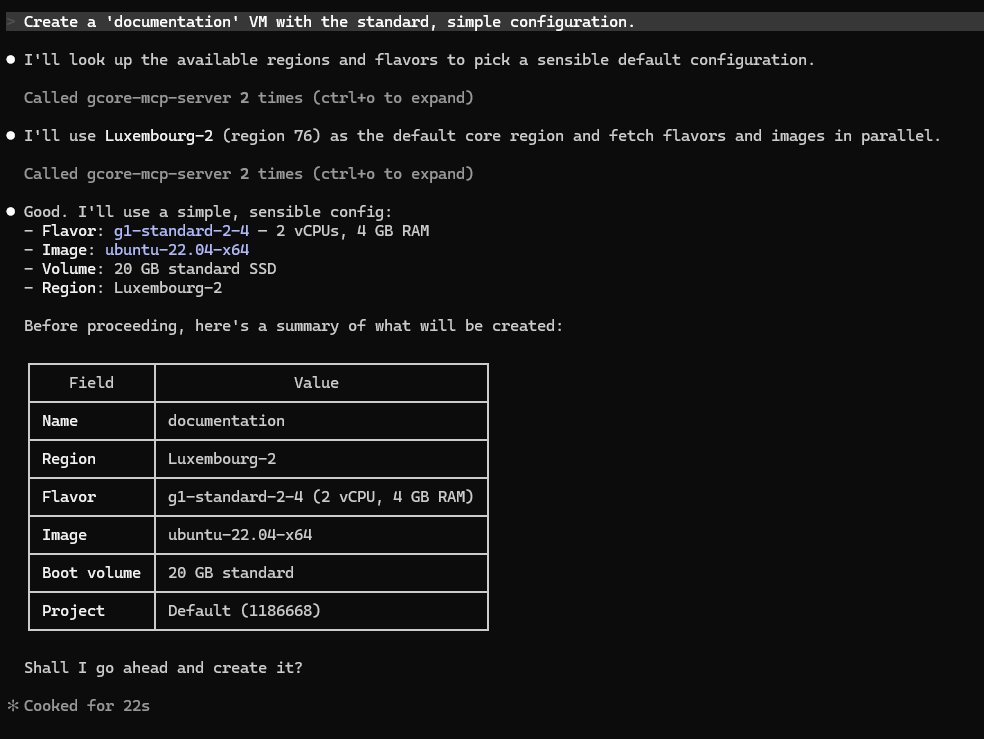
Requests can be written in any language. For multi-step operations, the server chains tool calls automatically. A request like "Create a VM with a standard configuration" triggers the server to look up available regions, flavors, and images, present a summary for confirmation, and then provision the instance.
Set up CDB MCP Server
- 1
Install and configure the server
Connect the server to Claude Code or Cursor IDE with Server setup.
- 2
Test the available tools
Explore exposed tools in a browser with MCP Inspector.
- 3
Filter tools for large tool sets
Limit exposed tools for a specific workflow with Tool filtering and the
GCORE_TOOLSenvironment variable.
An API token with permissions matching the tools used is required. The token permissions table below lists the required role per category.
API token permissions
The API token must have permissions matching the tools being used. CDB uses role-based access control:
| Tool category | Required role |
|---|---|
cdn.* | CDN Viewer (read) or CDN Editor (read/write) |
cloud.* | Cloud Viewer or Cloud Editor |
dns.* | DNS Viewer or DNS Editor |
edgecompute.* | CDB EdgeCompute Viewer or CDB EdgeCompute Editor |
storage.* | Storage Viewer or Storage Editor |
streaming.* | Streaming Viewer or Streaming Editor |
waap.* | WAAP Viewer or WAAP Editor |
iam.* | Account Administrator |
For full access across all products, use an API token with the Administrators role. For restricted access, create tokens with only the roles needed for specific operations.
Viewer roles allow read-only operations (list, get). Editor roles are required for create, update, and delete operations.