How to use CDB APIs with Postman
Postman provides a graphical interface for sending CDB API requests and inspecting responses. Authentication is configured at the collection level, a protection template is retrieved, and its id is reused in another request.
- 1
Store the token
Click Create new, then Environment. Name the environment
CDB API. Add a variable namedtokenand set the value to the API token.
Select
CDB APIin Environment.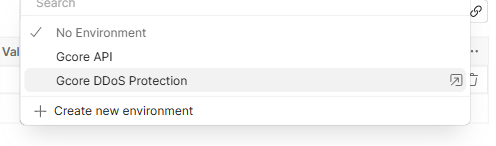
- 2
Authorize the collection
Create a collection. On its Authorization tab:
- Set Auth type to API Key.
- Set Key to
Authorization. - Set Value to
apikey {{token}}. - Set Add to to Header.
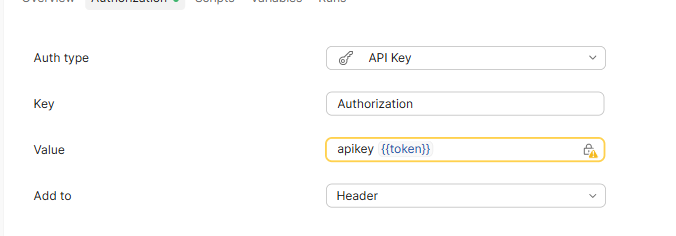
Requests in the collection use this header when their authorization is inherited.
- 3
Read the templates
Create a request in the collection. On the Authorization tab, the collection authorization is shown as Inherited.
Set the method to GET and enter
https://api.cdb-staging.cdn.orange.com/security/sifter/v3/templatesas the request URL. The operation is List protection templates.Select Send.
HTTP 200 means the request succeeded.
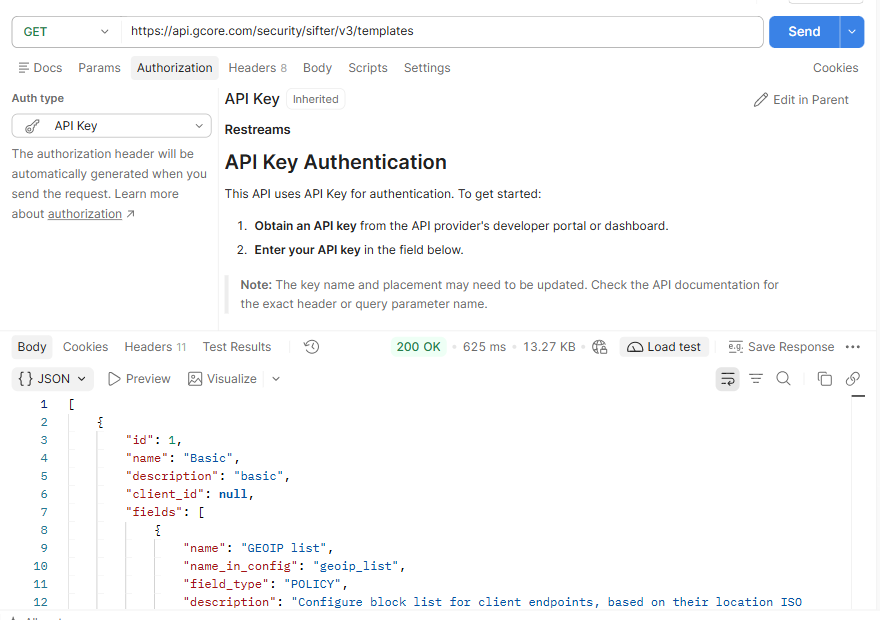
Find the template named
Basicin the response. In theCDB APIenvironment, create a variable namedtemplate_idand set its value to the template'sid. - 4
Read one template
Create another request in the same collection. On the Authorization tab, the collection authorization is shown as Inherited.
Set the method to GET and enter
https://api.cdb-staging.cdn.orange.com/security/sifter/v3/templates/{{template_id}}as the request URL. The operation is Get protection template.Select Send.
An HTTP 200 response confirms that the request succeeded. The response body contains the selected template.