IP allowlist and blocklist
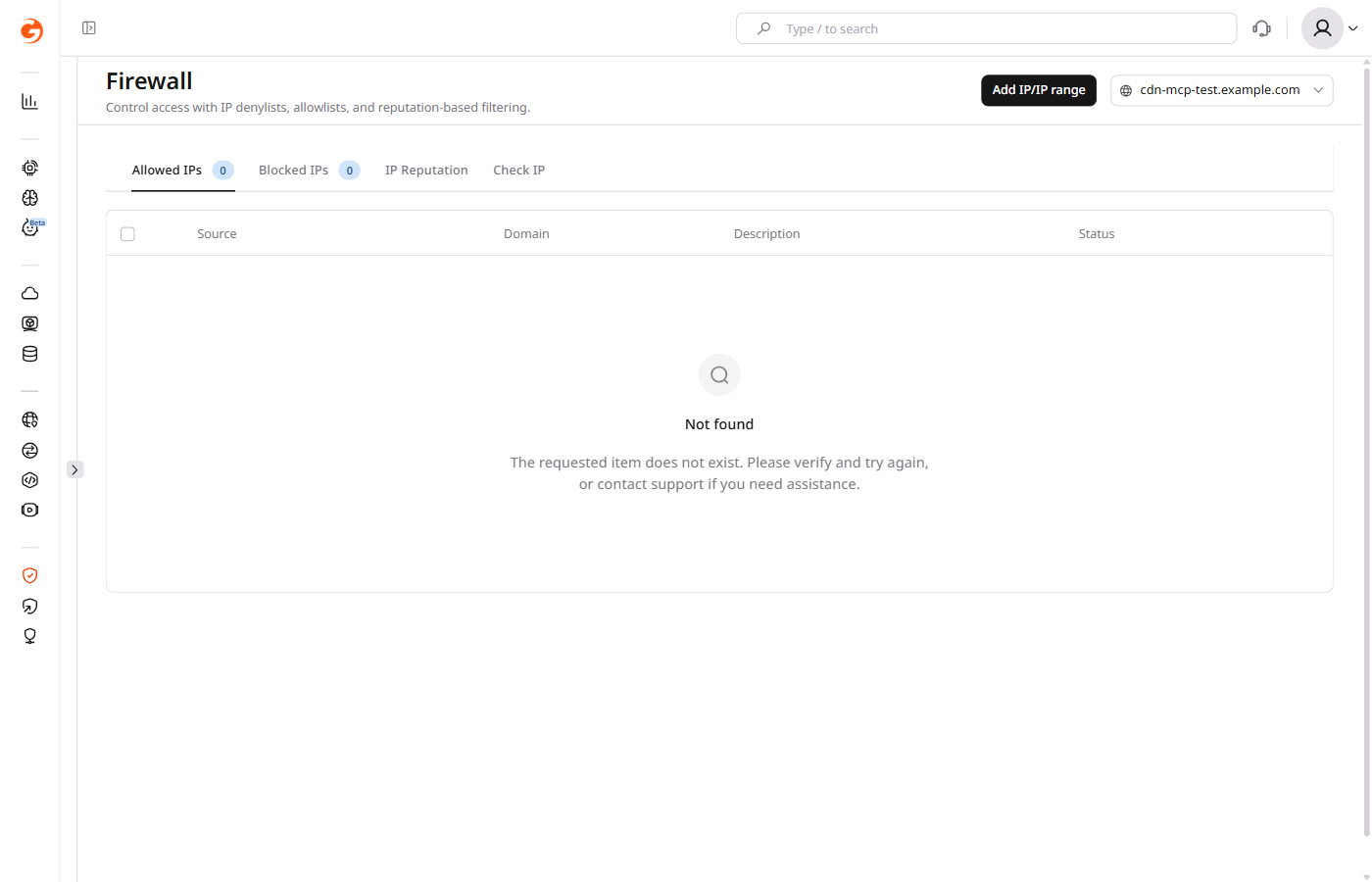
The Allowed IPs and Blocked IPs tabs let you explicitly permit or deny traffic from individual IP addresses or ranges before requests reach your application.
- Allowed IPs: permit traffic from specific addresses or ranges without any additional security checks.
- Blocked IPs: deny requests from specified addresses or ranges.
Both IPv4 and IPv6 addresses are supported. Rules must be created separately for each address type. In addition to individual addresses, you can define IP ranges using the first and last IP in the range. Up to 30 networks can be included in a single range. Subnet masks and CIDR notation are not supported.

Add a rule
- In the CDB Technical Web Portal, navigate to WAAP > Firewall.
- In the domain dropdown in the top-right corner, select the domain you want to apply the rule to.
- Open the tab for the type of rule you want to create: Allowed IPs or Blocked IPs.
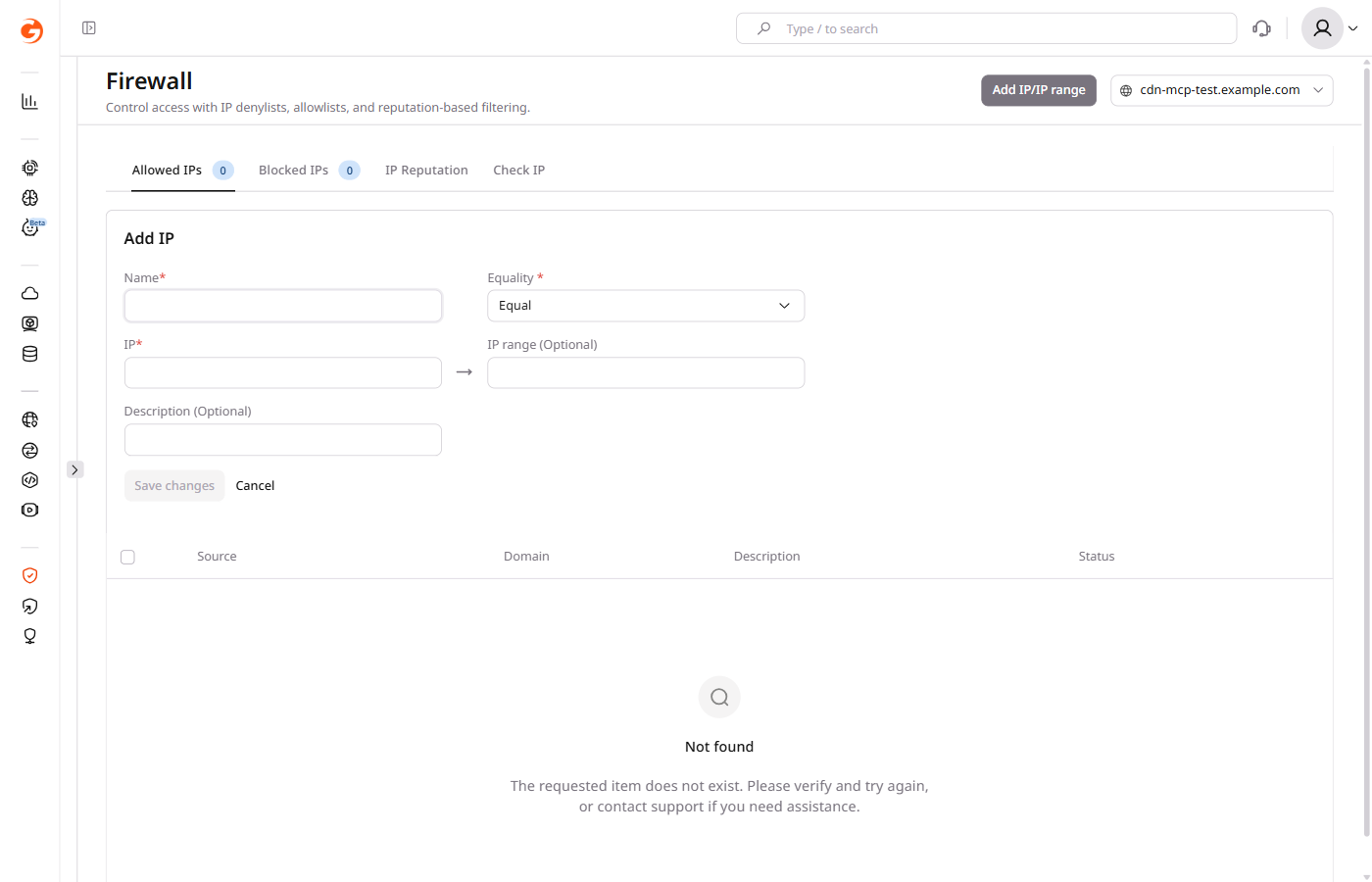
- Click Add IP/IP range. The Add IP form appears.

- Fill in the fields:
- Name: a label for the rule. Allowed characters are letters, numbers, spaces, periods, and colons.
- Equality: select Equal to match the specified IP exactly, or Not to match all IPs except the one specified.
- IP: the IP address to allow or block.
- IP range (Optional): if you are defining a range, enter the last IP address in the range.
- Description (Optional): a note about the rule purpose.
- Click Save changes.
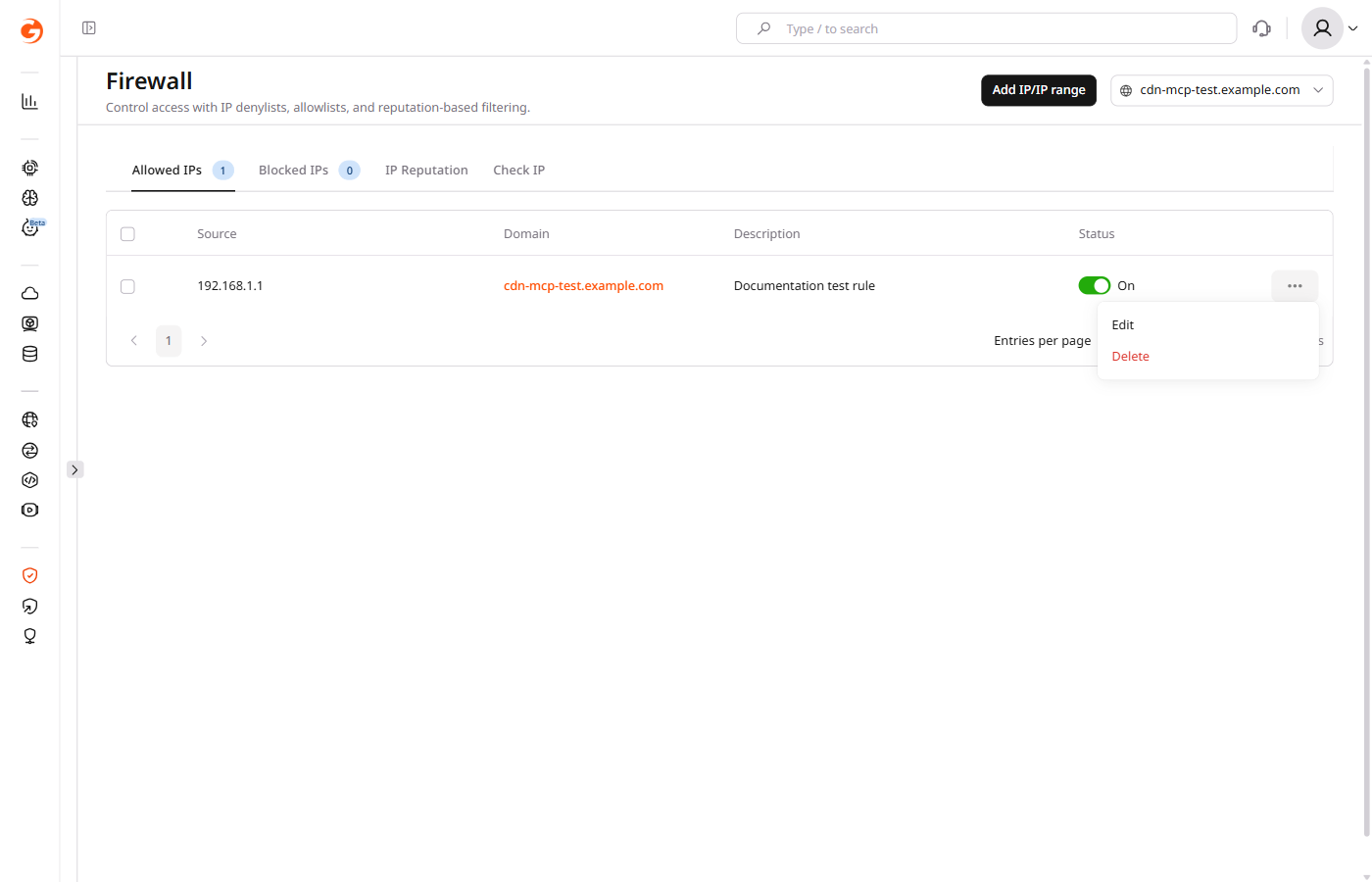
The rule appears in the list. The Status toggle is set to On by default. You can disable a rule at any time by toggling its status without deleting it.
Edit or delete a rule
- In the CDB Technical Web Portal, navigate to WAAP > Firewall.
- Select the domain from the dropdown.
- Open the Allowed IPs or Blocked IPs tab containing the rule you want to manage.
- Click the three-dot icon at the end of the rule row.

- Select the action:
- Edit: update the rule fields and click Save changes.
- Delete: confirm deletion in the dialog that appears.
To delete multiple rules at once, select the checkboxes next to the rules and use the Actions dropdown that appears above the table.
WAAP Firewall rules allow or block traffic from individual IP addresses or IP ranges before requests reach the application. The Firewall Rules endpoints support the full lifecycle: create, update, toggle, and delete rules. Response examples include only the fields used in each step.
An API token is required, along with the ID of a WAAP-protected domain and the Python or Go SDK installed for SDK examples.
export GCORE_API_KEY="{YOUR_API_KEY}"
export WAAP_DOMAIN_ID="{YOUR_DOMAIN_ID}"
List rules
Retrieve all rules configured for a domain. Filter by action=allow or action=block to narrow results to one list type.
import gcore
import os
client = gcore.CDB(api_key=os.environ["GCORE_API_KEY"])
domain_id = int(os.environ["WAAP_DOMAIN_ID"])
rules = client.waap.domains.firewall_rules.list(domain_id)
for rule in rules.results:
action = "allow" if rule.action.allow is not None else "block"
status = "enabled" if rule.enabled else "disabled"
print(f"{rule.id}: {rule.name} | {action} | {status}")
package main
import (
"context"
"fmt"
"os"
"strconv"
gcore "github.com/G-Core/gcore-go"
"github.com/G-Core/gcore-go/option"
"github.com/G-Core/gcore-go/waap"
)
func main() {
client := gcore.NewClient(option.WithAPIKey(os.Getenv("GCORE_API_KEY")))
domainID, _ := strconv.ParseInt(os.Getenv("WAAP_DOMAIN_ID"), 10, 64)
page, _ := client.Waap.Domains.FirewallRules.List(
context.Background(),
domainID,
waap.DomainFirewallRuleListParams{},
)
for _, rule := range page.Results {
action := "block"
if rule.Action.JSON.Allow.Valid() {
action = "allow"
}
status := "disabled"
if rule.Enabled {
status = "enabled"
}
fmt.Printf("%d: %s | %s | %s\n", rule.ID, rule.Name, action, status)
}
}
curl -X GET "https://api.cdb-staging.cdn.orange.com/waap/v1/domains/${WAAP_DOMAIN_ID}/firewall-rules" \
-H "Authorization: APIKey ${GCORE_API_KEY}"
Response:
{
"limit": 100,
"offset": 0,
"count": 1,
"results": [
{
"id": 12345,
"name": "partner API server",
"enabled": true,
"action": {"allow": {}},
"conditions": [{"ip": {"ip_address": "203.0.113.42", "negation": false}}]
// ...
}
// ...
]
}
Create a rule
Rules match on either a single IP address or an IP range. Set action to {"allow": {}} to add to the Allowed IPs list, or {"block": {}} to add to the Blocked IPs list.
import gcore
import os
client = gcore.CDB(api_key=os.environ["GCORE_API_KEY"])
domain_id = int(os.environ["WAAP_DOMAIN_ID"])
# Allow a single IP address
allow_rule = client.waap.domains.firewall_rules.create(
domain_id,
name="partner API server",
description="Trusted partner IP",
enabled=True,
action={"allow": {}},
conditions=[{"ip": {"ip_address": "203.0.113.42", "negation": False}}],
)
print(f"Created allow rule id={allow_rule.id}")
# Block an IP range
block_rule = client.waap.domains.firewall_rules.create(
domain_id,
name="datacenter scanner range",
enabled=True,
action={"block": {}},
conditions=[{
"ip_range": {
"lower_bound": "203.0.113.10",
"upper_bound": "203.0.113.20",
"negation": False,
}
}],
)
print(f"Created block rule id={block_rule.id}")
package main
import (
"context"
"fmt"
"os"
"strconv"
gcore "github.com/G-Core/gcore-go"
"github.com/G-Core/gcore-go/option"
"github.com/G-Core/gcore-go/waap"
)
func main() {
client := gcore.NewClient(option.WithAPIKey(os.Getenv("GCORE_API_KEY")))
domainID, _ := strconv.ParseInt(os.Getenv("WAAP_DOMAIN_ID"), 10, 64)
// Allow a single IP address
allowRule, _ := client.Waap.Domains.FirewallRules.New(
context.Background(),
domainID,
waap.DomainFirewallRuleNewParams{
Name: "partner API server",
Description: gcore.String("Trusted partner IP"),
Enabled: true,
Action: waap.DomainFirewallRuleNewParamsAction{Allow: map[string]any{}},
Conditions: []waap.DomainFirewallRuleNewParamsCondition{{
IP: waap.DomainFirewallRuleNewParamsConditionIP{
IPAddress: "203.0.113.42",
Negation: gcore.Bool(false),
},
}},
},
)
fmt.Printf("Created allow rule id=%d\n", allowRule.ID)
// Block an IP range
blockRule, _ := client.Waap.Domains.FirewallRules.New(
context.Background(),
domainID,
waap.DomainFirewallRuleNewParams{
Name: "datacenter scanner range",
Enabled: true,
Action: waap.DomainFirewallRuleNewParamsAction{Block: waap.DomainFirewallRuleNewParamsActionBlock{}},
Conditions: []waap.DomainFirewallRuleNewParamsCondition{{
IPRange: waap.DomainFirewallRuleNewParamsConditionIPRange{
LowerBound: "203.0.113.10",
UpperBound: "203.0.113.20",
Negation: gcore.Bool(false),
},
}},
},
)
fmt.Printf("Created block rule id=%d\n", blockRule.ID)
}
# Allow a single IP
curl -X POST "https://api.cdb-staging.cdn.orange.com/waap/v1/domains/${WAAP_DOMAIN_ID}/firewall-rules" \
-H "Authorization: APIKey ${GCORE_API_KEY}" \
-H "Content-Type: application/json" \
-d '{
"name": "partner API server",
"description": "Trusted partner IP",
"enabled": true,
"action": {"allow": {}},
"conditions": [{"ip": {"ip_address": "203.0.113.42", "negation": false}}]
}'
Response:
{
"id": 12345,
"name": "partner API server",
"enabled": true,
"action": {"allow": {}},
"conditions": [{"ip": {"ip_address": "203.0.113.42", "negation": false}}]
// ...
}
# Block an IP range
curl -X POST "https://api.cdb-staging.cdn.orange.com/waap/v1/domains/${WAAP_DOMAIN_ID}/firewall-rules" \
-H "Authorization: APIKey ${GCORE_API_KEY}" \
-H "Content-Type: application/json" \
-d '{
"name": "datacenter scanner range",
"enabled": true,
"action": {"block": {}},
"conditions": [{"ip_range": {"lower_bound": "203.0.113.10", "upper_bound": "203.0.113.20", "negation": false}}]
}'
Response:
{
"id": 12346,
"name": "datacenter scanner range",
"enabled": true,
"action": {"block": {"status_code": 403}},
"conditions": [{"ip_range": {"lower_bound": "203.0.113.10", "upper_bound": "203.0.113.20", "negation": false}}]
// ...
}
Save the id value from the response — it is required for all subsequent operations on the rule.
The table below describes the request body fields. Only name, enabled, action, and conditions are required.
| Field | Required | Description |
|---|---|---|
name | Yes | Rule label. Letters, numbers, spaces, periods, and colons only. Max 100 characters. |
enabled | Yes | true to activate the rule immediately after creation. |
action | Yes | {"allow": {}} for Allowed IPs list; {"block": {}} for Blocked IPs list. |
conditions | Yes | Array with one entry. Use ip for a single address or ip_range for a range. |
conditions[].ip.ip_address | Yes (single IP) | IPv4 or IPv6 address. |
conditions[].ip.negation | No | true to invert the match — the rule applies to all addresses except the one specified. Default: false. |
conditions[].ip_range.lower_bound | Yes (range) | First address in the range. |
conditions[].ip_range.upper_bound | Yes (range) | Last address. The range spans up to 30 contiguous networks. CIDR notation is not accepted. |
description | No | Free-text note about the rule. |
Update a rule
A partner server's IP was rotated after a security incident — move it from the allowlist to the blocklist by changing only the action field. All other fields retain their current values when omitted from the request.
import gcore
import os
client = gcore.CDB(api_key=os.environ["GCORE_API_KEY"])
domain_id = int(os.environ["WAAP_DOMAIN_ID"])
rule_id = 12345 # ID from the Create response
client.waap.domains.firewall_rules.update(
rule_id,
domain_id=domain_id,
action={"block": {}},
description="Compromised endpoint - moved to blocklist",
)
print("Rule moved to blocklist")
package main
import (
"context"
"fmt"
"os"
"strconv"
gcore "github.com/G-Core/gcore-go"
"github.com/G-Core/gcore-go/option"
"github.com/G-Core/gcore-go/waap"
)
func main() {
client := gcore.NewClient(option.WithAPIKey(os.Getenv("GCORE_API_KEY")))
domainID, _ := strconv.ParseInt(os.Getenv("WAAP_DOMAIN_ID"), 10, 64)
ruleID := int64(12345) // ID from the Create response
_ = client.Waap.Domains.FirewallRules.Update(
context.Background(),
ruleID,
waap.DomainFirewallRuleUpdateParams{
DomainID: domainID,
Action: waap.DomainFirewallRuleUpdateParamsAction{Block: waap.DomainFirewallRuleUpdateParamsActionBlock{}},
Description: gcore.String("Compromised endpoint - moved to blocklist"),
},
)
fmt.Println("Rule moved to blocklist")
}
export RULE_ID=12345
curl -X PATCH "https://api.cdb-staging.cdn.orange.com/waap/v1/domains/${WAAP_DOMAIN_ID}/firewall-rules/${RULE_ID}" \
-H "Authorization: APIKey ${GCORE_API_KEY}" \
-H "Content-Type: application/json" \
-d '{"action": {"block": {}}, "description": "Compromised endpoint - moved to blocklist"}'
A 204 response confirms the update was applied. The endpoint returns no body.
Enable or disable a rule
Suspend a rule temporarily without deleting it by setting its state to disable. Restore it later with enable. Both calls return 204 with no body.
import gcore
import os
client = gcore.CDB(api_key=os.environ["GCORE_API_KEY"])
domain_id = int(os.environ["WAAP_DOMAIN_ID"])
rule_id = 12345
client.waap.domains.firewall_rules.toggle("disable", domain_id=domain_id, rule_id=rule_id)
print("Rule disabled")
client.waap.domains.firewall_rules.toggle("enable", domain_id=domain_id, rule_id=rule_id)
print("Rule enabled")
package main
import (
"context"
"fmt"
"os"
"strconv"
gcore "github.com/G-Core/gcore-go"
"github.com/G-Core/gcore-go/option"
"github.com/G-Core/gcore-go/waap"
)
func main() {
client := gcore.NewClient(option.WithAPIKey(os.Getenv("GCORE_API_KEY")))
domainID, _ := strconv.ParseInt(os.Getenv("WAAP_DOMAIN_ID"), 10, 64)
ruleID := int64(12345)
_ = client.Waap.Domains.FirewallRules.Toggle(
context.Background(),
waap.DomainFirewallRuleToggleParamsActionDisable,
waap.DomainFirewallRuleToggleParams{DomainID: domainID, RuleID: ruleID},
)
fmt.Println("Rule disabled")
_ = client.Waap.Domains.FirewallRules.Toggle(
context.Background(),
waap.DomainFirewallRuleToggleParamsActionEnable,
waap.DomainFirewallRuleToggleParams{DomainID: domainID, RuleID: ruleID},
)
fmt.Println("Rule enabled")
}
export RULE_ID=12345
# Disable the rule
curl -X PATCH "https://api.cdb-staging.cdn.orange.com/waap/v1/domains/${WAAP_DOMAIN_ID}/firewall-rules/${RULE_ID}/disable" \
-H "Authorization: APIKey ${GCORE_API_KEY}"
# Enable the rule
curl -X PATCH "https://api.cdb-staging.cdn.orange.com/waap/v1/domains/${WAAP_DOMAIN_ID}/firewall-rules/${RULE_ID}/enable" \
-H "Authorization: APIKey ${GCORE_API_KEY}"
To confirm the new state, retrieve the rule with GET /docs/waap/v1/domains/{domain_id}/firewall-rules/{rule_id} and check the enabled field.
Delete a rule
Remove a rule permanently. The operation cannot be undone — disable the rule first if the goal is temporary suspension.
import gcore
import os
client = gcore.CDB(api_key=os.environ["GCORE_API_KEY"])
domain_id = int(os.environ["WAAP_DOMAIN_ID"])
rule_id = 12345
client.waap.domains.firewall_rules.delete(rule_id, domain_id=domain_id)
print(f"Rule {rule_id} deleted")
package main
import (
"context"
"fmt"
"os"
"strconv"
gcore "github.com/G-Core/gcore-go"
"github.com/G-Core/gcore-go/option"
"github.com/G-Core/gcore-go/waap"
)
func main() {
client := gcore.NewClient(option.WithAPIKey(os.Getenv("GCORE_API_KEY")))
domainID, _ := strconv.ParseInt(os.Getenv("WAAP_DOMAIN_ID"), 10, 64)
ruleID := int64(12345)
_ = client.Waap.Domains.FirewallRules.Delete(
context.Background(),
ruleID,
waap.DomainFirewallRuleDeleteParams{DomainID: domainID},
)
fmt.Printf("Rule %d deleted\n", ruleID)
}
export RULE_ID=12345
curl -X DELETE "https://api.cdb-staging.cdn.orange.com/waap/v1/domains/${WAAP_DOMAIN_ID}/firewall-rules/${RULE_ID}" \
-H "Authorization: APIKey ${GCORE_API_KEY}"
A 204 response confirms deletion.