TLS fingerprinting with JA3 and JA4
TLS fingerprinting identifies clients by the parameters exchanged during the TLS handshake rather than by IP address or the User-Agent header. These parameters — cipher suites, protocol version, and extensions — reflect the client's underlying network stack. Because they remain consistent across IP changes and are difficult to randomize at scale, they're effective for identifying botnets that rotate addresses or imitate browsers.
WAAP supports two fingerprinting algorithms:
| JA3 | JA4 | |
|---|---|---|
| Algorithm | MD5 | Truncated SHA-256 |
| Ordering sensitivity | Sensitive — values can differ between sessions | Stable — sorts fields before hashing |
| Output format | 32-character hex string | Three-part string (prefix_hex12_hex12) |
| Example value | e2925c27149b0d0dc34373d55040dde1 | t13d1516h2_8daaf6152771_b1ff8ab2d16f |
JA3 dominates threat intelligence feeds and external security tools, making it the right choice when cross-referencing fingerprints across systems. JA4 is better suited for modern TLS clients — it normalizes handshake fields that browsers may reorder between sessions, so fingerprints stay consistent.
For every incoming request, WAAP computes and logs both the JA3 and JA4 fingerprints automatically. No configuration is required.
View events by fingerprint
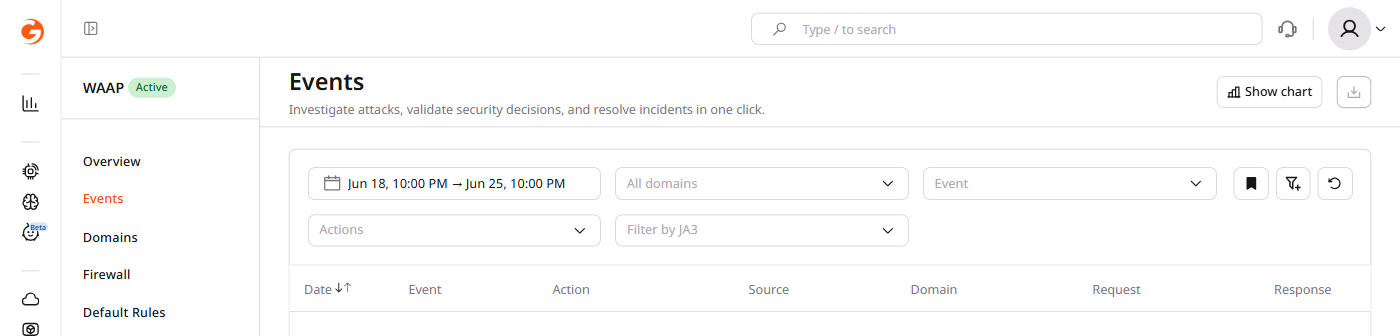
Every event logged by WAAP includes both the JA3 and JA4 fingerprints of the originating request — visible in the event list and in the request details panel. Filter by hash to isolate all traffic from a specific client library:
- In the CDB Technical Web Portal, navigate to WAAP > Events.
- In the filter bar, click the filter icon and select JA3.
- Enter the 32-character hex hash and click Apply.
Create an Advanced Rule with a fingerprint condition
Advanced Rules evaluate fingerprint values against conditions and apply an action — block, allow, or rate-limit — to matching requests. A single rule matching a specific fingerprint covers an entire botnet regardless of how many IP addresses it uses.
After identifying a suspicious fingerprint in the event log, use it directly as a rule condition:
- In the Customer Portal, navigate to WAAP > Custom Rules.
- Click Add custom rule and select Advanced Rule as the rule type.
- In the Define rule section, set the object to request and the attribute to ja3 or ja4.
- Enter the fingerprint value and set the desired action, then click Save.
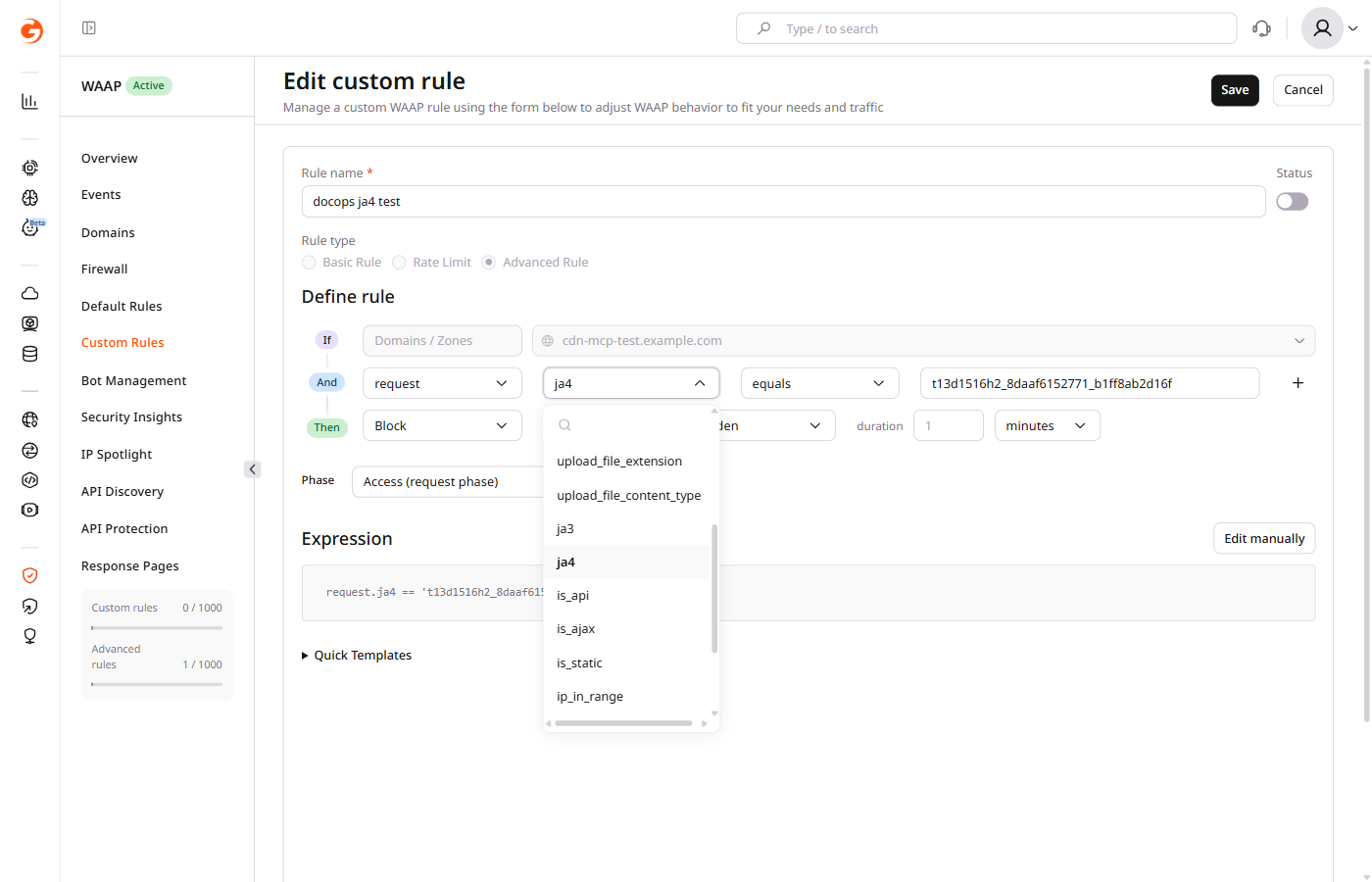
The rule builder generates the CEL expression automatically. To match multiple fingerprints, click + to add conditions, or click Edit manually to write a combined expression:
request.ja3 == 'e2925c27149b0d0dc34373d55040dde1' or
request.ja3 == '3e9b20610098b6c9bff953856e58016a' or
request.ja3 == '7d671906ed4a1edac3262a54676dacfa'
Malicious TLS Fingerprint tag
Explicit fingerprint matching isn't the only option.
WAAP automatically assigns the malicioustlsfp predefined tag to requests whose JA3 fingerprint consistently shows malicious behavior across CDB's traffic. A tag-based rule targeting this tag applies an action without requiring knowledge of a specific hash value:
tags.exists('malicioustlsfp')
When a fingerprint hasn't yet crossed the behavioral threshold, an explicit request.ja3 or request.ja4 condition in an Advanced Rule is the fallback — as the incident below illustrates.
Incident example
A gaming service received approximately 1.5 billion requests from around 2,200 source IPs. The attack used only five User-Agent strings and mimicked legitimate browser behavior, making blocking by IP or User-Agent impractical.
Analysis showed that 99% of the attack traffic shared a single JA3 fingerprint. One Advanced Rule matching that fingerprint mitigated the entire attack without touching IP allowlists or rate limits.