Auto-refresh CDN secure tokens
Short-lived tokens are the most effective defence against link sharing during live events or pay-per-view streams. Set the token to expire in 60 seconds, refresh it automatically in the player before it expires, and anyone who copies the URL from the browser or network inspector will have a useless link within a minute — while your legitimate viewers experience uninterrupted playback.
The link-sharing problem
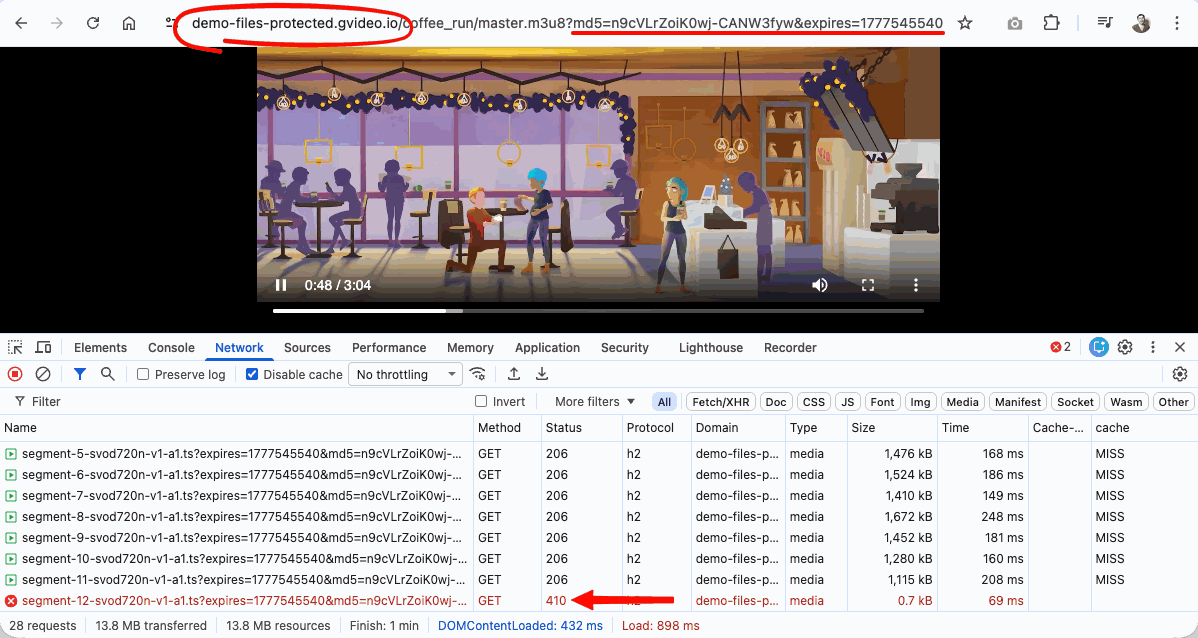
A CDN secure token embeds authentication in the URL as query parameters:
http://cdn.example.com/live/stream/master.m3u8?md5={token}&expires={expires}
This URL is visible to any viewer who opens developer tools or copies the address from a player. With a 24-hour token, a paying subscriber can paste the link into a chat during a live broadcast, and anyone who follows it can watch for free for the full 24 hours.
The fix: make tokens expire in 60 seconds and refresh them automatically. Copied URLs become invalid within a minute. Authorized viewers never notice the transition.
Token modes
There are two decisions to make when you configure token auto-refresh for video delivery:
- Choose the URL token format supported by your product.
- Choose whether the token is plain or IP-bound.
For custom CDN resources with your own video origin, CDN Secure Token supports query string parameters only:
https://cdn.example.com/video/master.m3u8?md5=TOKEN&expires=EXPIRY
Path-based token URLs are supported by CDB Video Streaming, not by generic CDN resources:
https://example.gvideo.io/videos/{video_id}/{token}/{expires}/master.m3u8
If you use Video CDN with your own HLS or MPEG-DASH origin, use query string parameters and enable Query String Forwarding. If you want CDB to handle the full workflow — ingest, transcoding, packaging, CDN delivery, and player-ready protected URLs — use CDB Video Streaming.
After you choose the query-parameter format for CDN, choose one of these token validation modes for CDN Secure Token:
| Mode | Description | Best for |
|---|---|---|
| Plain token | Valid from any IP. Shared URL is worthless within the TTL. | Users behind NAT, VPNs, or mobile networks where IP can change |
| IP-bound token | Tied to the viewer's IP at generation time. Sharing fails even within the TTL. | Desktop viewers on stable connections; highest security |
Prerequisite: enable Query String Forwarding For HLS/DASH playback, you must enable Query String Forwarding on your CDN resource before using auto-refresh tokens. Otherwise, you'll see 403 errors for segments after the first token refresh.
See the Query String Forwarding documentation for full details.
How auto-refresh works
   Player loads          ~10 s before expiry      Fresh token received
   with 60-s URL
        │                       │                         │
   ─────┼───────────────────────┼─────────────────────────┼──────────────▶ time
        │    seamless playback  │   background fetch      │   continues
        │◄───────────────────────────────────────────────►│
- The player loads with a signed URL containing a short-lived token (e.g., 60 s).
- A timer fires a few seconds before expiry.
- The player calls your backend and receives a fresh
{ token, expires, url }response. - The
?md5=TOKEN&expires=EXPIRYquery parameters are updated in every outgoing request. - Playback continues without a visible interruption. The viewer's browser still shows a URL that will expire in seconds — sharing it is pointless.
Choosing a token lifetime
For maximum reliability use long-lived tokens (e.g. more than an hour). For maximum protection use short-lived IP-bound tokens — a shared URL is both nearly expired and locked to the original viewer's IP. But keep in mind the tradeoff: the shorter the token lifetime, the more sensitive the system becomes to poor network conditions (see Choosing a token lifetime below).
The demo uses expire=60 (60 seconds) to make refresh cycles easy to observe. In production, 60 seconds is very aggressive — use it only if link sharing during live events is a critical threat.
The core tradeoff is: shorter TTL = stronger protection, but less tolerance for slow networks.
On a poor mobile connection, a viewer's player may take several seconds to fetch a fresh token and download the next media segment before the old token expires. If both operations don't complete within the token's lifetime, the CDN rejects the segment request with a 403 and playback will stall or error.
| TTL | Protection level | Mobile friendliness | Typical use case |
|---|---|---|---|
| 30–60 s | Maximum | Low — may cause issues on 3G/poor Wi-Fi | High-value live pay-per-view |
| 300 s (5 min) | Strong | Good | Most live streaming scenarios |
| 600 s (10 min) | Good | Excellent | VOD, audiences on mixed networks |
| 3600 s (1 h) | Basic | No issues | Low-risk content, wide audience |
| 86400 s (24 h) | Minimum | No issues | Low-risk content, wide audience |
A rule of thumb: set the refresh lead time to at least 20-30% of the token lifetime. For a 300-second token, a lead of 60-90 seconds gives enough runway for the token fetch to complete even on a slow connection before the current token expires.
Architecture for HLS / MPEG-DASH with token auto-refresh
Players such as hls.js and dash.js can work with token auto-refresh, but the player alone is not enough. You need both:
- an updated player integration that can request fresh tokens and rewrite playback URLs,
- a backend endpoint that authenticates the viewer and generates new CDN Secure Tokens.
The player gets video manifests and segments from Video CDN. It gets new secure tokens from your backend.
                         1. request video manifest / segments
Viewer browser
hls.js / dash.js  -------------------------------------------->  CDN
     ^                                                  .m3u8 / .mpd / segments
     | 2. request fresh token before expiry
     | 3. return md5 + expires, rewrites requests with fresh token
     v
Customer backend
auth + access checks + token generation
CDN does not decide whether a viewer has paid or has the right subscription. It validates only the token in the request.
Your backend makes the business decision, then returns a new token only for authorized users.
Backend: generating tokens
Backend to generate tokens
Token generation must run on your server — the CDN secret key must never be sent to the browser. Your backend can use any authentication and internal checks before it returns a token: user session, JWT, subscription status, payment status, geo rules, account permissions, purchased event tickets, or any other access logic.
After these checks, your backend decides what to return:
- a fresh token and expiration time,
- a full signed playback URL,
- or an error if the viewer is not allowed to watch the content.
Demo backend for token API
A working demo endpoint is available for testing and development:
GET https://cdn-token-102748.edgecompute.app/
    ?path=/coffee_run/master.m3u8   # path to the protected file
    &expire=60                       # token lifetime in seconds
For the demo, we prepared a very simple CDB EdgeCompute application at https://cdn-token-102748.edgecompute.app/. It returns new tokens to all users without authentication, so you can test the player-side refresh flow quickly.
This CDB EdgeCompute app is bound to the CDB demo CDN resource and signs tokens for the demo-files-protected.gvideo.io domain only. Use it for testing and integration purposes — it cannot be used with your own CDN resource or content.
Response:
{
  "token":     "wJwksdtokkU4B9fn3YPWtg",
  "token_ip":  "6JicUv-0vgR9mue8rCcF5w",
  "client_ip": "92.223.112.84",
  "expires":   1775780869,
  "url":       "http://demo-files-protected.gvideo.io/coffee_run/master.m3u8?md5=wJwksdtokkU4B9fn3YPWtg&expires=1775780869",
  "url_ip":    "http://demo-files-protected-ip.gvideo.io/coffee_run/master.m3u8?md5=6JicUv-0vgR9mue8rCcF5w&expires=1775780869"
}
| Field | Description |
|---|---|
token | Plain secure token — valid from any IP |
token_ip | IP-bound secure token — locked to client_ip |
client_ip | Viewer's IP as seen by the API (used for IP-bound tokens) |
expires | Unix timestamp when both tokens expire |
url | Ready-to-use URL with plain token as query params |
url_ip | Ready-to-use URL with IP-bound token as query params |
What is CDB EdgeCompute?
CDB EdgeCompute is a serverless edge-compute platform that runs WebAssembly applications at CDN edge locations worldwide. Apps compile to WASM, start in microseconds with no cold starts, and respond in milliseconds. Billing is per request with no idle cost.
For token signing — a stateless, CPU-bound computation — CDB EdgeCompute is a natural fit: it runs close to the viewer, scales automatically to any load, and requires no dedicated infrastructure to manage.
Need user authentication? The demo CDB EdgeCompute app generates tokens for anyone who calls it — there is no login check. If you need to restrict access to authenticated users only (subscribers, paid accounts, ticket holders), you must implement your own backend endpoint that verifies the user's session or JWT before generating a token. CDB EdgeCompute can still be used for that, but the authentication logic must be added to the app. Alternatively, use any backend stack you already have (Node.js, Python, Go, etc.) — the token generation formula is the same regardless of the platform.
CDB EdgeCompute app source code
The demo endpoint is a Rust WebAssembly application deployed on CDB EdgeCompute. You can use it as a starting point for your own token API.
Production requirement: Add your own authentication check before generating a token. Verify that the requesting user has a valid session and is authorised to access the specific content. Without this check, any caller can request a token for any file path.
If you need user authentication, implement your own backend that validates the session and returns the signed URL from the server — never expose the CDN secret key to the client.
Frontend: player integration
The examples below use the demo API. Replace TOKEN_API_URL with your own authenticated backend endpoint before deploying to production.
All approaches share the same core mechanism: a URL rewriter adds or updates the ?md5=TOKEN&expires=EXPIRY query parameters in every outgoing request, and a timer fetches a fresh token a few seconds before expiry.
To give you an idea of how it works, we have prepared a demo app for CDB Video Player: https://g-core.github.io/gcore-videoplayer-js/example/protected-content.html
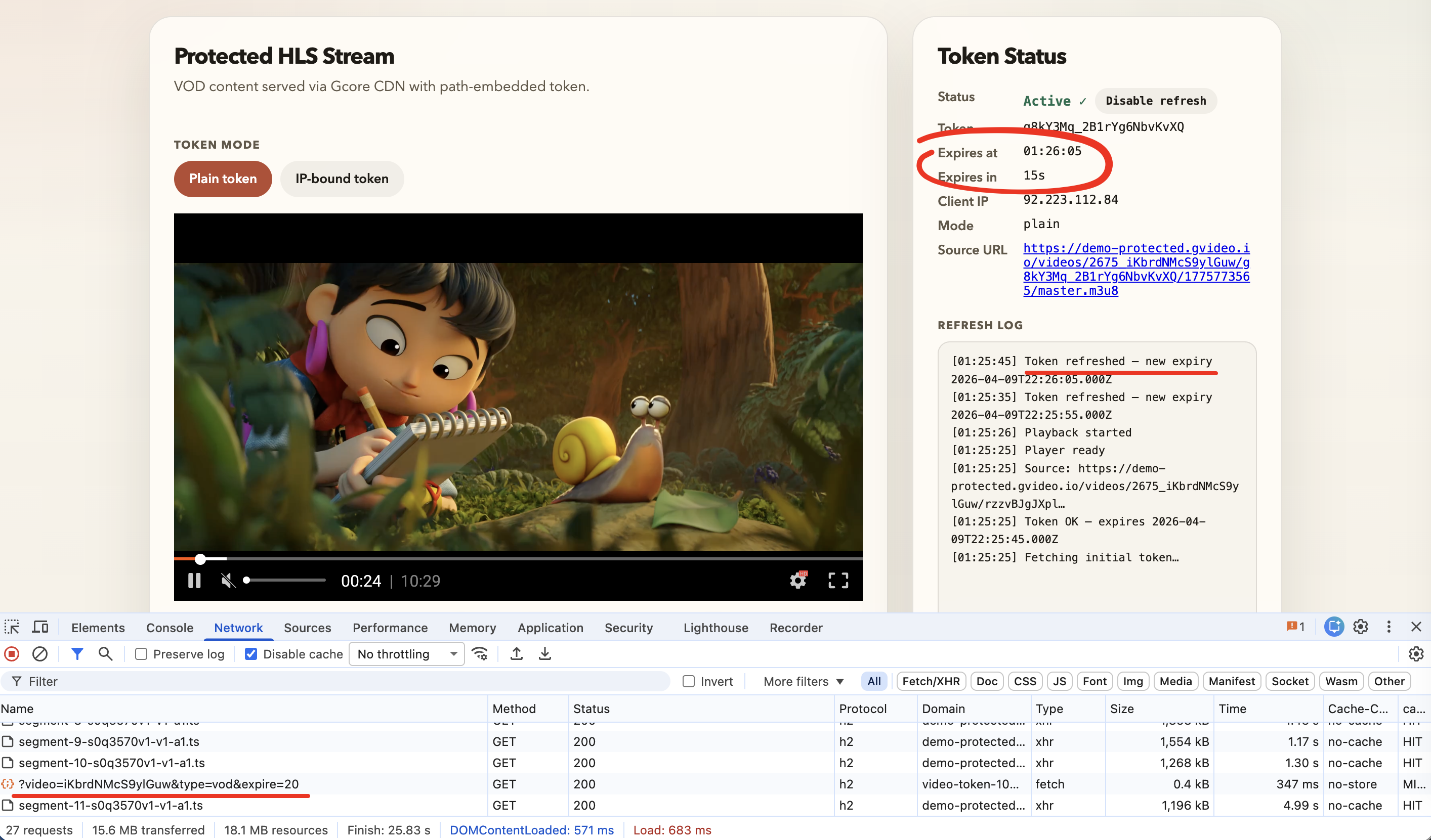
Below are 2 approaches for token auto-refresh implementation:
- HLS.js + custom URL loader
- Dash.js + custom URL loader
Both approaches share the same core mechanism: a URL rewriter replaces the ?md5={token}&expires={expiry} query parameters in every outgoing request and a timer fetches a fresh token a few seconds before expiry. Playback is never interrupted.
hls.js
For HLS streams, hls.js with a custom URL-rewriting loader gives seamless, uninterrupted token rotation. This is the recommended approach for most use cases.
How it works:
TokenRewriteLoaderextends the default hls.js XHR loader. Before every request — master manifest, sub-playlists, media segments — it callsrewriteUrl()to update the?md5=and&expires=query parameters.tokenStateis a plain object shared between the loader and the refresh timer. The loader closure always reads the latest value.- A
setTimeout-based scheduler triggers a refresh ~10 s before expiry and reschedules itself after each successful fetch. - With Query String Forwarding enabled on the CDN resource, the CDN also propagates these parameters from manifest requests to derived segment requests server-side. The custom loader ensures the parameters stay current after each token refresh.
dash.js
For DASH (MPEG-DASH) streams, dash.js provides a RequestModifier extension that rewrites every URL before the request is dispatched. The refresh timer is identical to the hls.js approach.
How it works:
- The
RequestModifierextension'smodifyRequest()method is called before every HTTP request — MPD manifest, segment requests, and initialization chunks. - The same
rewriteUrl()function as in the hls.js example sets?md5=and&expires=on every URL. - Enable Query String Forwarding on the CDN resource (
.mpd→.m4s) for DASH segment auth to work.
CDB Video Player
The CDB Video Player (@gcorevideo/player) can play protected CDN streams by reloading the source URL with a fresh token before each expiry.
For details see the dedicated guide.