When a domain hosts APIs on the same hostname and API Discovery is off, add those paths to the API base path. WAAP treats the paths as API traffic and applies API-specific protection, while allowlist entries stay a separate setting.
Enter each path as a suffix of the domain:
A plain path matches recursively — api/ covers api/v1/* and api/v2/*.
Paths support Lua pattern syntax. api/v1/.* and v2/.* are valid patterns. Lua patterns do not support regular-expression alternation (|), so each alternative path needs its own entry.
Enter the path without the protocol or the domain: api/, not https://mywebsite.com/api/. WAAP adds the domain.
Paths are case-sensitive. api/ does not match requests to /API/.
Each path needs its own entry.
API endpoint addition
Add one path on the API Base Path tab, or mark the whole domain as an API.
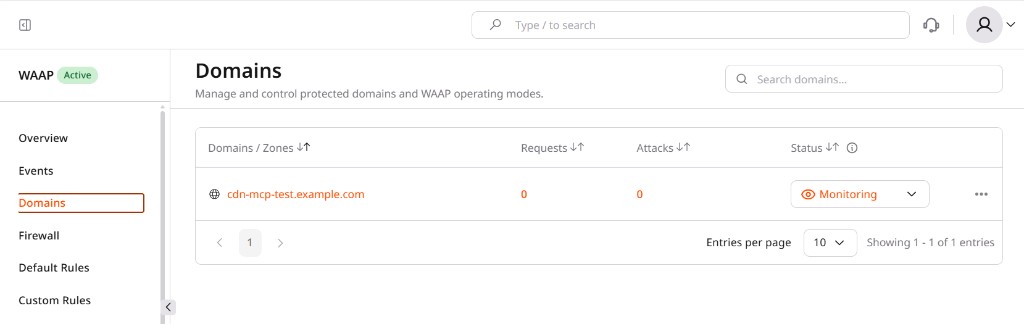
Select a domain and click its name. The Overview page opens.
2
Open API base path settings
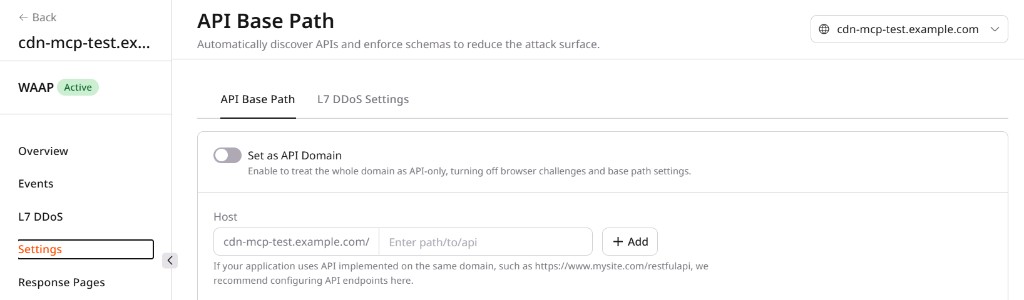
In the sidebar, click Settings, then select the API Base Path tab.
3
Add the path
The Host field already shows the domain, and the placeholder is Enter path/to/api. Enter only the path, api/.
Click Add. The path appears in the Endpoint table.
4
Mark the whole domain
(Optional) Select Set as API Domain, then click Enable. Defined paths no longer apply, and WAAP updates the matching CDN setting.
For paths in the Endpoint table, WAAP disables CAPTCHA and JavaScript validation. DDoS protection, IP reputation, and rate limiting stay active on those paths. Custom WAAP rules and firewall rules can still block the requests.
API endpoint removal
Remove a path from the Endpoint table when WAAP should stop treating it as API traffic.
1
Delete the path
Find the path and click the three-dot icon next to it.
Select Delete.
In the Delete API endpoint dialog, click Delete.
When a domain hosts APIs on the same hostname and API Discovery is off, set the API base path with Retrieve domain settings and Set domain settings. WAAP disables CAPTCHA and JavaScript validation on those paths and keeps DDoS protection, IP reputation, and rate limiting active, while allowlist entries stay a separate setting.
Each response shows only the fields used in that call.
A plain path matches recursively — api/ covers api/v1/* and api/v2/*.
Paths support Lua pattern syntax. api/v1/.* and v2/.* are valid patterns. Lua patterns do not support regular-expression alternation (|), so each alternative path needs its own entry.
Enter the path without the protocol or the domain: api/, not https://mywebsite.com/api/. WAAP adds the domain.
Paths are case-sensitive. api/ does not match requests to /API/.
Each path needs its own entry.
⚠️
The api_urls field replaces the entire list on every update. Sending {"api_urls": ["api/v3/"]} erases every previously configured path and leaves only api/v3/. Retrieve the current list first and include every existing path in the update.
Current configuration
The call returns is_api and the current api_urls list.
import os
from gcore import CDB

client = CDB()
domain_id = int(os.environ["DOMAIN_ID"])

settings = client.waap.domains.settings.get(domain_id)
print("is_api:", settings.api.is_api)
print("api_urls:", settings.api.api_urls)
curl -X GET "https://api.cdb-staging.cdn.orange.com/waap/v2/domains/${DOMAIN_ID}/settings" \
  -H "Authorization: apikey ${GCORE_API_KEY}"
API path configuration
Add or remove paths by sending the complete api_urls list to PATCH /docs/waap/v2/domains/{domain_id}/settings. Read the current list first, because the field replaces every stored path, and the call returns HTTP 200 with the updated settings.
import os
from gcore import CDB

client = CDB()
domain_id = int(os.environ["DOMAIN_ID"])

settings = client.waap.domains.settings.get(domain_id)
current = settings.api.api_urls or []

# Add a path
client.waap.domains.settings.update(
    domain_id,
    api={"api_urls": current + ["api/v3/"]},
)

# Remove a path
# client.waap.domains.settings.update(
#     domain_id,
#     api={"api_urls": [u for u in current if u != "api/v2/"]},
# )
package main

import (
    "context"
    "fmt"
    "os"
    "strconv"

    gcore "github.com/G-Core/gcore-go"
    "github.com/G-Core/gcore-go/waap"
)

func main() {
    client := gcore.NewClient()
    ctx := context.Background()
    domainID, err := strconv.ParseInt(os.Getenv("DOMAIN_ID"), 10, 64)
    if err != nil {
        panic(fmt.Errorf("invalid DOMAIN_ID: %w", err))
    }

    settings, err := client.Waap.Domains.Settings.Get(ctx, domainID)
    if err != nil {
        panic(err.Error())
    }

    // Add a path
    _, err = client.Waap.Domains.Settings.Update(ctx, domainID, waap.DomainSettingUpdateParams{
        API: waap.DomainSettingUpdateParamsAPI{
            APIURLs: append(settings.API.APIURLs, "api/v3/"),
        },
    })
    if err != nil {
        panic(err.Error())
    }
    fmt.Println("Updated.")

    // Remove a path: filter the list and send the result
    // pathToRemove := "api/v2/"
    // var updated []string
    // for _, u := range settings.API.APIURLs {
    //     if u != pathToRemove {
    //         updated = append(updated, u)
    //     }
    // }
    // _, err = client.Waap.Domains.Settings.Update(ctx, domainID, waap.DomainSettingUpdateParams{
    //     API: waap.DomainSettingUpdateParamsAPI{APIURLs: updated},
    // })
}
# Retrieve the current paths first, then send the full updated list.
# The call adds api/v3/ to the existing api/v1/ and api/v2/ paths.
curl -X PATCH "https://api.cdb-staging.cdn.orange.com/waap/v2/domains/${DOMAIN_ID}/settings" \
  -H "Authorization: apikey ${GCORE_API_KEY}" \
  -H "Content-Type: application/json" \
  -d '{"api": {"api_urls": ["api/v1/", "api/v2/", "api/v3/"]}}'

# To remove api/v2/, send the list without it:
# -d '{"api": {"api_urls": ["api/v1/", "api/v3/"]}}'
Domain-wide API configuration
When is_api is enabled, WAAP treats all domain traffic as API requests and disables browser challenges for the whole domain. Individual api_urls entries stay stored and apply again when is_api is set back to false, and the call returns HTTP 200 with the updated domain settings.
import os
from gcore import CDB

client = CDB()
domain_id = int(os.environ["DOMAIN_ID"])

client.waap.domains.settings.update(
    domain_id,
    api={"is_api": True},
)