Azure Blob Export by API
Prerequisites
A CDB API token with CDN access An Azure Storage account with a container created Either an Account Key or a SAS token for authentication
Step 0: Retrieve access information from Azure Portal
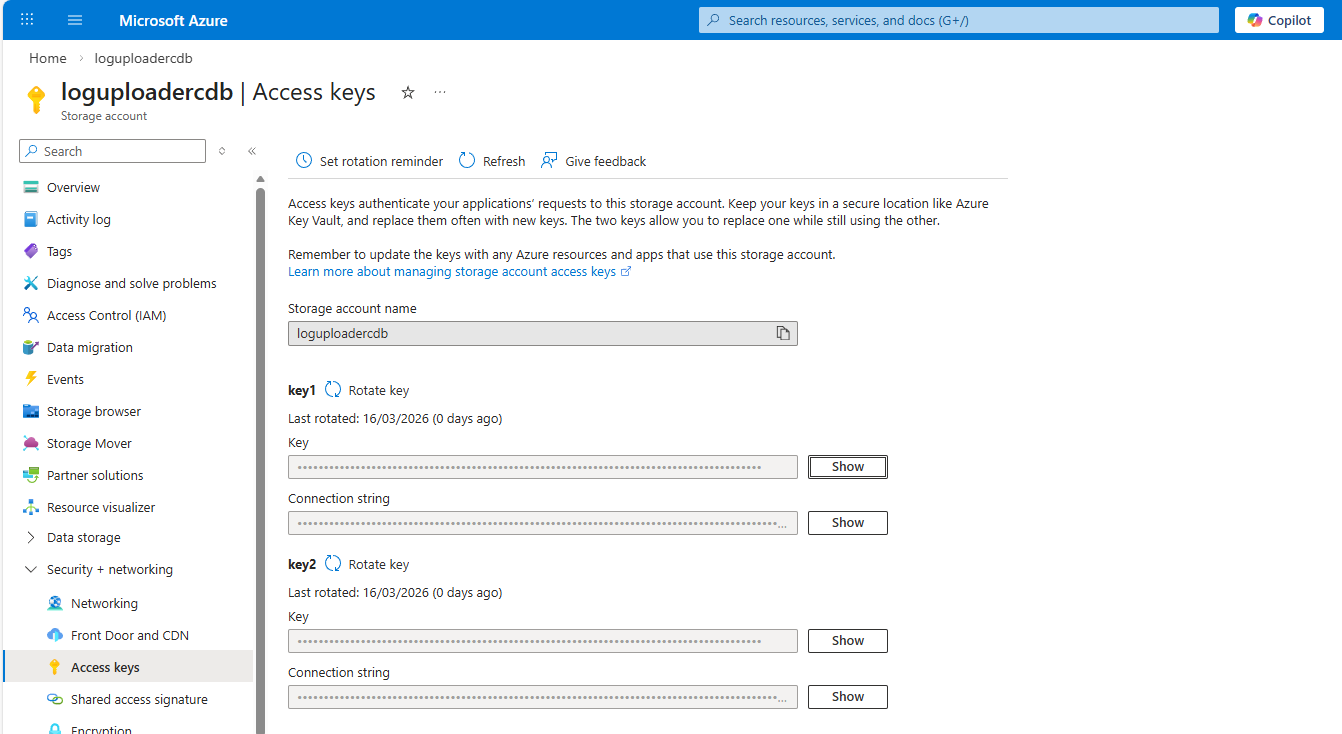
Option A - Access key
Go to Storage Center > Blob Storage.
Select the Blob that will be used as destination.
Go to security + Networking > Access keys
Copy the Key of one of the 2 key.
Option B - Shared Access Signature
Go to Storage Center > Blob Storage.
Select the Blob that will be used as destination.
Go to security + Networking > Shared access signature
Generate a new SAS and connection string.
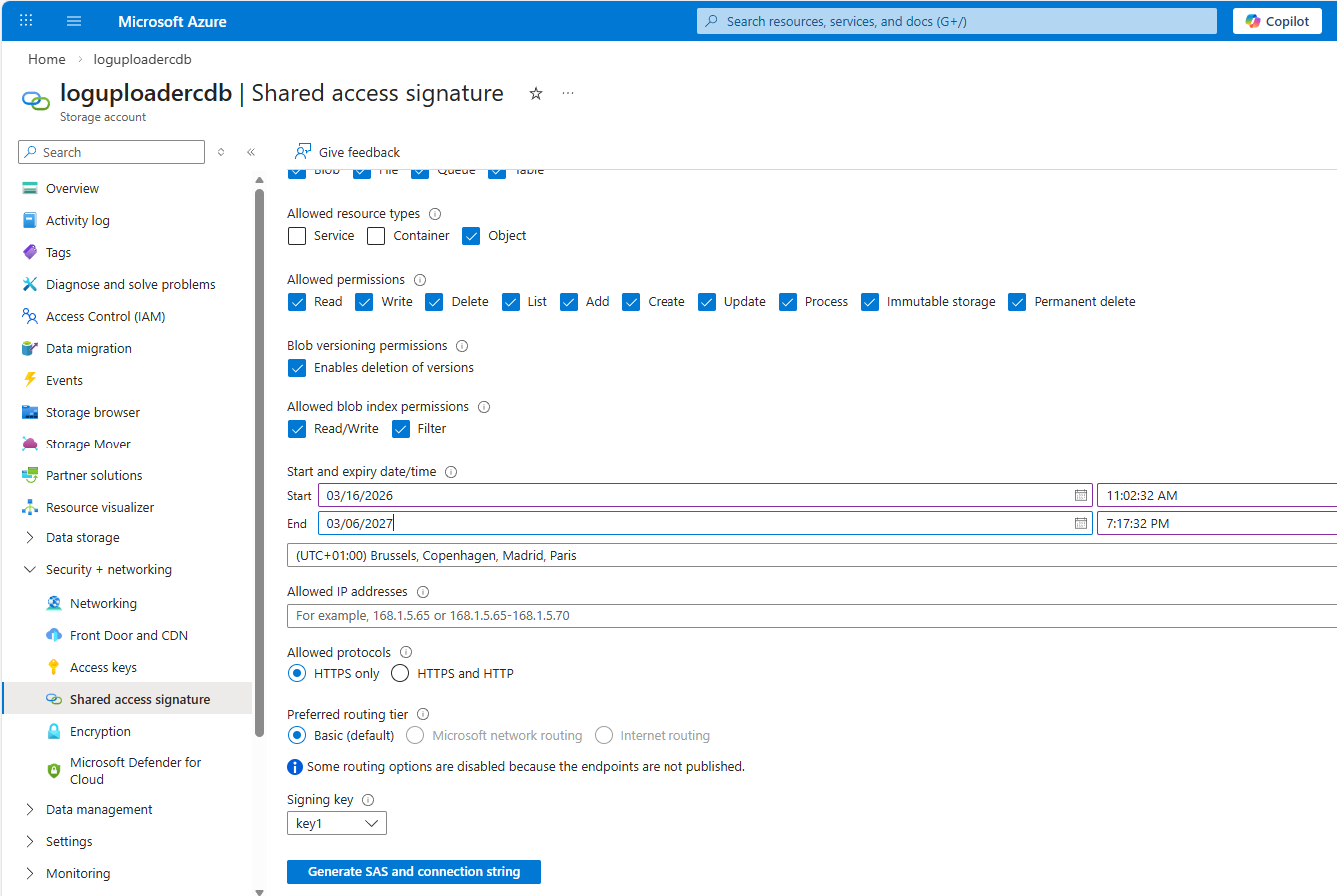 Copy SAS token entry
Step 1: Create a Log Uploader Target
POST /docs/cdn/api/v1/logs_uploader/targets
Option A — Shared Key authentication
  curl -X POST https://api.cdb-staging.cdn.orange.com/docs/cdn/api/v1/logs_uploader/targets \
    -H "Authorization: APIKey <your_token>" \
    -H "Content-Type: application/json" \
    -d '{
      "storage_type": "azure_blob",
      "name": "My Azure Blob Target",
      "description": "CDN logs to Azure",
      "config": {
        "account_name": "mystorageaccount",
        "container_name": "cdn-logs",
        "directory": "cdn/raw",
        "auth": {
          "type": "shared_key",
          "config": {
            "account_key": "<base64-encoded-account-key>"
          }
        }
      }
    }'

Option B — SAS Token authentication
  curl -X POST https://api.cdb-staging.cdn.orange.com/docs/cdn/api/v1/logs_uploader/targets \
    -H "Authorization: APIKey <your_token>" \
    -H "Content-Type: application/json" \
    -d '{
      "storage_type": "azure_blob",
      "name": "My Azure Blob Target (SAS)",
      "config": {
        "account_name": "mystorageaccount",
        "container_name": "cdn-logs",
        "directory": "cdn/raw",
        "auth": {
          "type": "sas_token",
          "config": {
            "token": "sv=2021-06-08&ss=b&srt=co&sp=rwdlacupiytfx&..."
          }
        }
      }
    }'

Field reference
| Field | Required | Description |
|---|---|---|
| storage_type | yes | Must be "azure_blob" |
| config.account_name | yes | Azure Storage account name (max 512 chars) |
| config.container_name | yes | Blob container name (max 512 chars) |
| config.directory | no | Subdirectory path inside the container (max 512 chars) |
| config.endpoint | no | Custom endpoint URL — use only when targeting a non-Microsoft endpoint (e.g. Azurite, sovereign cloud) |
| config.auth.type | yes | "shared_key" or "sas_token" |
| config.auth.config.account_key | if shared_key | Storage account key (from Azure portal → Access keys) |
| config.auth.config.token | if sas_token | SAS token string (without leading ?) |
Successful response — 201 Created:
 {
    "id": 42,
    "client_id": 1001,
    "storage_type": "azure_blob",
    "name": "My Azure Blob Target",
    "status": { "..." },
    "config": {
      "account_name": "mystorageaccount",
      "container_name": "cdn-logs",
      "directory": "cdn/raw",
      "endpoint": null,
      "auth": {
        "type": "shared_key",
        "config": { "account_key": "*****" }
      }
    }
  }
Step 2: Validate the Target
Trigger a connectivity check to confirm CDB can reach the container:
  curl -X POST https://api.cdb-staging.cdn.orange.com/docs/cdn/api/v1/logs_uploader/targets/42/validate \
    -H "Authorization: APIKey <your_token>"
Check the status field in the response for the validation result.
Step 3: Update the Target
Use PATCH to update individual fields without replacing the whole config:
  curl -X PATCH https://api.cdb-staging.cdn.orange.com/docs/cdn/api/v1/logs_uploader/targets/42 \
    -H "Authorization: APIKey <your_token>" \
    -H "Content-Type: application/json" \
    -d '{
      "config": {
        "auth": {
          "type": "sas_token",
          "config": { "token": "<new-sas-token>" }
        }
      }
    }'
Use PUT to fully replace the target configuration (same body shape as POST).
Step 4: Delete the Target
  curl -X DELETE https://api.cdb-staging.cdn.orange.com/docs/cdn/api/v1/logs_uploader/targets/42 \
    -H "Authorization: APIKey <your_token>"