A secret can hold multiple encrypted values in separate slots. Each slot has a numeric Slot index and an independently encrypted value.
Slot selection logic
The SDK selects a slot based on its index. Which slot is returned depends on the function used:
get_secret(name) — always returns the value from the slot with the highest indexget_effective_at(name, n) — returns the value from the slot with the highest index that is ≤ n
Slot indices for password rotation
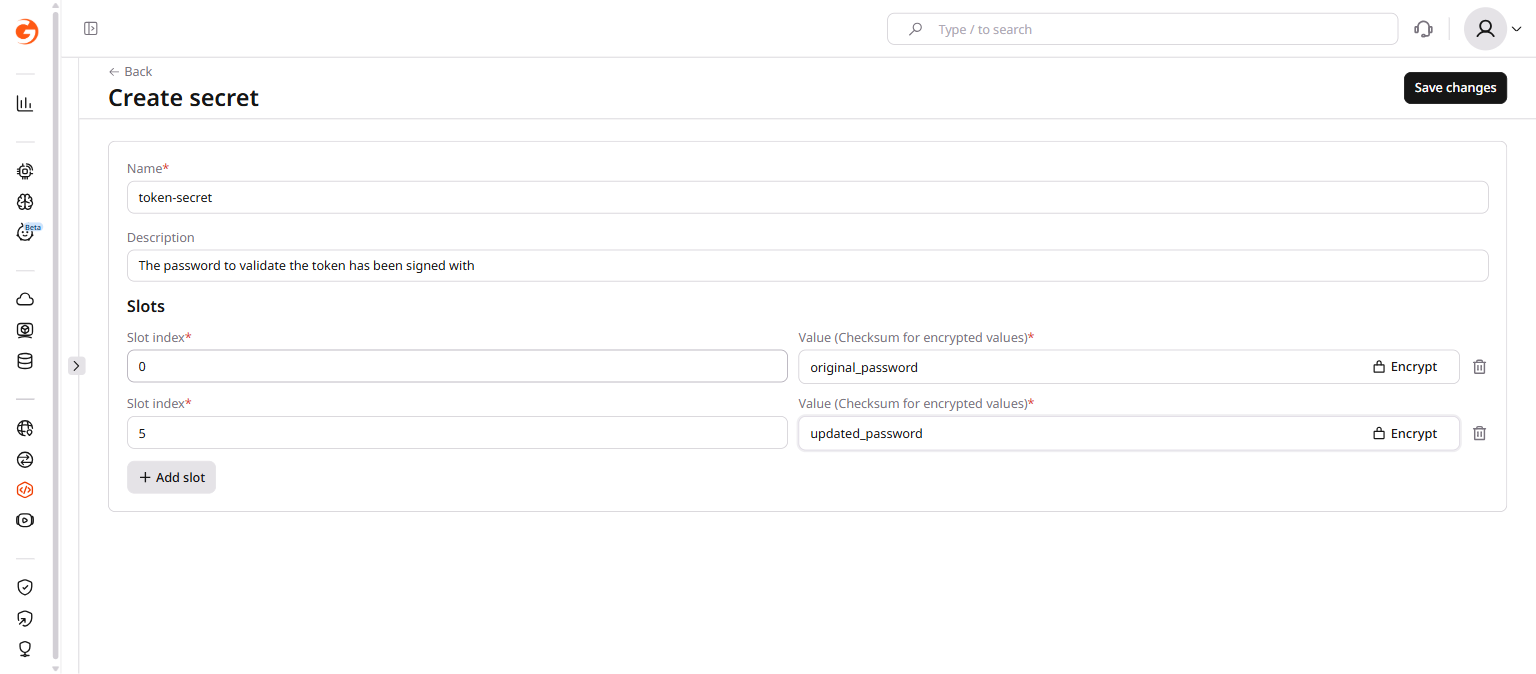
In this pattern, slot indices are arbitrary integers that represent password versions. Applications store the slot index used to sign a token in the token payload, then pass that index to get_effective_at when validating.
The secret below has two slots:
With this configuration:
get_effective_at("token-secret", 0) returns original_passwordget_effective_at("token-secret", 3) returns original_password (highest slot ≤ 3 is slot 0)get_effective_at("token-secret", 5) returns updated_passwordget_effective_at("token-secret", 7) returns updated_password (highest slot ≤ 7 is slot 5)
Tokens signed with the old password carry index 0 and continue to validate correctly. New tokens carry index 5 and use the updated password. Both coexist without requiring any immediate migration.
Unix timestamps for time-based rotation
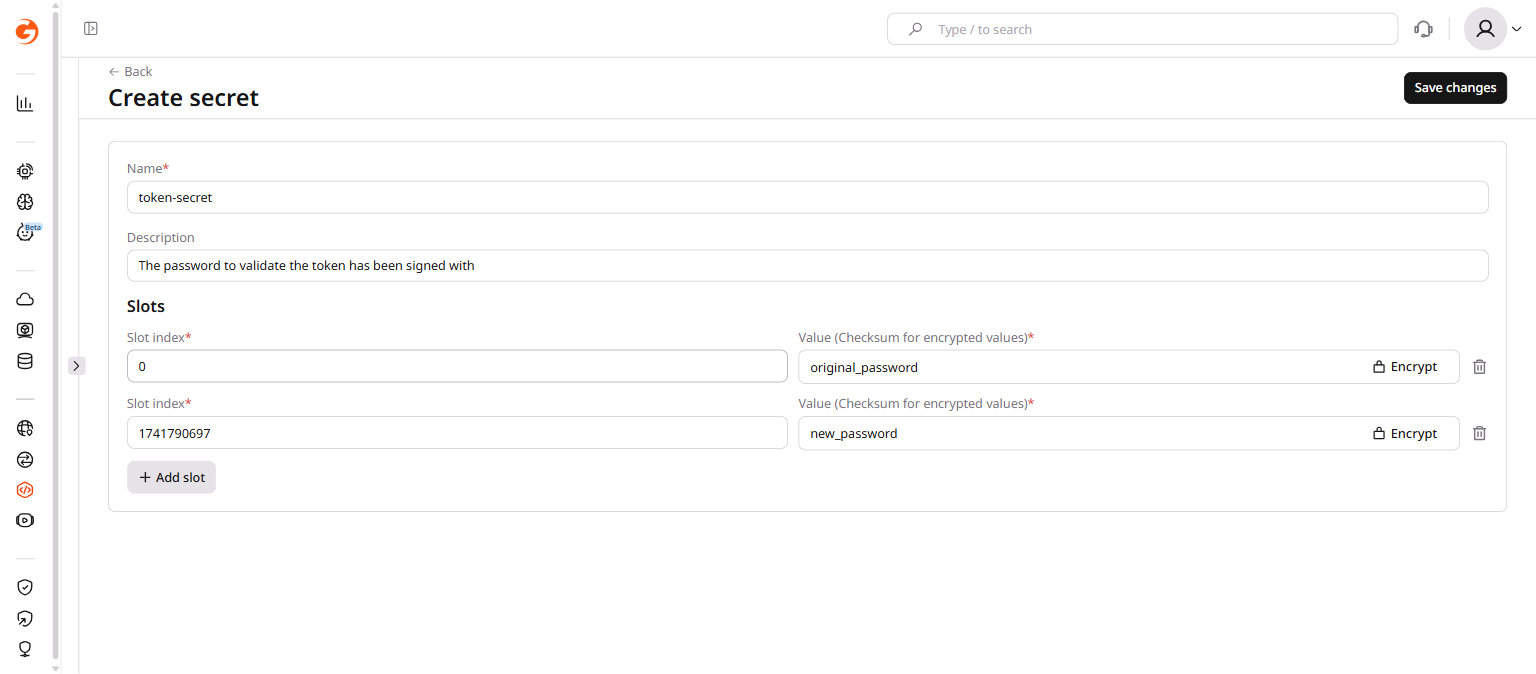
In this pattern, slot indices are Unix timestamps indicating when each password version becomes active. Applications pass the token issue time (iat claim) to get_effective_at.
With slot 0 holding original_password and slot 1741790697 (Wed Mar 12 2025 14:44:57 UTC) holding new_password:
- Any token with
iat before 1741790697 validates against original_password
- Any token issued after that timestamp validates against
new_password
Rotation happens automatically at the specified time — no redeployment required.
Slots are stored as part of the secret object. Use PATCH to add rotation slots without removing existing ones. Use PUT only when replacing the entire secret configuration.
All requests authenticate with an API token. Set it as an environment variable before running the examples:
export GCORE_API_KEY="{YOUR_API_KEY}"
Create a secret with multiple slots
Pass all slots in a single request to create a pre-configured rotation setup:
curl -X POST https://api.gcore.com/fastedge/v1/secrets \
  -H "Authorization: APIKey $GCORE_API_KEY" \
  -H "Content-Type: application/json" \
  -d '{
    "name": "token-secret",
    "comment": "Password for token validation",
    "secret_slots": [
      {"slot": 0,          "value": "original_password"},
      {"slot": 1741790697, "value": "new_password"}
    ]
  }'
Add a rotation slot
To add a new slot to an existing secret without removing the current ones, use PATCH with only the new slot:
curl -X PATCH https://api.gcore.com/fastedge/v1/secrets/SECRET_ID \
  -H "Authorization: APIKey $GCORE_API_KEY" \
  -H "Content-Type: application/json" \
  -d '{
    "secret_slots": [
      {"slot": 1741790697, "value": "new_password"}
    ]
  }'
PATCH adds or updates only the slots listed in the request — existing slots at other indices are preserved.
⚠️PUT replaces the entire secret including all slots. Any slot not included in a PUT request is permanently removed. Use PATCH for rotation to preserve existing slots.
Remove an old slot after rotation is complete
Once all clients have migrated to the new password, remove the old slot by sending a PUT with only the current slot:
curl -X PUT https://api.gcore.com/fastedge/v1/secrets/SECRET_ID \
  -H "Authorization: APIKey $GCORE_API_KEY" \
  -H "Content-Type: application/json" \
  -d '{
    "name": "token-secret",
    "secret_slots": [
      {"slot": 1741790697, "value": "new_password"}
    ]
  }'
This removes slot 0 and leaves only the new slot. After this, get_secret and get_effective_at with any index ≥ 0 both return the new password.