About secure token
What is secure token?
Secure Token is a feature of the Orange's CDN that protects your files from unwanted downloading. It helps to make a link to your content temporary or restrict the access to the content by an IP address. If a fraud uses an expired URL or sends a request from not an allowlisted IP, no files will be downloaded.
What secure token is used for
Secure Token is used to protect content from stealing or from using it longer than allowed. We illustrate the use of this feature with four examples.
Company private content. You have sensitive data and want it to be available only from your company office. You set up the feature, so links to this data can be open only from an office IP address.
Paid content. Your users buy temporary access to content — for instance, one month's access to an online course. You set up the feature, so a link to this content "lives" only one month after the purchase.
Temporary access to files set up by users. Your users want to share temporary links to their files — for instance, to allow 24-hour access to a folder. You set up the feature, so your users can generate temporary links to files for sharing.
Broadcasting. You want to protect live broadcasts from frauds, who steal direct links to your broadcasts and place them on their sites. You set up the feature, so users get a link with a very short lifespan — for instance, two seconds. Thus, your users enjoy a video without any issues and frauds cannot steal the content: a link expires while they are copy-pasting it.
Secure token lifetime
When a secure token is valid, CDN returns the requested file with a 200 OK response. After the token expires, CDN returns 410 Gone instead, and the file can no longer be downloaded with that URL.
You set a link lifespan. If it expires while the content is downloading, the CDN won't stop sending the files until they are complete. Therefore, even users with a slow internet speed can receive your files without worrying about download abortion. For example, if a link expiration time is 18:40, and a user requests the content at 18:39, they will receive the full file, even if the download takes several hours. But if they open the link at 18:40 or later, no files will be sent.
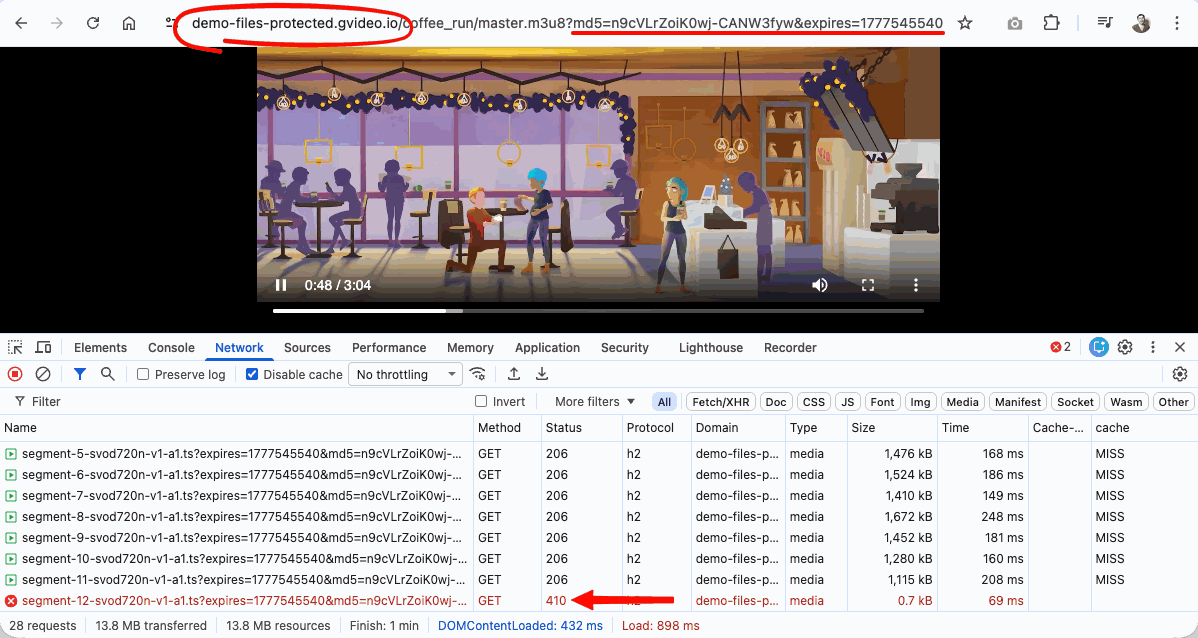
Video delivery is a good example. The screenshot below shows a video protected by Secure Token: after some time, the player requests segment12.ts, but the token has already expired, so CDN returns 410. Playback stops because the next segment cannot be downloaded. To continue playback, the end user's player must request a fresh token and reload the stream URL. This protects the broadcaster because copied or old video links stop working after the configured lifetime.
How secure token works
What secures a link
URLs are secured by a special character set — it is added to every link. This set is a code that stores a directive on how long a link can be available and what IP address may access the content. The code is known as a secure token. When a user follows the link our CDN processes this request and decrypts a secure token. It doesn't send content if a link is expired, or an IP address is not allowlisted.
Secure tokens are created and added to links by your site. To configure the site is easy — you just need to add a necessary script. You can use our script templates. For PHP, generate secure tokens using this template; for Python, use this one; for OpenSSL, use this one. The script will create secure tokens and add them to URLs.
How a secured URL looks
Here is how a link with a secure token looks:

How content is requested via a secured link
1. When enabling Secure Token in the CDN resource options, you specify a key (any character set).
2. You add a script for secured URLs generation to your site. In the script, you specify four variables: a link lifespan, an allowlisted IP, a path to your file, and the key from Step 1.
3. Using the key, the script encodes other variables turning them into a string such as DMF1ucDxtHCxwYQ.
4. The script adds the DMF1ucDxtHCxwYQ string to a URL of a file as follows: http://cdn.example.com/photo.jpeg?md5=DMF1ucDxtHCxwYQ&expires=2147483647. This is the link a user sees.
5. The user tries to request content using this secured URL.
6. Our CDN processes the request. It knows the key used by the script to encrypt variables, and therefore it can decrypt DMF1ucDxtHCxwYQ. The CDN sees three variables: the link expiration time, the allowlisted IP and the path to your file.
7. If a link is not yet expired, the request comes from an allowlisted IP address, and a file's path is correct, the CDN sends the content. If something doesn't match, the CDN returns an error.

Supported secure token URL types
Orange's CDN supports secure tokens in query string parameters. For video workflows, query string tokens can also be forwarded from a manifest request to related manifests, segments, and subtitles by enabling Query String Forwarding.
| Token type | Supported | Example |
|---|---|---|
| Token in query string parameters | Yes | /images/photo.jpeg?md5=aaa&expires=100 |
| Token in query string parameters, with forwarding to related files | Yes | User requests /video/master.m3u8?md5=aaa&expires=100; the CDN forwards the token to related files such as: - /video/rendition-1080.m3u8?md5=aaa&expires=100 - /video/segment-001.ts?md5=aaa&expires=100. |
| Token in a path | Video Streaming only | /secure/{token}/{expiration}/video/master.m3u8 supported in CDB Video Streaming. |
Responses for requests with secure tokens
There are three possible scenarios:
HTTP 2xx OKresponse code, if the hash key is valid and unexpired.HTTP 403 Forbiddenresponse code, if the hash key is invalid.HTTP 410 Goneresponse code, if the hash key is valid but expired.
Example 1: Status 200. Valid token and expiration time is far away – January 1, 2030 at 00:00:00 UTC:
curl -I "https://demo-files-protected.gvideo.io/coffee_run/coffee_run_poster.jpeg?md5=PAI3746SSzAY88o6MC20YQ&expires=1893456000"

HTTP/2 200
server: nginx
date: Thu, 30 Apr 2026 13:42:20 GMT
content-type: image/jpeg
content-length: 80318
Example 2: Status 403. Invalid token: the same token as above is used but with changed extension to ".png":
curl -I "https://demo-files-protected.gvideo.io/coffee_run/coffee_run_poster.png?md5=PAI3746SSzAY88o6MC20YQ&expires=1893456000"

HTTP/2 403
server: nginx
date: Thu, 30 Apr 2026 13:44:52 GMT
content-type: text/html
content-length: 146
Example 3: Status 410. Valid token, but expired because expiration time is on January 1, 2026 at 00:00:00 UTC:
curl -I "https://demo-files-protected.gvideo.io/coffee_run/coffee_run_poster.jpeg?md5=JjmEygLm5-zn6NxouvCfZQ&expires=1767225600"

HTTP/2 410
server: nginx
date: Thu, 30 Apr 2026 13:40:33 GMT
content-type: text/html
content-length: 136
Configure secure token
For Secure Token operation, your site must generate secured URLs and give them to users, and our CDN needs a key to decrypt such links. How to configure a website and the CDN, we describe in the article Configure and use Secure Token.