Configure and use secure token
Secure token restricts content access to URLs that contain a valid MD5 hash and a Unix expiration timestamp. The CDN rejects requests with a missing, expired, or incorrect hash with a 403 Forbidden response.
Customer Portal setup
The signing key and the IP option are set on the resource. The Customer Portal accepts a key of 6–32 characters. The REST API accepts a key of up to 255 characters.
- 1
Open Secure token
In the CDB Technical Web Portal, navigate to CDN:
- Open the resource.
- On the OPTIONS tab, select Access > Secure token.
- 2
Set the signing key
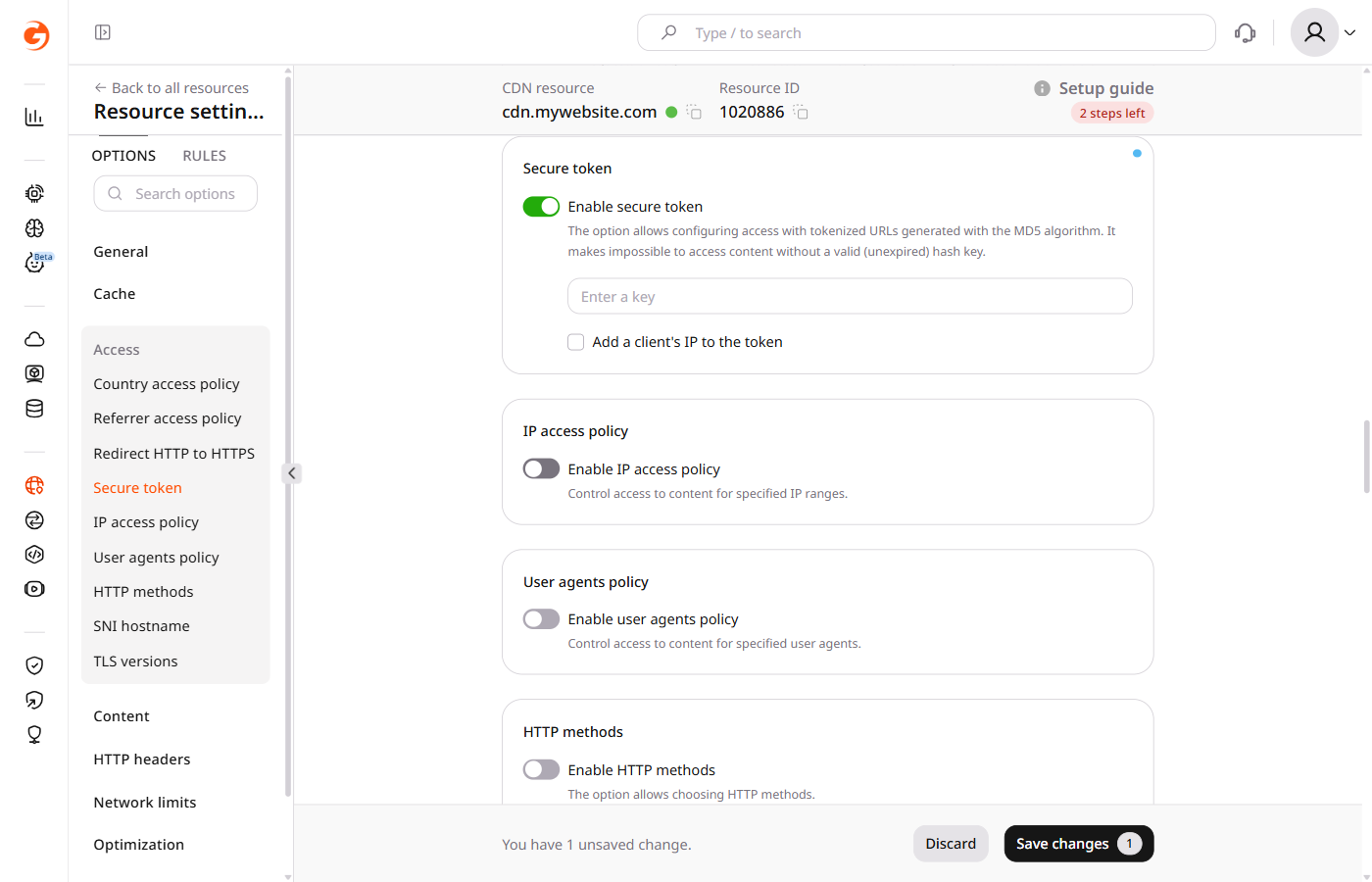
Turn on Enable secure token.
In the Customer Portal, enter a key of 6–32 characters in the Enter a key field. The origin server uses this key in the hash.
- 3
Set IP binding
Leave Add a client's IP to the token unchecked to allow any client IP address. Check it to restrict access to one IP address — the client's IP address is added to the hash formula in the generation scripts.
Enterprise customers with mobile audiences can tie the token to a subnet rather than a single IP address. That mode is covered under IP binding.
- 4
Save the resource
Click Save changes.
Confirm that a request without a token is rejected:
curl -I "https://cdn.example.com/photo.jpeg"
The CDN returns 403 Forbidden and does not forward the request to the origin.
Enabling secure token may decrease the cache hit ratio. To improve it, enable Ignore Query String, which treats objects with different query parameters as one cacheable object.
Signed URL format
The origin generates a signed link for each protected file. The link has this form:
http://cdn.example.com/photo.jpeg?md5=DMF1ucDxtHCxwYQ&expires=2147483647
The link has three parts:
- The host and path identify the file
DMF1ucDxtHCxwYQis the MD5 hash of{expires}{path}{ip} {key}when IP binding is enabled, or{expires}{path} {key}when it is disabled (base64-encoded, URL-safe)2147483647is the expiration time in Unix timestamp format
The PHP, Python, and OpenSSL generation scripts build this hash and append it to the file URL.
On the origin server, block direct client access to the origin — restricting inbound connections to CDN server IP ranges is one approach. The CDN validates the token at the edge before forwarding the request to the origin, so the origin does not need to perform token validation and must remain reachable by CDN servers without a token.
Secure token URL matching
Secure token validates three things from the request URL:
md5: the token hashexpires: the Unix timestamp until which the URL is valid- Path: the file path or directory path used when the token was generated
The CDN recomputes the hash with the path used when generating the token. For a directory token, the CDN uses the directory of the requested path, which can be shorter than the full requested path.
- When the token was generated for the exact file
/images/poster.jpeg, the CDN uses that same path on every request, so only that file passes. - When the token was generated for the directory
/videos/video-1/, the CDN uses the directory of the requested path. A request for/videos/video-1/segment-001.tsuses/videos/video-1/and passes, while a request for/videos/video-1/360p/segment.tsuses/videos/video-1/360p/and returns403 Forbidden.
Query String Forwarding copies md5 and expires from playlist links onto the media segment requests, so a player that receives the token with the master manifest sends it on each nested request. Each nested request is still checked against the token path.
Token for exact file
Use an exact file token when each file has its own signature: an image, an archive, an MP4 file, or one video manifest. Generate the token for /images/poster.jpeg:
/images/poster.jpeg
The client requests:
https://cdn.example.com/images/poster.jpeg?md5=TOKEN&expires=1777545540
This token matches only /images/poster.jpeg, so the adjacent paths return 403 Forbidden:
https://cdn.example.com/images/poster.webp      → 403 Forbidden
https://cdn.example.com/images/poster.png       → 403 Forbidden
https://cdn.example.com/images/master.m3u8      → 403 Forbidden
HLS and MPEG-DASH
Use a token with Query String Forwarding enabled for HLS and MPEG-DASH when the master manifest, nested manifests, media segments, and subtitles are stored in the same directory.
Generate the token for the directory path, including the trailing slash. For the files in /videos/video-1/, the script uses that directory:
/videos/video-1/
For PHP:
$path = '/videos/video-1/';
For Python:
path = "/videos/video-1/"
This token matches files directly inside /videos/video-1/. A file in /videos/video-1/360p/ returns 403 Forbidden, so split layouts need a separate token per directory, or the manifests and segments stay in one directory.
HLS files in that directory:
/videos/video-1/master.m3u8
/videos/video-1/rendition-1080.m3u8
/videos/video-1/segment-001.ts
/videos/video-1/segment-002.ts
The client requests only the master manifest with the token:
https://cdn.example.com/videos/video-1/master.m3u8?md5=TOKEN&expires=1893456000
With Query String Forwarding enabled, the CDN inserts the same query parameters into related manifest body links, so the player requests the nested files with the forwarded token:
https://cdn.example.com/videos/video-1/rendition-1080.m3u8?md5=TOKEN&expires=1893456000
https://cdn.example.com/videos/video-1/segment-001.ts?md5=TOKEN&expires=1893456000
https://cdn.example.com/videos/video-1/segment-002.ts?md5=TOKEN&expires=1893456000
For HLS and MPEG-DASH, configure Query String Forwarding with:
{
  "forward_from_file_types": [
    "m3u8",
    "mpd"
  ],
  "forward_to_file_types": [
    "ts",
    "mp4",
    "m3u8",
    "m4s",
    "vtt"
  ],
  "forward_only_keys": [
    "md5",
    "expires"
  ]
}
The demo manifest includes an extra parameter that the CDN does not forward, and the player demo loads that manifest:
http://demo-files-protected.gvideo.io/coffee_run/master.m3u8?md5=eBx15p01_a9JNuo1iZpTfQ&expires=1893456000&other=parameter
http://demo-files-protected.gvideo.io/coffee_run/index-svod720n-v1-a1.m3u8?expires=1893456000&md5=eBx15p01_a9JNuo1iZpTfQ
http://demo-files-protected.gvideo.io/coffee_run/segment-1-svod720n-v1-a1.ts?expires=1893456000&md5=eBx15p01_a9JNuo1iZpTfQ
http://demo-files-protected.gvideo.io/coffee_run/segment-2-svod720n-v1-a1.ts?expires=1893456000&md5=eBx15p01_a9JNuo1iZpTfQ
Token in a path
CDN secure token carries md5 and expires in the query string. CDB Video Streaming places the token in the URL path:
https://cdn.example.com/secure/TOKEN/1777545540/coffee_run/master.m3u8
https://cdn.example.com/secure/TOKEN/1777545540/coffee_run/rendition-1080.m3u8
https://cdn.example.com/secure/TOKEN/1777545540/coffee_run/segment-001.ts
A Video Streaming path token looks like this:
https://demo-protected.gvideo.io/videos/2675_pG8TfmKx2LU2qs/rI1224fiE3USCa8qYnMuGQ/1861919999/master.m3u8
The path has four parts:
https://demo-protected.gvideo.iois the CDN URL/videos/2675_pG8TfmKx2LU2qs/is the video IDrI1224fiE3USCa8qYnMuGQis the token1861919999is the expiration time in Unix timestamp format
Scripts for link generation
PHP
This script adds the client IP address to the hash, so the file stays reachable from that address until the link expires:
<?php
$secret = 'secret_key';
$ip = '1.2.3.4';
$path = '/live/133529_2/chunklist.m3u8';
$expires = time() + 10000;
$link = "$expires$path$ip $secret";
$md5 = md5($link, true);
$md5 = base64_encode($md5);
$md5 = strtr($md5, '+/', '-_');
$md5 = str_replace('=', '', $md5);
$url = "http://cdn.site.com{$path}?md5={$md5}&expires={$expires}";
echo $url;
echo "\n";
This script signs the expiration, the path, and the key, so any client IP address can open the file until the link expires:
<?php
$secret = 'secret_key';
$path = '/live/133529_2/chunklist.m3u8';
$expires = time() + 10000;
$link = "$expires$path $secret";
$md5 = md5($link, true);
$md5 = base64_encode($md5);
$md5 = strtr($md5, '+/', '-_');
$md5 = str_replace('=', '', $md5);
$url = "http://cdn.site.com{$path}?md5={$md5}&expires={$expires}";
echo $url;
echo "\n";
In these scripts:
$secretis the secret key$pathis the path to the file$ipis the IP address allowed to access the content$expiresis the link expiration time as a Unix timestamp$urlis the address of the file
Python
This script signs the expiration, the path, the client IP address, and the key:
import base64
from hashlib import md5
from time import time

secret = 'secret_key'
path = "/images/1.jpg"
ip = '1.2.3.4'
ttl = 100000
expires = int(time()) + ttl
token_hash = md5(f"{expires}{path}{ip} {secret}".encode()).digest()
token = base64.b64encode(token_hash).decode().replace("\n", "").replace("+", "-").replace("/", "_").replace("=", "")
secured_url = f"http://cdn.site.com{path}?md5={token}&expires={expires}"
print(secured_url)
This script signs the expiration, the path, and the key:
import base64
from hashlib import md5
from time import time

secret = 'secret_key'
path = "/images/1.jpg"
ttl = 100000
expires = int(time()) + ttl
token_hash = md5(f"{expires}{path} {secret}".encode()).digest()
token = base64.b64encode(token_hash).decode().replace("\n", "").replace("+", "-").replace("/", "_").replace("=", "")
secured_url = f"http://cdn.site.com{path}?md5={token}&expires={expires}"
print(secured_url)
In these scripts:
secretis the secret keypathis the path to the fileipis the IP address allowed to access the contentexpiresis the link expiration time as a Unix timestampsecured_urlis the link to the file
OpenSSL
This command limits the link lifespan and adds the client IP address to the hash:
echo -n '2147483647/images/1.jpg1.2.3.4 secret_key' | openssl md5 -binary | openssl base64 | tr +/ -_ | tr -d =
# Pattern: '{expires}{path}{ip} {secret_key}'
This command signs the expiration, the path, and the key:
echo -n '2147483647/images/1.jpg secret_key' | openssl md5 -binary | openssl base64 | tr +/ -_ | tr -d =
# Pattern: '{expires}{path} {secret_key}'
In these scripts:
2147483647/images/1.jpgis the path to the file prefixed with the expiration timestamp1.2.3.4is the IP address allowed to access the contentsecret_keyis the key entered in Enter a key
These scripts generate the secure token only. A separate script is needed to construct the full signed URL in the format {path}?md5={token}&expires={expires}.
IP binding and mobile networks
When a secure token includes the client IP address, the CDN recomputes the hash with the IP on the incoming request. A token signed for one address fails as soon as the carrier moves the client to another.
On some mobile networks the public address changes within minutes, because the ISP routes many subscribers through carrier-grade NAT and rotates addresses across a pool.
The effect shows up with Query String Forwarding for video. The player requests the manifest and receives a token, and the CDN forwards that token to the related segments. If the address changes between those requests, the next segment returns 403 while earlier segments returned 200, so the mixed responses indicate address rotation rather than an expired or malformed token.
For Enterprise customers, CDB can bind the token to a /24 or /16 subnet instead of one address. The wider mask still ties the URL to the ISP block, so sharing outside that block stays blocked, while the client can move between addresses inside it. Contact CDB support or an account manager to enable the wider mask.